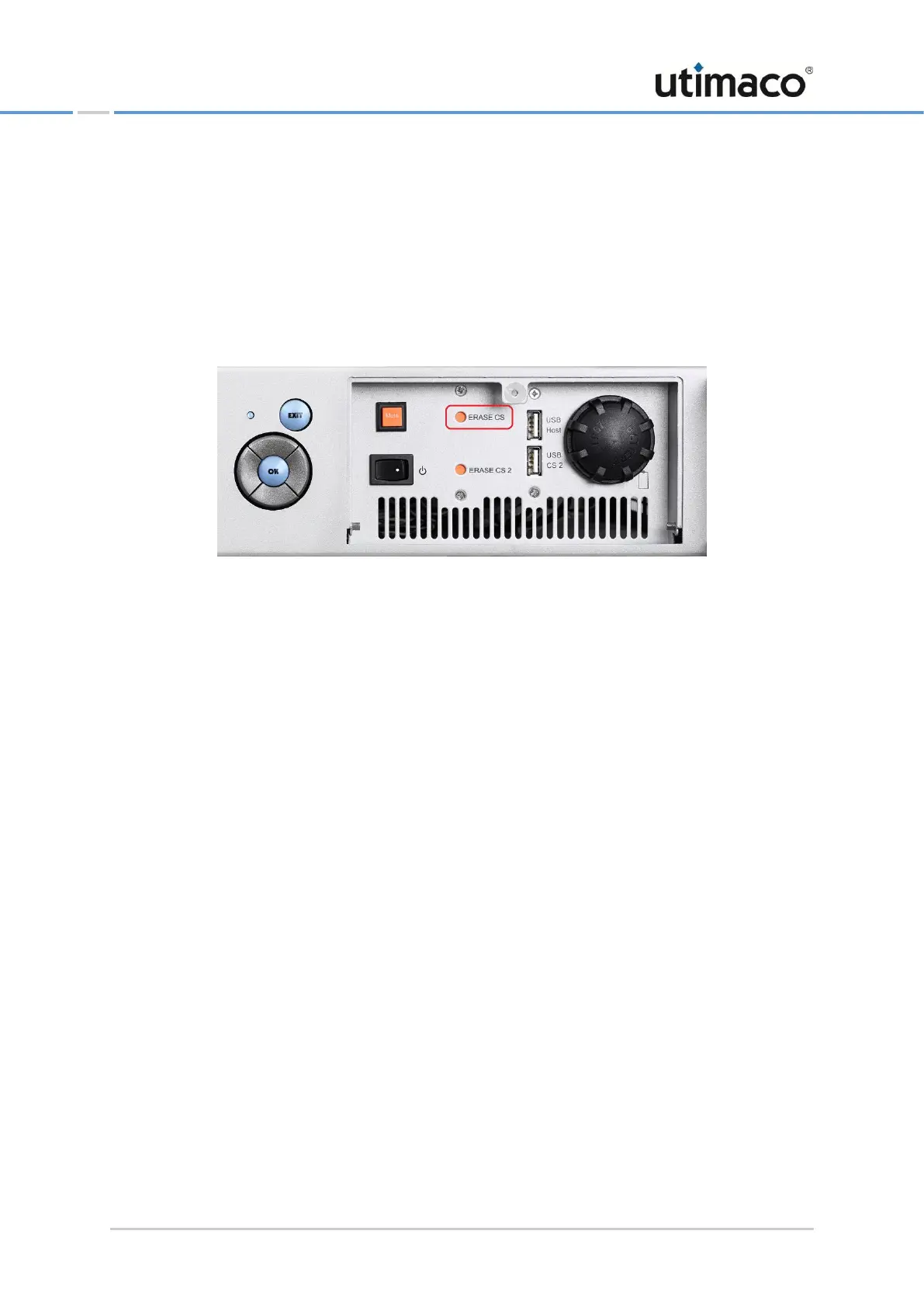
2. Push the corresponding ERASE push-button by using an appropriate screwdriver.
If a CryptoServer plug-in card CSe- or Se-Series has been installed in the CryptoServer
LAN, pushing the ERASE push-button is only effective if the CryptoServer LAN has been
switched on.
If pushing the ERASE push-button should be applied to a CryptoServer plug-in card Se-
Series Gen2 in the CryptoServer LAN, it is not necessary that the CryptoServer LAN has
been switched on.
Figure 22: ERASE pushbutton for performing External Erase on a CryptoServer LAN V4
▣ If there is a single CryptoServer plug-in card integrated in the CryptoServer LAN, only
the ERASE CS push-button is connected.
▣ If there are two CryptoServer plug-in cards integrated in the CryptoServer LAN, you
have to know exactly which plug-in card is connected to which ERASE push-button.
An External Erase has been performed on the CryptoServer, and an Alarm has been
triggered.
3. Close the front door of the CryptoServer LAN.
4. Make sure that the CryptoServer is in Maintenance Mode and an alarm has been triggered.
You can retrieve the CryptoServer status information by using the CryptoServer LAN menu
control buttons:
5. On the front panel of the CryptoServer LAN, press the OK button.
The arrow on the far left-hand side of the display shows you which submenu you can
select with the OK button.
6. Use the OK button to open the CryptoServer Administration menu item.
7. Use the button to select Show CryptoServer Info and press the OK button to open the
menu item.
8. Use the button to select Get State and press the OK button to open the menu item.
The following information is shown by way of example on the display of the CryptoServer
LAN:


 To Next Page