9
DISPLAY INDICATORS
BEFORE USING
H
DISPLAY INDICATORS
8
HANDSET DESCRIPTION
BEFORE USING
H
THE FUNCTION KEYS
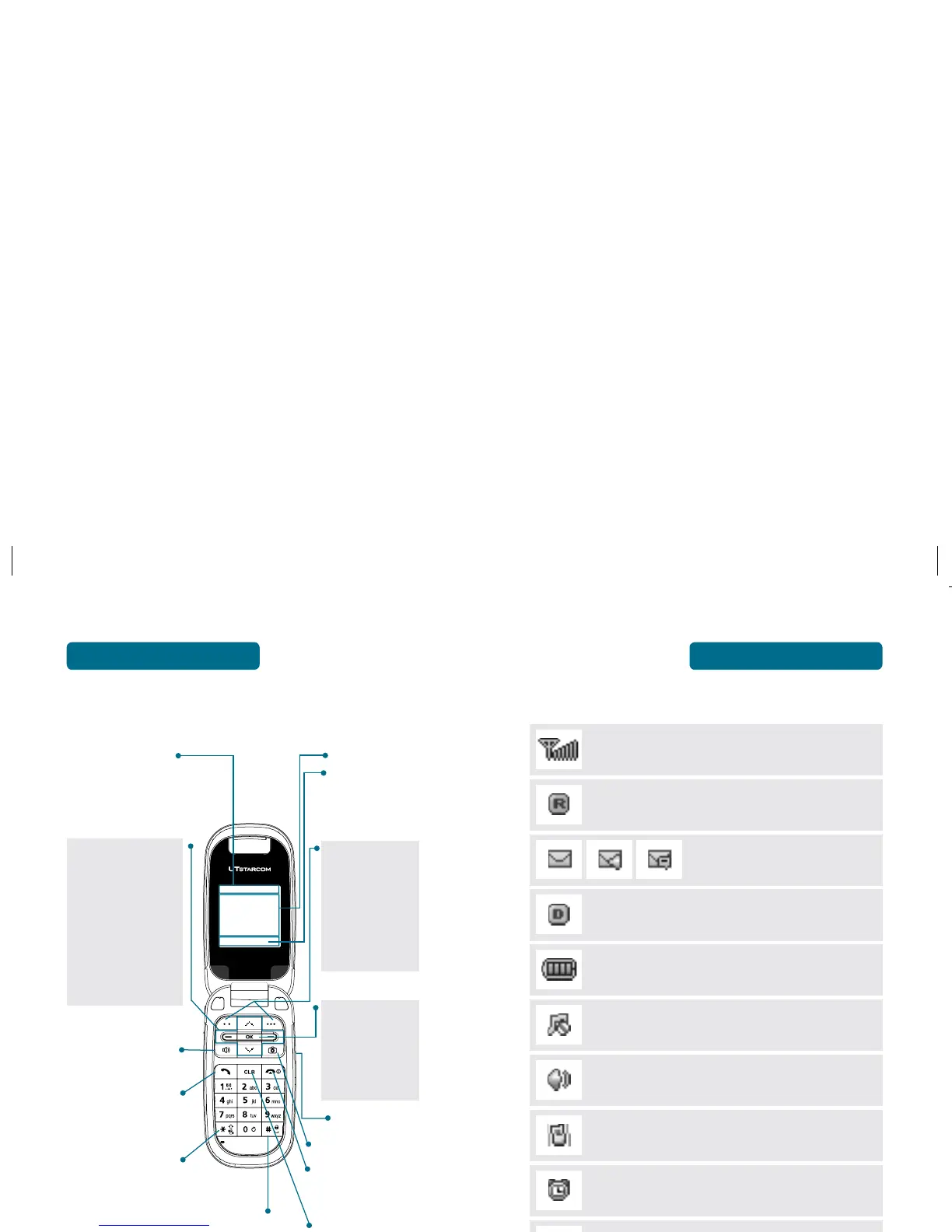
Soft Key Indicators
Shows the functions
currently assigned
to each soft key and
displays some icons.
Clear
Press to clear a digit from
the display or to return to
the previous page.
Press and hold to enter
Lock Mode.
Press to turn the phone on/
off, to terminate a call or to
return to the initial page.
THE FUNCTION KEYS
Left Soft Key
Press to access the
Main Menu or the
function displayed on the
bottom line.
Right Soft Key
Press to access Contacts
menu or function
displayed on bottom line.
Text & Graphic area
Display Indicators
See page 9 for a list
of icons.
THE NAVIGATION KEYS
In Idle Mode
Press Up for Short Cut Key 2,
Down for Short Cut Key 4,
Right for Short Cut Key 3 and
Left for Short Cut Key 1.
Inside a menu
Within a menu, use to
scroll through menu
options, or to select a
function displayed on the
screen.
Press to make or
receive a call.
Short press: Quickly press to
access the Recent Calls list.
In idle mode, press to turn
the Speaker Phone On/Off.
Press to adjust volume.
Press to access the “Take a
Picture” Viewfinder.
OK KEY
In Idle Mode
Press to access the
Camera Menu.
Inside a menu
Within a menu, press to
select the highlighted
menu option.
Signal Strength
Current signal strength - the more lines, the stronger
the signal.
Roaming
Phone is out of home area.
Message
New Text or Voice message.
Digital Mode
Phone is operating in digital mode.
Battery
Battery power level – the more blocks, the more power
you have left.
Silence
Appears when Silent is selected as the ring mode.
Speaker Phone
Phone is in speaker phone mode.
Etiquette
Phone will vibrate when call is received.
Alarm
When the Alarm is set, the idle screen appears. The idle
screen disappears if the alarm is in operation or disabled.
Ring Mode
Appears when a ringer is set for the ringer mode.
Voice Privacy
Indicates “Voice Privacy” mode.
Press and hold to enter
Vibrate Mode.



 To Next Page