11
BATTERY USAGE
BEFORE USING
H
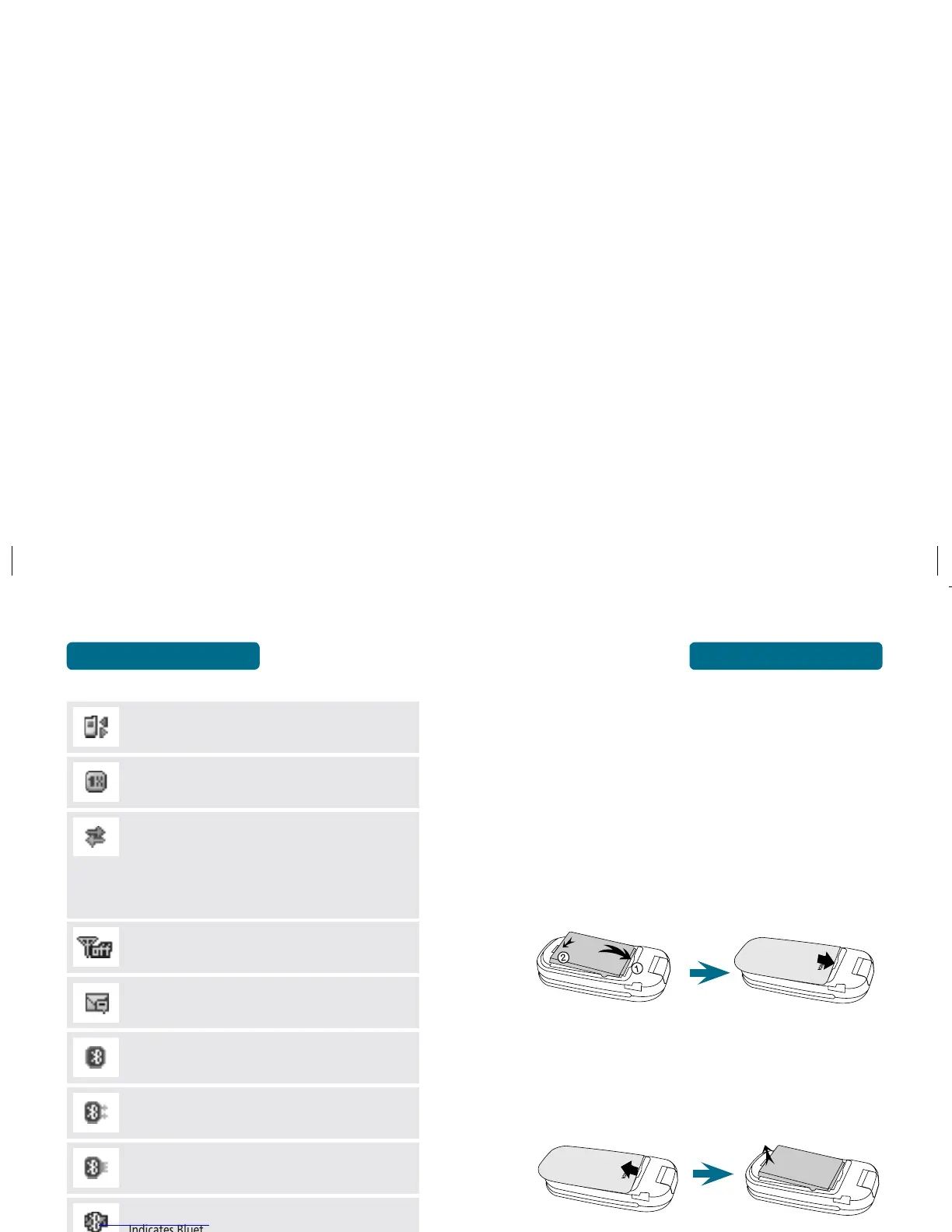
BATTERY INSTALLATION
Place the battery on the back of the phone so the
metal contacts match up on the battery and in the
battery cavity.
Push the battery down into the battery cavity until it
locks into place.
Place the battery cover over the battery and slide
up into place.
H
BATTERY REMOVAL
Pull up the release latch, lift up the battery cover case.
Remove the battery from the handset.
If the battery is not correctly placed in the compartment,
the handset will not turn on and/or the battery may be
detached during use.
10
DISPLAY INDICATORS
BEFORE USING
Data Only
Phone is ready to receive a data call.
1X
Phone is in the 1x service area.
Dormant
Indicates your phone is in a dormant state during a data
call. Your phone lapses into Dormant mode when you
have not had any activity on a page for some time
- your connection is still active and you can make and
receive calls.
Airplane Mode
The mode that restricts transmitting and receiving
inside the airplane.
Voice mail
Indicates you have voice mail messages.
Bluetooth
Indicates Bluetooth mode.
Bluetooth Active
Indicates Bluetooth Active mode.
Bluetooth Connect
Indicates Bluetooth connect mode.
Bluetooth Discovery
Indicates Bluetooth discovery mode.
TTY
TTY mode is active.



 To Next Page