2 Device Introduction
38
Items Item Label Description
5 Select
Button used to confirm a selection. Same function as
the remote control OK button.
6 Cancel
Button used to return to the previous screen. Same
function as the remote control BACK button.
7 USB
Two Universal Serial Bus interfaces used to connect
USB peripherals, such as a USB mouse and
keyboard.
8 [Cover Panel] Cover that protects the interfaces.
9 Smart Card Stores user information
10 Status On when the MC1088H is powered on.
11 IR
Flashes when the built-in IR sensor receives signals
from the remote control.
12 Ext IR
Flashes when the optional external IR sensor receives
signals from the remote control.
13 CATV On when CATV is in service
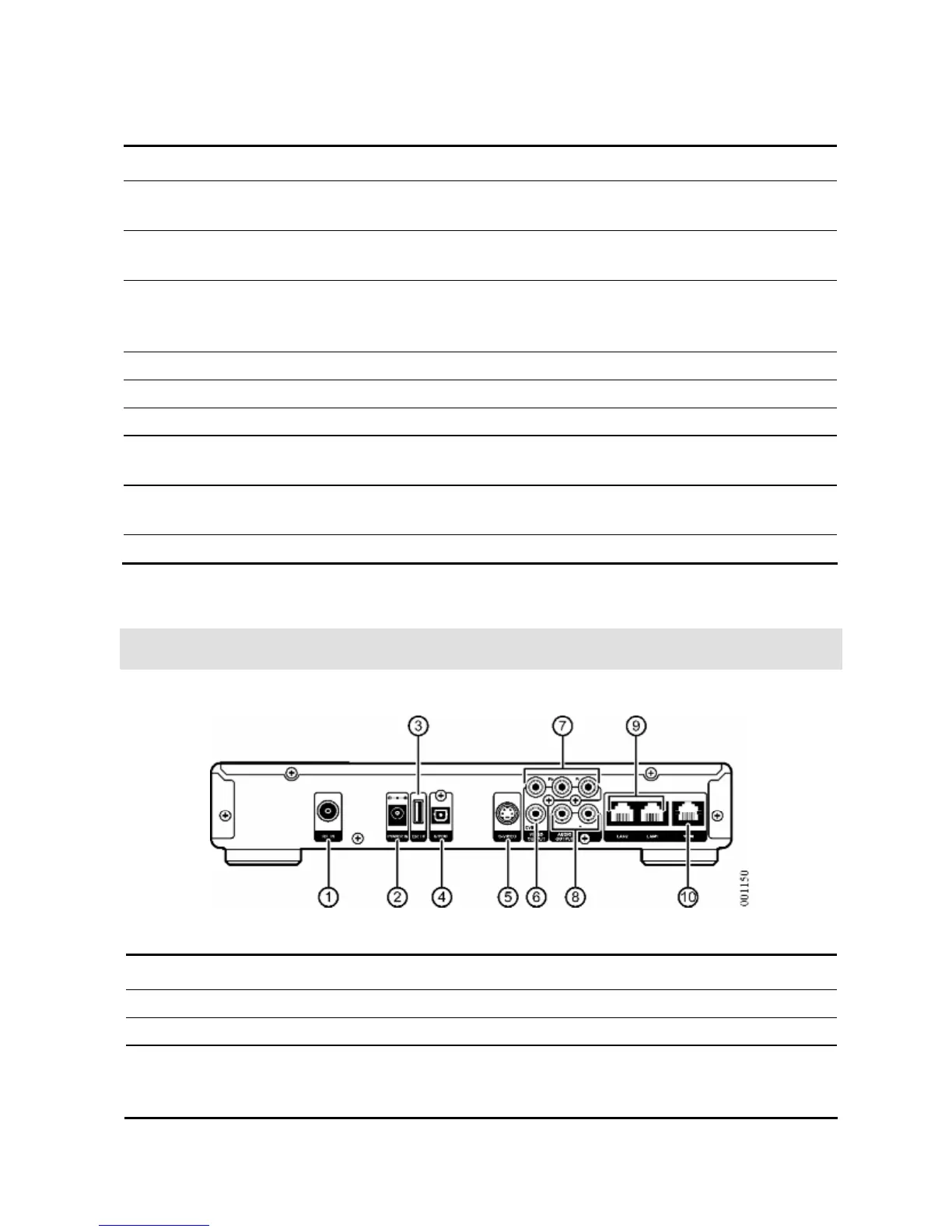
Rear Panel Description
Figure 5 MC1088H Rear View
Table 2 MC1088H Rear Interface Descriptions
Items Interface Description
1 RF IN Cable TV signal input
2 POWER IN Power supply input
3 Ext IR
Used to connect an external IR sensor. When an
external IR sensor is connected, the built-in IR
sensor is disabled.


 To Next Page