-3-
5. Monitoring Door Station / Camera
Mon/Talk button again/or press Return button) to end the communication.
If nobody answers the phone, the screen will be turned off automatically after 40
seconds.
3. During talking state, Press
Unlock button to release the rst door. If the system
connect 2 locks, press
Call button/Unlock 2nd button to open the second door.
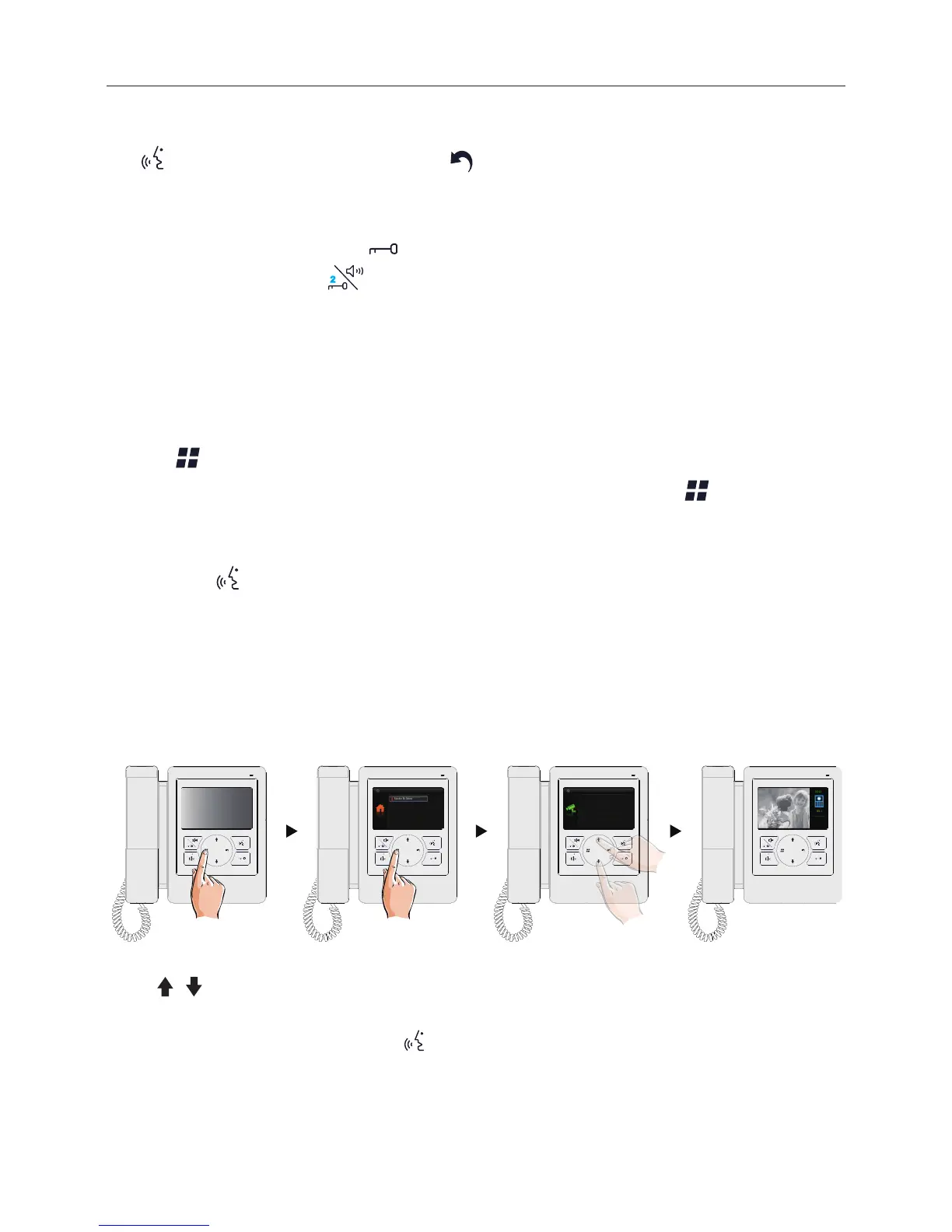
You can monitor the entrance at any time via the monitor.
1. Press
Menu button on the panel in standby mode.
2. Select Monitor by Select item on main menu page, and then press
Menu button to
enter Select a Camera page.
*Note: Press
Mon/Talk button on panel in standby mode to monitor the master door
station in shortcut.
Monitoring door stations/cameras:
DS1~4 and CAM1~4 can be selected to monitor individually if the system installs multi
door stations/cameras.See the following steps:
2 2
Monitor By Select
Main Menu
Playback
Don’t Disturb
Intercom Call
22
DS-1
Select a Camara
DS-3
DS-4
DS-2
* Use / button to move upward / downward to select the item you want.
* During monitoring, images can be viewed, but audio cannot be heard.
* If there is a visitor at the entrance, press
Mon/Talk button on panel to begin communication with door
station.


 To Next Page