-6-
9. Divert Call
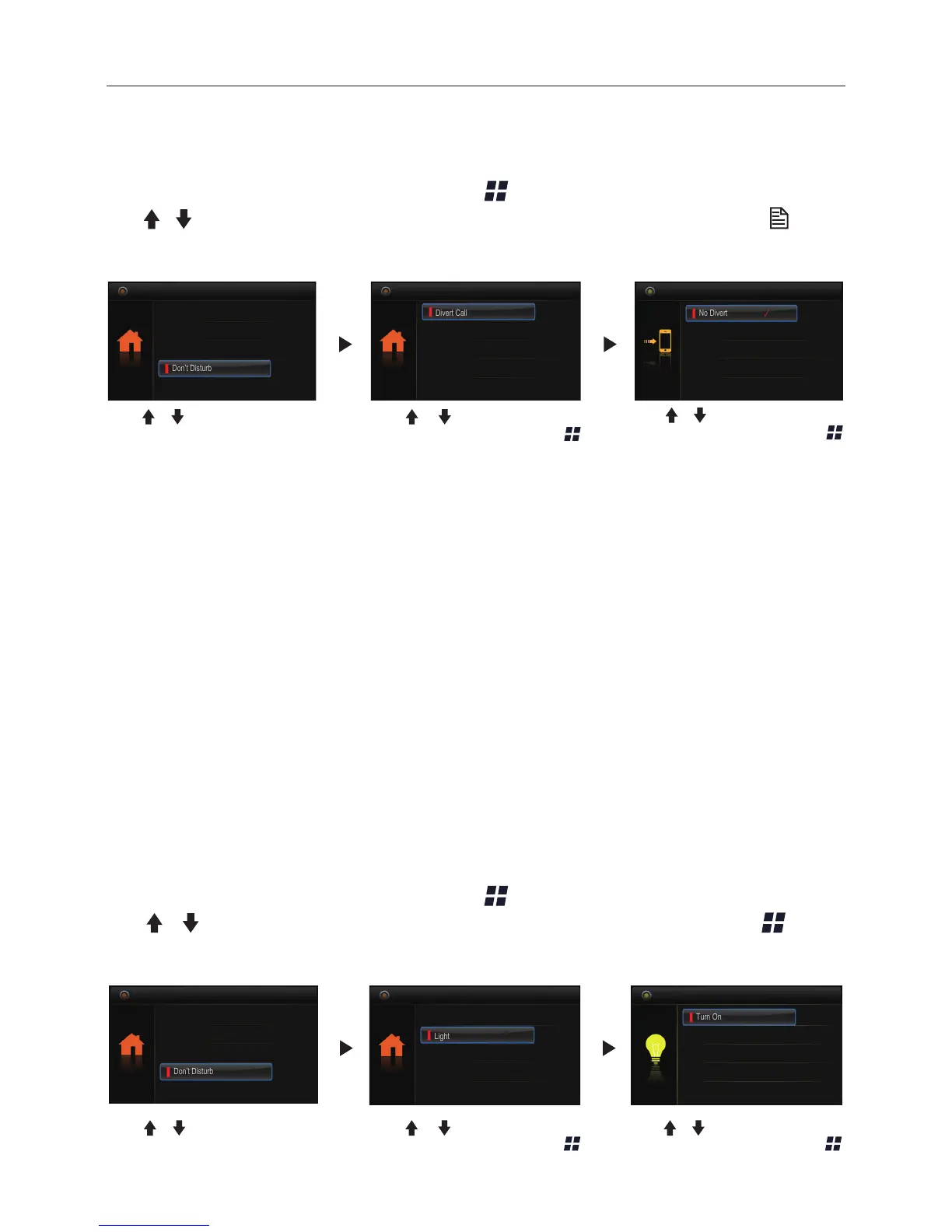
When the monitor is in standby mode, press Menu button to enter main menu page.
Use
/ button to move upward / downward to select Divert Call item, press Menu
Button to enter the call divert options page, you have 4 items to select. Follow the steps:
Monitor By Select
Main Menu
Playback
Don’t Disturb
Intercom Call
1.
No Divert
----calls from outdoor station will not be diverted.
2.
If No Answer
----Calls form outdoor station without respond in 30 seconds will be
transfer to the number you set.
Even though the monitor will shut off when transfer via GSM/TPS, you still available to
operate it (such as monitor, talk, and unlock).
3.
Simutaneously
----Calls from outdoor station will be diverted to your telephone
immediately.At this mode,the monitor won't shut off when GSM/TPS divert sucessfully,
but if the monitor answers the call at this time, GSM/TPS will quit absolutely.
4.
Setup Tel Numbers.
----Select this item to edit the divert numbers you want.
No Divert
Call Divert Options
Simultaneously
Setup Tel Numbers.
If No Answer
Use / button to selete
Divert Call item, then press
Menu button to conrm.
Use / button to to scroll
pages.
Use
/ button to selete the
item you want, then press
Menu button to conrm.
10. Opening Staircase Light
When the monitor is in standby mode, press Menu button to enter main menu page.
Use / button to move upward / downward to select Light item, press Menu
button to enter the light option page, you have 3 items to select.
Divert Call
Main Menu
Setup
About
Light
Turn On
Light Option
Turn Off
Turn On 5min.
Use / button to selete
Light item, then press
Menu button to conrm.
Use / button to selete the
item you want, then press
Menu button to conrm.
Monitor By Select
Main Menu
Playback
Don’t Disturb
Intercom Call
Use / button to to scroll
pages.


 To Next Page