ENGLISH
- 51 -
• Channel4operatesaccordingtothesettingoftheparameter
AUX
:
MON
:monostable.Thecontactofanoptionrelay(REL1-2-3)
setascourtesylightiskeptclosedaslongasthechannelis
active.
BIST
:bistable.Thecontactofanoptionrelay(REL1-2-3)set
ascourtesylightisswitchedeverytimethechannelisactivated.
TIM
:timer.Thecontactofanoptionrelay(REL1-2-3)setas
courtesylightiskeptclosedforthetimeset.Ifthechannelis
againactivated,thetimecountisreset.
TOUT
:timeout.Thecontactofanoptionrelay(REL1-2-3)set
ascourtesylightiskeptclosedforthesettime.
Ifthechannelisagainactivated,therelaycontactisopened.
PRES
:forcedeadmanmode.Ateachactivationofthe
channeltheunitswitchesbetweentheoperatingmodesetand
thedeadmanmode.
18 - OPERATING MODES
Theoperatingmodeofcontrolsdependsonthesettingsofthe
parameter
MODE
.
• Pulse mode (
MODE
=
STAN
)
Acommandopensthegate.Themanoeuvreendswhenthe
limitswitchisactivated,whenanothercommandisreceivedor
whenasafetydeviceisactivated.Whentheautomaticclosing
isenabledthegateclosesafterthepausetimeset(parameter
CH.AU
)
• Clock mode (
MODE
=
CLOCK
)
Thisfunctionallowstodelaytheopeningofthegatethrough
anexternalclock.Theoperationisidenticaltothemode
STAN
,butthepausetimecountissuspendeduntilthe
contactofthedeviceconnectedtoaninputconguredas
STRT
,
ST.PE
or
APRE
isclosed.
Tousethisfeature,youmustenabletheautomaticclosing
(parameter
CH.AU
)
• Dead man mode (
MODE
=
PRES
)
Thecommandmustbekeptactivefortheentiredurationof
themovementofthegate;whenthecommandissuspended
thegatestopsimmediately.Inthismode,theSTARTcommand
launchesalternatelytheopeningandclosing.
• Mixed mode (
MODE
=
S.PRE
)
Theopeningmovementsarecontrolledbypulsesandthe
closingonesindeadmanmode.
Agatethatmovesindeadmanmodestopsifasafetydevice
isactivated;itisnotpossibletoreversethemovementofthe
gateasduringnormaloperation.
19 - SPECIAL OPERATING MODES
TheHEAVY1unithassomespecialoperatingmodes,tobeused
onlyinspecialcases.
DEAD MAN MODE
Thedeadmanmodecanbetemporarilyforcedthrougha
commandonterminalS3:whenthecontactisclosed,themodeis
activated(theparameter
ING3
mustbesetto
PRES
).
EMERGENCY DEAD MAN MODE
ThisoperationalmodecanbeusedtomovethegateinDEAD
MANmodeinparticularcases,suchasinstallation/maintenanceor
inthecaseofmalfunctioningofphotocell,edge,limitswitchesor
encoder.
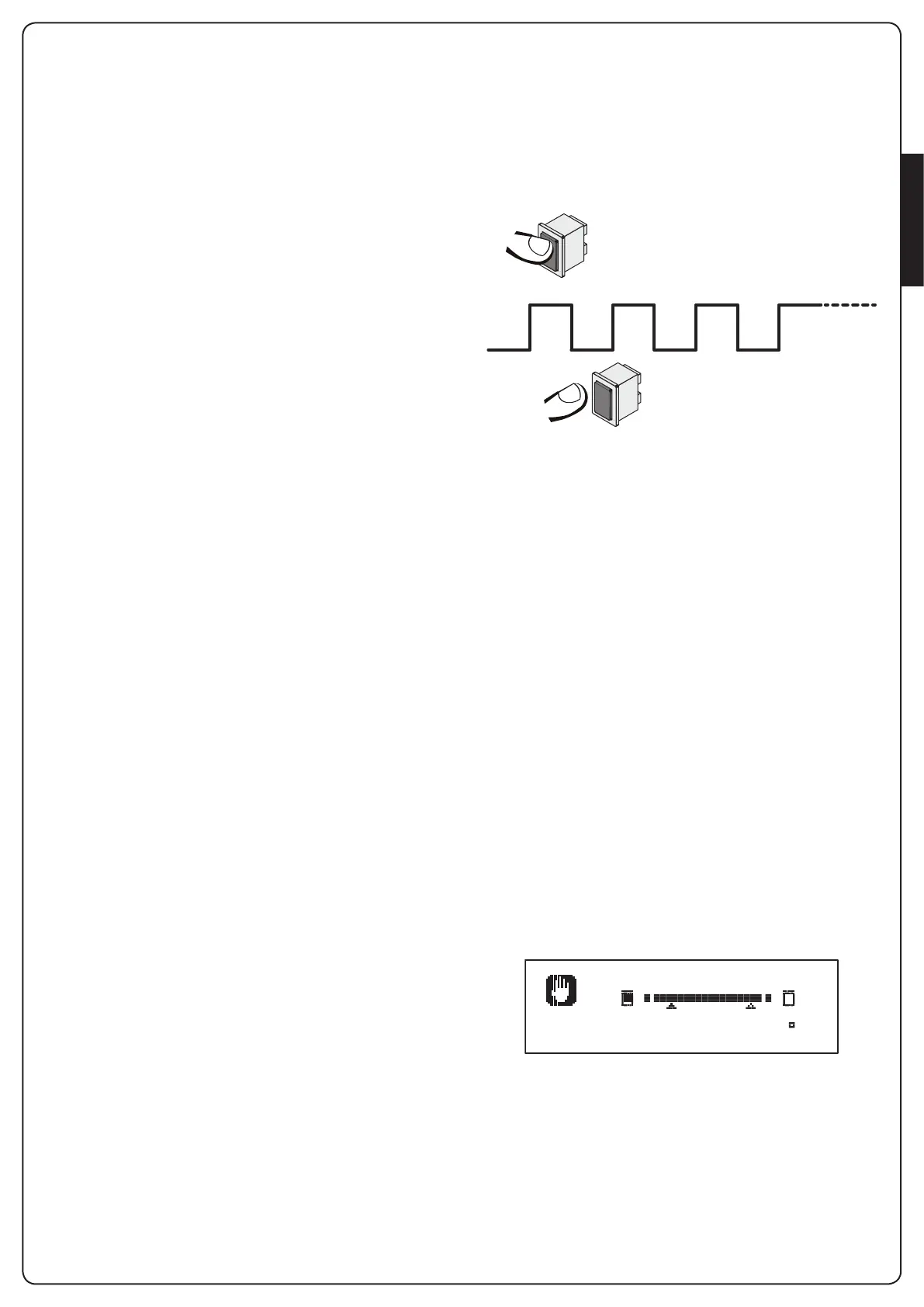
ToactivatethefunctiontheSTARTcommandmustbepressed
3times(pressesmustlastatleast1second;thepausebetween
commandsmustlastatleast1second).
1” 1” 1” T
>1” >1” >1”
ThefourthSTARTcommandactivatesthegateinMANPRESENT
mode.TomovethegatekeeptheSTARTcommandpressedfor
thedurationoftheoperation(timeT).
Thefunctionwillautomaticallyturnoffafter10secondsof
inactivityofthegate.
m WARNING: during the emergency movement the
safety device considered defective is not taken into account:
all its activation will be ignored
MANUAL HANDLING
Duringinstallationormaintenance,youcanmovethegate
throughthebuttonshandiplacednexttothedisplay.
Theoperationmodeisalwaysdeadman:
hopensandiclosesthegate.
Thespeedofthegateisdeterminedbythevaluesetforthe
parameter
VEL.M
m WARNING: all the safety devices are ignored
(except for the Emergency STOP), then it is the operator’s
responsibility to make sure that there are no obstacles on
the travel path of the gate.
Duringmanualhandling,thedisplayshowssomeinformationon
theoperationoftheinverter:voltage,currentonthemotorand
temperatureofthedriver.
Manual
Inv: 298V 0.0A 28 C
NOTE:Itispossibletoreadthisinformationwithoutmovingthe
gatewithaquickpressureononeoftwohandibuttons.
Themanualhandlingmoderemainsactivefor1minute,thenthe
unitreturnstonormaloperation.
Toimmediatelyreturntonormaloperation,presstheOKbutton
for1second.


 To Next Page