ENGLISH
- 52 -
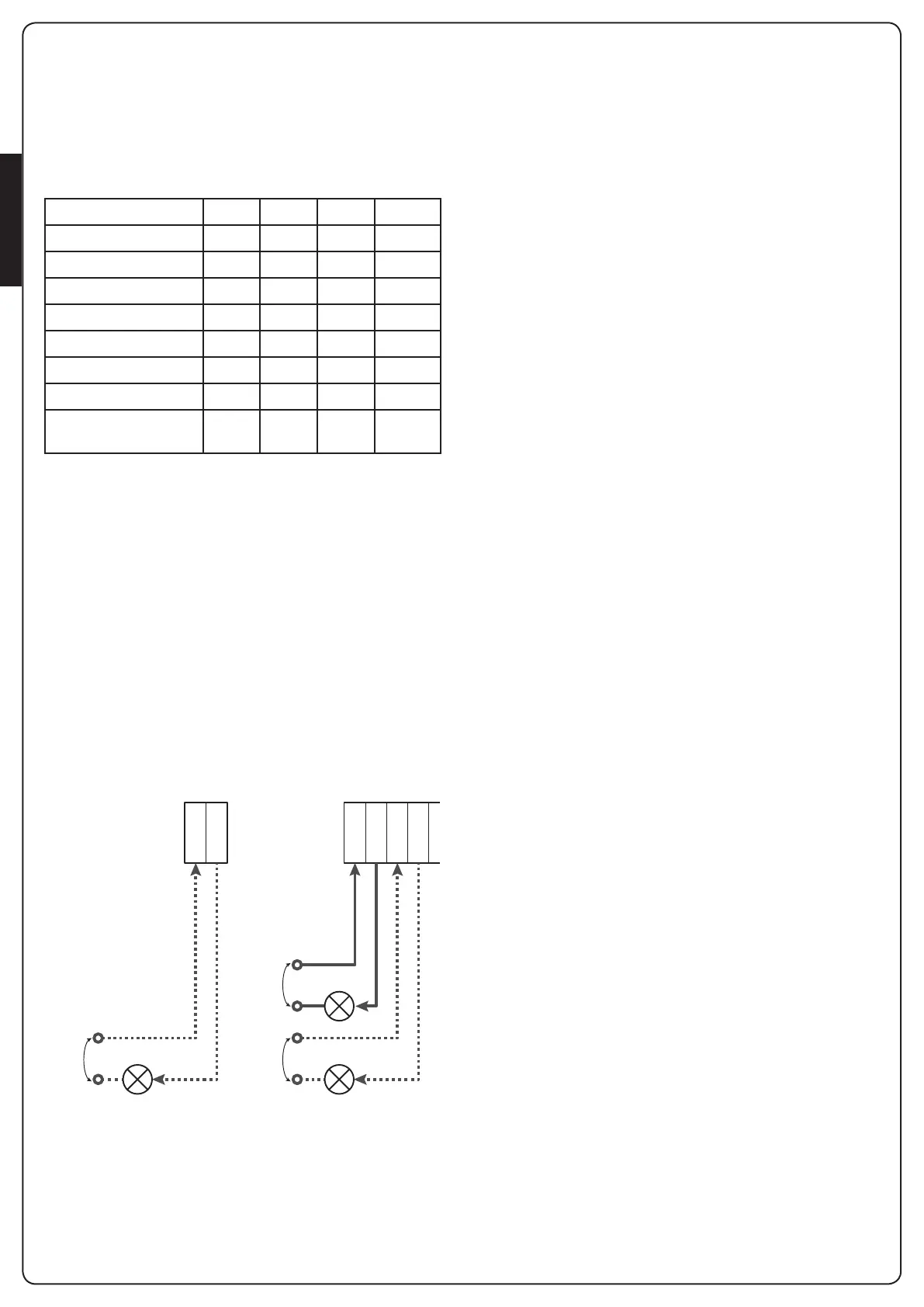
20 - OPTION RELAY OUTPUT
Theunithasthreerelayoutputswithnormallyopendrycontact
thatcanbeconguredwithdifferentfunctionsthroughthe
parameters
REL1
,
REL2
and
REL3
Inthistablearetheavailablefunctionsandthevaluetosetforthe
parameters
REL1
,
REL2
and
REL3
ConnectthedevicecontrolledbytheREL1outputtoterminals
Z4 andZ3
ConnectthedevicecontrolledbytheREL2outputtoterminals
Z6 andZ5
ConnectthedevicecontrolledbytheREL3outputtoterminals
B2 andB1
m The relay outputs act as simple switches and do not
provide any power supply.
The power supply to the device Vsupply can be provided by
the unit or the line.
If you use the power supply of accessories, 24 Vac or
12 Vdc, make sure that the current required is compatible
with that supplied by the unit.
B1B2
Z3Z4Z5Z6
VSUPPLY
VSUPPLY
REL2
REL1
SUPPLY
REL3
REL1
parametera DEFAULT =
LUCI
(courtesylight)
REL2
parametera DEFAULT =
NO
(nofunction)
REL3
parametera DEFAULT =
NO
(nofunction)
20.1 - COURTESY LIGHT
Thecourtesylightscanbeoperatedinthefollowingways:
1. Timer control
Thelightsturnonwhentheopeningiscommandedandstay
onforthetimeset.
Selectthevalue
T.LUC
intheparameter
LUCI
andsetthe
desiredtime.
2. Moving + timer
Thelightsturnonwhentheopeningiscommanded;whenthe
gatestops(openorclosed)thelightsstayonforthetimeset.
Selectthevalue
CICL
intheparameter
LUCI
andsetthe
desiredtime.
3. Timer by AUX control
Thelightsareactivatedbyaremotecontrolstoredonchannel
4oftheMRreceiverandstayonforthetimeset.
Selectthevalue
TIM
intheparameter
AUX
andsetthe
desiredtime.
4. Light monostable
Thelightsareactivatedbyaremotecontrolstoredonchannel
4onthereceiverMRandstayonforthewholedurationofthe
commandtransmission.
Selectthevalue
MONO
intheparameter
AUX
5. Light bistable
Thelightsareactivatedbyaremotecontrolstoredonchannel
4ofthereceiverMR:arstcommandturnsonthe lights,a
secondcommandturnsthemoff.
Selectthevalue
BIST
intheparameter
AUX
6. Bistable + timeout
Thelightsareactivatedbyaremotecontrolstoredonchannel
4oftheMRreceiverandstayonforthetimeset.
Asecondtransmissionbeforetimerunsoutturnsoffthelights.
Selectthevalue
TOUT
intheparameter
AUX
andsetthe
desiredtime.
20.2 - LOCK
Therelayisclosedforthreesecondseachtimeanewopening
manoeuvreisstarted.
Tofacilitatethereleaseofthelockyoucansetatimeforthe
waterhammer:beforeyoustartopeningthegateiscontrolledto
closeforashorttime.
Toactivatethisfunction,setthebacklashtimethroughthe
T.AR
20.3 - SERVICE REPORTING
TherelayisactivatedwhenthecyclecountsetfortheService
requestreaches
0
(Chapter22.4):inthiswayitispossibleto
activateawarninglight.
20.4 – OPENING COMMAND
Therelayisactivatedwhenthemotoriscontrolledwhenopening:
inthiswayitispossibletoactivatesecondarymotorsorsend
synchronizedsignalswiththemovementofthemainmotor.
FUNCTION
REL1 REL2 REL3
VALUE
Lock
•
SERR
Openingcommand
•
APRE
Closingcommand
•
CHIU
Servicereporting
•
SERV
Safetydevicestest
• •
TEST
Custom
• •
CUST
Courtesylight
• • •
LUCI
Indicationofmovement
•
MO.NO
MO.NC


 To Next Page