ENGLISH
- 54 -
22 - PROGRAMMING
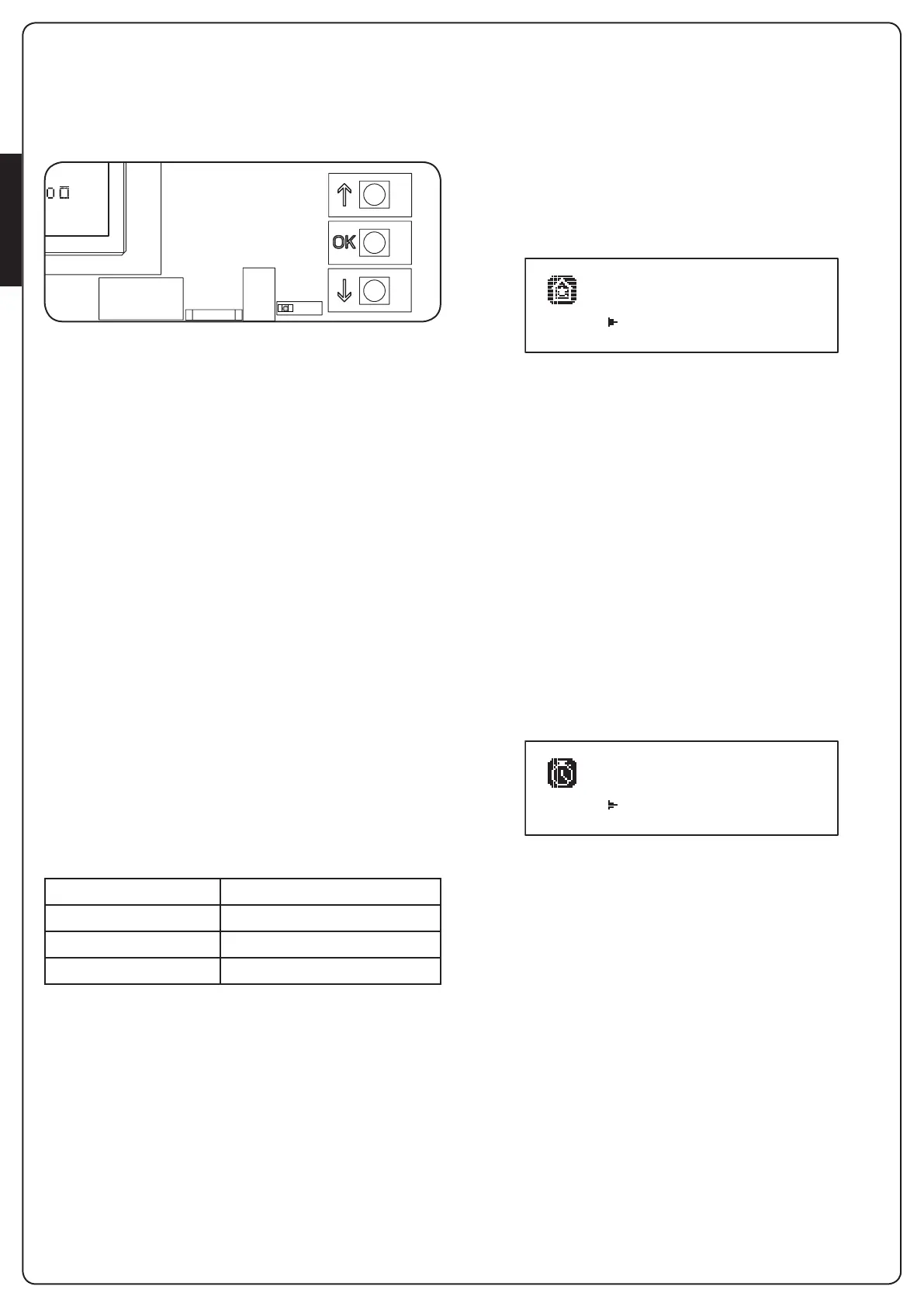
Theprogrammingofthefunctionsandtimesoftheunitiscarried
outthroughthecongurationmenus,accessibleandsearchable
throughthe3buttonsh, iandOKplacednexttothedisplayof
theunit.
S1 S2A1 A2 S3 S4 S5 S6 S7 S8 S9 H1 H2 H3 H4 H5 H6 H7 H8 E1 E2 E3 E4 E5 T1 T1
RECEIVER
OVERLOAD
FRONT PANEL
i1
o
i2
o
i3
o
f1
ATTESA
o
f2
o
c1
o
c2
o
U1U2U3
Z1Z2Z3Z4Z5Z6
W1 W2 W3 W4 W5
MAINSOUTPUTMOTOR
F1
F2
F3
MAINS
VOLTAGE SELECTOR
• BypressingOK buttonyoucanaccesstheprogrammingand
congurationmenusofeachindividualparameters
• Bypressingthebuttoniyouwillswitchtothenextitem
• Bypressingthebuttonhyoureturntothepreviousitem
m WARNING: Outside of the conguration menu, the
buttons h and i activate the motor in DEAD MAN mode.
The button h activates the command OPEN and the button
i activates the command CLOSE.
m These commands activate the motor without taking
into account the status of safety devices.
22.1 - ACCESS TO MAIN PROGRAMMING
MENUS
1. PressandholdtheOK buttonuntilthedisplayshowsthe
desiredmenu
PRG
Programmingoftheoperatingparameters(Chapter22.5)
CNT
CycleCounter(Chapter22.4)
SET
Learningofthetravel(Chapter22.3)
DEF
LoadingDEFAULTparameters(Chapter22.2)
2. ReleasetheOK button:thedisplayshowstherstiteminthe
sub-menortheoptionsavailableforthefunction.
PRG MODE
CNT Total / Service
SET Learn / Exit
DEF Load default / Exit
3. Usingthebuttonsh iandOK selectandedittheparameters
needed
m CAUTION: if you do not carry out any operation for
more than 1 minute, the unit exits from the programming
mode, without storing the settings and changes made are
lost.
22.2 - LOADING DEFAULT PARAMETERS
Ifnecessary,youcanresetallparameterstotheirDEFAULTvalues
(seetableonpage52)
m WARNING: This procedure involves the loss of all
customized parameters.
1. PressandholdtheOKbuttonuntilthedisplayshows
DEF
2. ReleasetheOKbutton:thedisplayshows
Load default
Exit
3. Toexitthefunction,select
Exit
usingtheh iandpressOK
toconrm
4. ToloadtheDEFAULTdataselect
Load default
usingtheh
ibuttonsandpressOK.
Thenselect
Yes
andpressOK:allparametersarere-written
withtheirDEFAULTvalue,theunitleavestheprogramming
modeandthedisplayshowsthecontrolpanel
22.3 - TRAVEL LEARNING
Thisfunctionallowsyoutostorethelimitswitches.
Therecordedvaluesareusefulforalltheprogramming
parametersthatarebasedonapercentageofthetravel.
1. PressandholdtheOK buttonuntilthedisplayshows
SET
2. ReleasetheOK button:thedisplayshows
Learn
Exit
3. Toexitthefunction,select
Exit
usingtheh iandpressOK
toconrm
4. Tostartthelearningprocedureofthetravelselect
Learn
throughthebuttonshandiandpressthenOK
5. Pressthehkeytostarttheopeningtravellearning:thegate
opensuntilitreachesthelimitswitch
6. Presstheikeytostarttheclosingtravellearning:thegate
closesuntilitreachesthelimitswitch
WARNING: the intervention of any safety devices stops the
self-learning cycle. To restart it is necessary to resume the
procedure from the beginning.
7. PresstheOK buttontostorethetravelandexitthefunction


 To Next Page