ENGLISH
- 55 -
22.4 - READING THE CYCLE COUNTER
TheHEAVY1unittakesintoaccountthecompletedopening
cyclesofthegateand,ifrequested,reportstheneedfor
maintenanceafteraxednumberofmanoeuvres.
Therearetwocountersavailable:
• Nonresettablecounteroftheopeningcyclescompleted
(
total
)
• Countershowingthecyclestobeperformedbeforethenext
maintenance(
service
)
Thissecondcountercanbeprogrammedwiththedesired
numberofcycles.
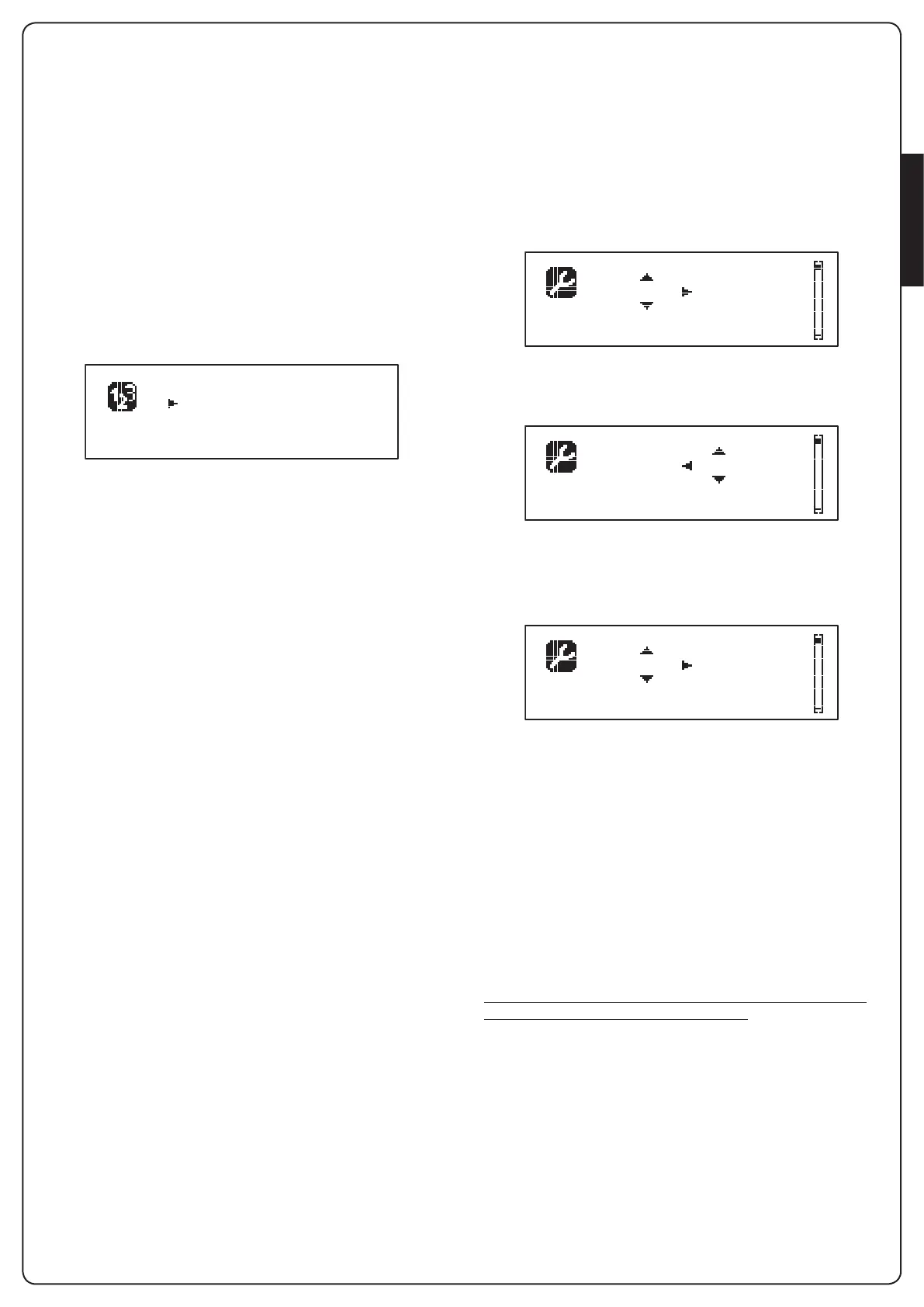
1. PressandholdtheOK buttonuntilthedisplayshows
CNT
2. ReleasetheOK button:thedisplayshows
Total : 0
Service : ----
3. Toactivatethemaintenancerequestselectthe
Service
functionandpressOK
4. Setthedesirednumberofcycles(thestepconsistsof250
cycles)
5. PressOKtoconrmthedisplayshowsthecontrolpanel
WhentheServicecounterreaches0theunitsendstherequestfor
maintenance,thatcanalsobesignalledintwoways:
1. Warning light:theoptionrelayREL2closestoactivatea
warninglight(Chapter23)
2. Pre-ashing:ifyoudonotconnectadedicatedwarninglight
theunitindicatestherequestforservicethroughanadditional
pre-ashingof5secondsatthebeginningofeachopening
cycle
Todisablethesignallingitisnecessarytoaccessthe
Service
countermenuandagainprogramthenumberofcyclesafter
whichthemaintenancewillberequired.
Ifsetto
0
,thesignallingfunctionfortherequestforserviceis
disabledandthesignalisnotrepeated.
m WARNING: maintenance operations should only be
carried out by qualied staff.
22.5 - PROGRAMMING THE OPERATING
PARAMETERS
1. PressandholdtheOK buttonuntilthedisplayshows
PRG
2. ReleasetheOK button:thedisplayshows:
• therstparameteroftheprogrammingmenu:
MODE
• thecurrentlysetvalue(
STAN
)
• ascrollbarusefulfordetectingthepositionofthe
parameterwithintheprogrammingmenu
• amessagedescribingtheparameter
MODE STAN
3. TochangethevalueofthisparameterpresstheOK button:
thearrowsmovetothethevalue
MODE STAN
4. Selectthedesiredvalueusingthebuttonshandi
5. PresstheOK buttontoconrmandexittheparameter.
Thedisplayshowsagain:
MODE STAN
6. Usingthebuttonsh iandOK selectandeditthenecessary
parameters:thefollowingpagesshowatablewithall
programmingvalues,theselectablevalues.thevaluessetby
DEFAULTandashortdescriptionofthefunction.
NOTE: Ifyouholdthebuttonshoritheitemsofthe
congurationmenuscrollinafastway,untiltheitem
FINE
is
displayed
m Thelastmenuitem
FINE
storesthechangesmade,exit
theprogrammingmenuandreturntonormaloperationofthe
system.
Toavoidlosingyourcongurationismandatorytoexitfromthe
programmingmodethroughthismenuitem.
m CAUTION: if you do not carry out any operation for
more than 1 minute, the unit exits from the programming
mode, without storing the settings and changes made are
lost.
Working mode


 To Next Page