V200 POSITIONER
www.vacaccessories.com
92026r15
15
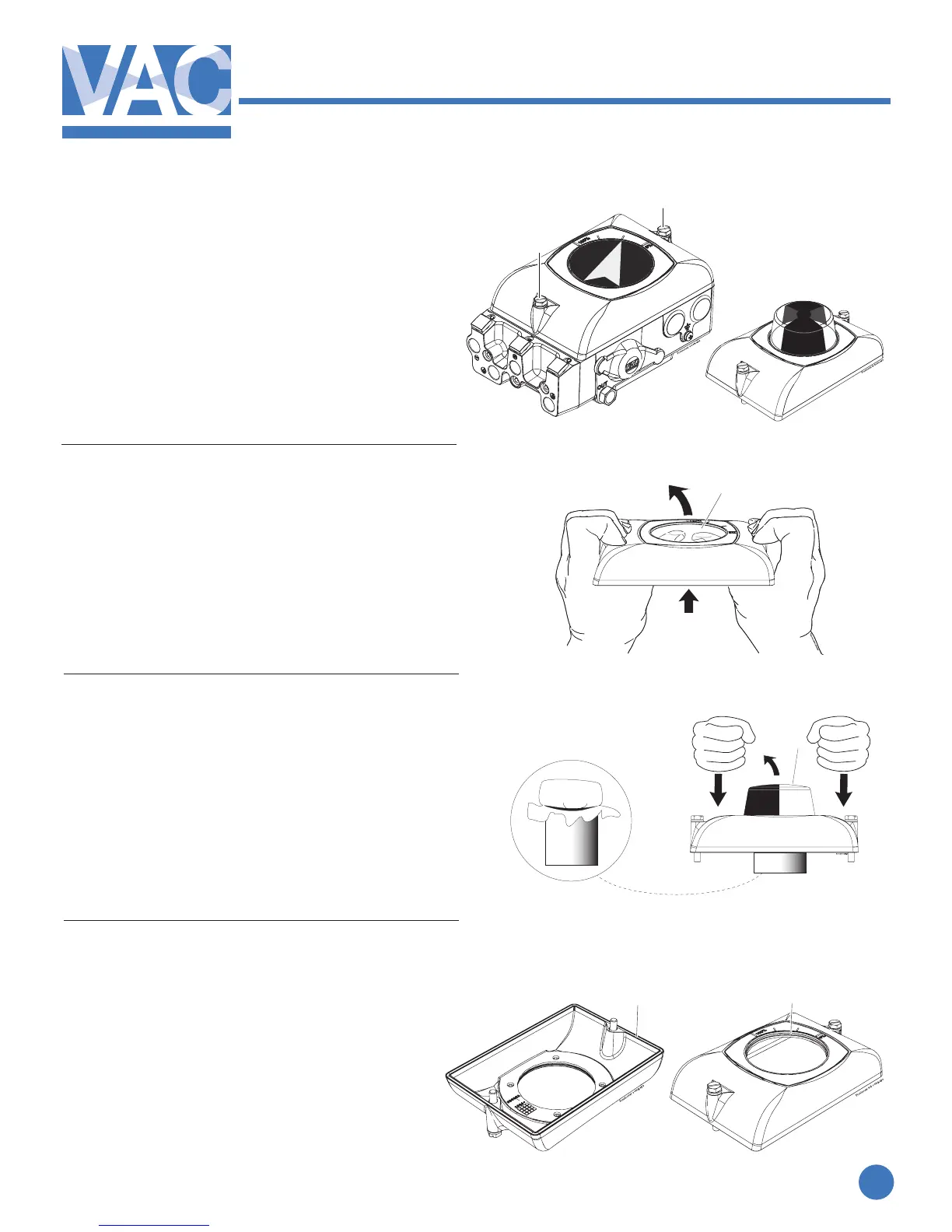
2.10 Front cover and indicator
2.10.1 Removing the front cover
Loosen the two screws(1) and
remove the front cover.
2.10.2 Removing at indicator cover
With the main cover removed, the indicator
cover(2) (clear cover) can be removed with
pressure from the backside.
2.10.3 Removing Dome indicator cover
Due to the combined depth of the dome indicator
andV200cover,careshouldbeexercisedwhen
removing the dome. It is recommended that
something sturdy and protective be placed un-
der the dome and equal pressure applied to the
cover. The dome should release without damage.
2.10.4 Changing the sealing in the front cover
Remove the O-ring(4) and replace if needed.
Check the O-ring(5) on the backside of the
front cover and replace if needed.
1
3
4
5
2
1



 To Next Page