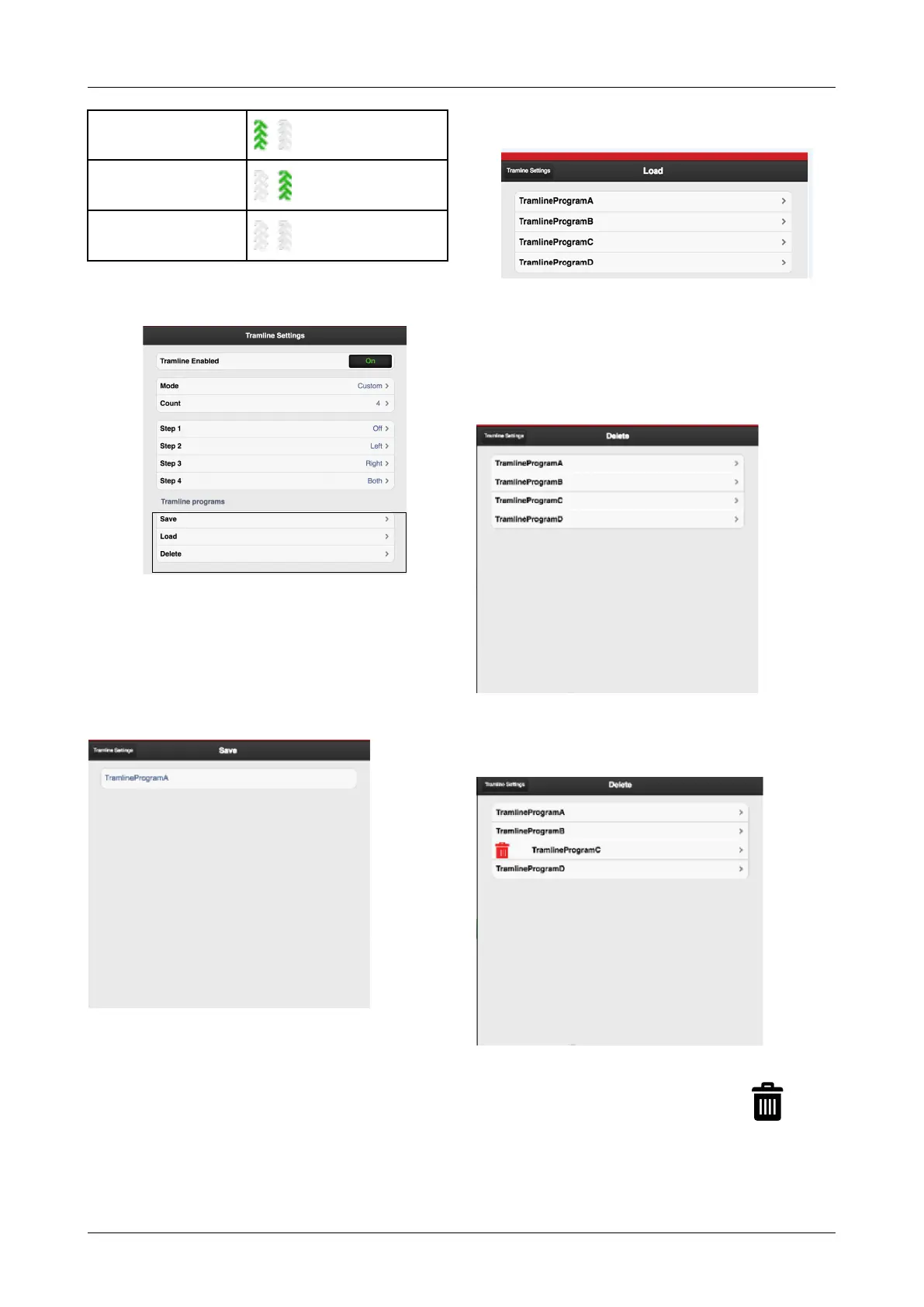
General settings
Left
Right
Off
6.4.2 Managing track program
Figure 6.10
A. Save the tramline program
B. Open a saved tramline program
C. Delete a saved tramline program
6.4.3 Save the tramline program
Figure 6.11
Press A and enter a name for the tramline program you
intend to save, “Figure 6.10 “.
Valid characters to use when naming tramlining programs
are uppercase (A-Z), lowercase (a-z) and numbers (0-9).
6.4.4 Open a saved tramline program
Figure 6.12
Press B to display a list of saved tramline programs. Open
the saved program by selecting its name on the list,
“Figure 6.10 “.
6.4.5 Delete a saved tramline program
Figure 6.13
Press C to display the list of saved tramline programs,
“Figure 6.10 “.
Figure 6.14
When you select the program to be deleted, will be
displayed, to indicate that the program will be deleted.
Press again to delete the program.
903099-en-gb; 19.01.2021 15



 To Next Page