0020244998_04 ecoTEC plus Installation and maintenance instructions 35
10 Adapting the unit to the heating
installation
To reset the most important system parameters, use the
Unit configuration menu item.
Menu → Installer level → Appliance config.
Or manually relaunch the installation assistant.
Menu → Installer level → Start inst. assistant
You can find setting options in the Diagnostics menu.
Menu → Installer level → Diagnostics menu
Overview of diagnostics codes (→ Page 51)
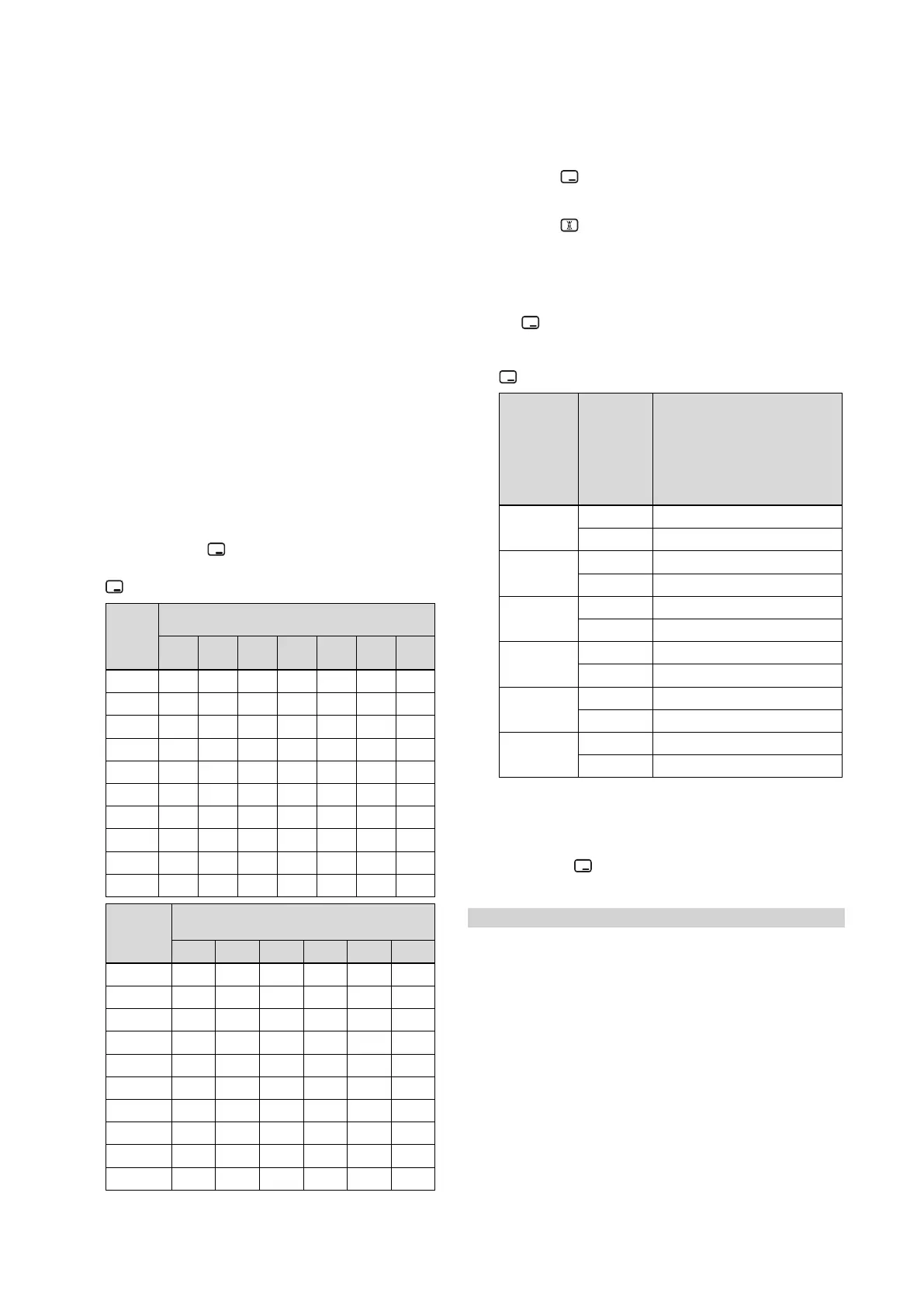
10.1 Burner anti-cycling time
To prevent frequent switching on and off of the burner and
thus prevent energy losses, an electronic restart lockout
is activated for a specific period each time the burner is
switched off. The burner anti-cycling time is only active
for the heating mode. Hot water handling during a burner
anti-cycling time does not affect the time function element
(default setting: 20 mins).
10.1.1 Setting the burner anti-cycling time
1. Navigate to Menu → Installer level → Diagnostics
menu → D.002 Max. anti-cycl. time: Heating and con-
firm by pressing .
2. Set the burner anti-cycling time and confirm by pressing
.
T
Flow
(tar-
get)
[°C]
Set maximum burner anti-cycling time [min]
1 5 10 15 20 25 30
30 2.0 4.0 8.5 12.5 16.5 20.5 25.0
35 2.0 4.0 7.5 11.0 15.0 18.5 22.0
40 2.0 3.5 6.5 10.0 13.0 16.5 19.5
45 2.0 3.0 6.0 8.5 11.5 14.0 17.0
50 2.0 3.0 5.0 7.5 9.5 12.0 14.0
55 2.0 2.5 4.5 6.0 8.0 10.0 11.5
60 2.0 2.0 3.5 5.0 6.0 7.5 9.0
65 2.0 1.5 2.5 3.5 4.5 5.5 6.5
70 2.0 1.5 2.0 2.5 2.5 3.0 3.5
75 2.0 1.0 1.0 1.0 1.0 1.0 1.0
T
Flow
(target)
[°C]
Set maximum burner anti-cycling time
[min]
35 40 45 50 55 60
30 29.0 33.0 37.0 41.0 45.0 49.5
35 25.5 29.5 33.0 36.5 40.5 44.0
40 22.5 26.0 29.0 32.0 35.5 38.5
45 19.5 22.5 25.0 27.5 30.5 33.0
50 16.5 18.5 21.0 23.5 25.5 28.0
55 13.5 15.0 17.0 19.0 20.5 22.5
60 10.5 11.5 13.0 14.5 15.5 17.0
65 7.0 8.0 9.0 10.0 11.0 11.5
70 4.0 4.5 5.0 5.5 6.0 6.5
75 1.0 1.0 1.0 1.0 1.0 1.0
10.1.2 Resetting the remaining burner anti-cycling
time
1. Alternatives 1:
▶ Navigate to Menu → Reset anti-cycl. time.
◁ The current burner anti-cycling time appears in
the display.
▶ Press to reset the burner anti-cycling time.
1.
Alternatives 2:
▶ Press .
10.2 Setting the maintenance interval
1. Navigate to Menu → Installer level → Diagnostics
menu → D.084 Maintenance in and confirm by press-
ing .
2. Set the maintenance interval (operating hours) until the
next maintenance work is due and confirm by pressing
.
Heat de-
mand
Number
of per-
sons
Guideline value for burner
operating hours until the
next inspection/maintenance
work is due for an average
operating time of one year
(dependent upon the system
type)
5.0 kW
1 ‑ 2 1050 h
2 ‑ 3 1150 h
10.0 kW
1 ‑ 2 1500 h
2 ‑ 3 1600 h
15.0 kW
2 ‑ 3 1800 h
3 ‑ 4 1900 h
20.0 kW
3 ‑ 4 2600 h
4 ‑ 5 2700 h
25.0 kW
3 ‑ 4 2800 h
4 ‑ 6 2900 h
> 27.0 kW
3 ‑ 4 3000 h
4 ‑ 6 3000 h
10.3 Setting the pump output
1. Navigate to Menu → Installer level → Diagnostics
menu → D.014 Pump speed target value and confirm
by pressing .
2. Set the required pump output.
Condition: Low loss header installed
▶ Switch off the speed regulation and set the pump output
to a fixed value.







 To Next Page