www.vanatoo.com 5
(continued next page)
# Feature Description
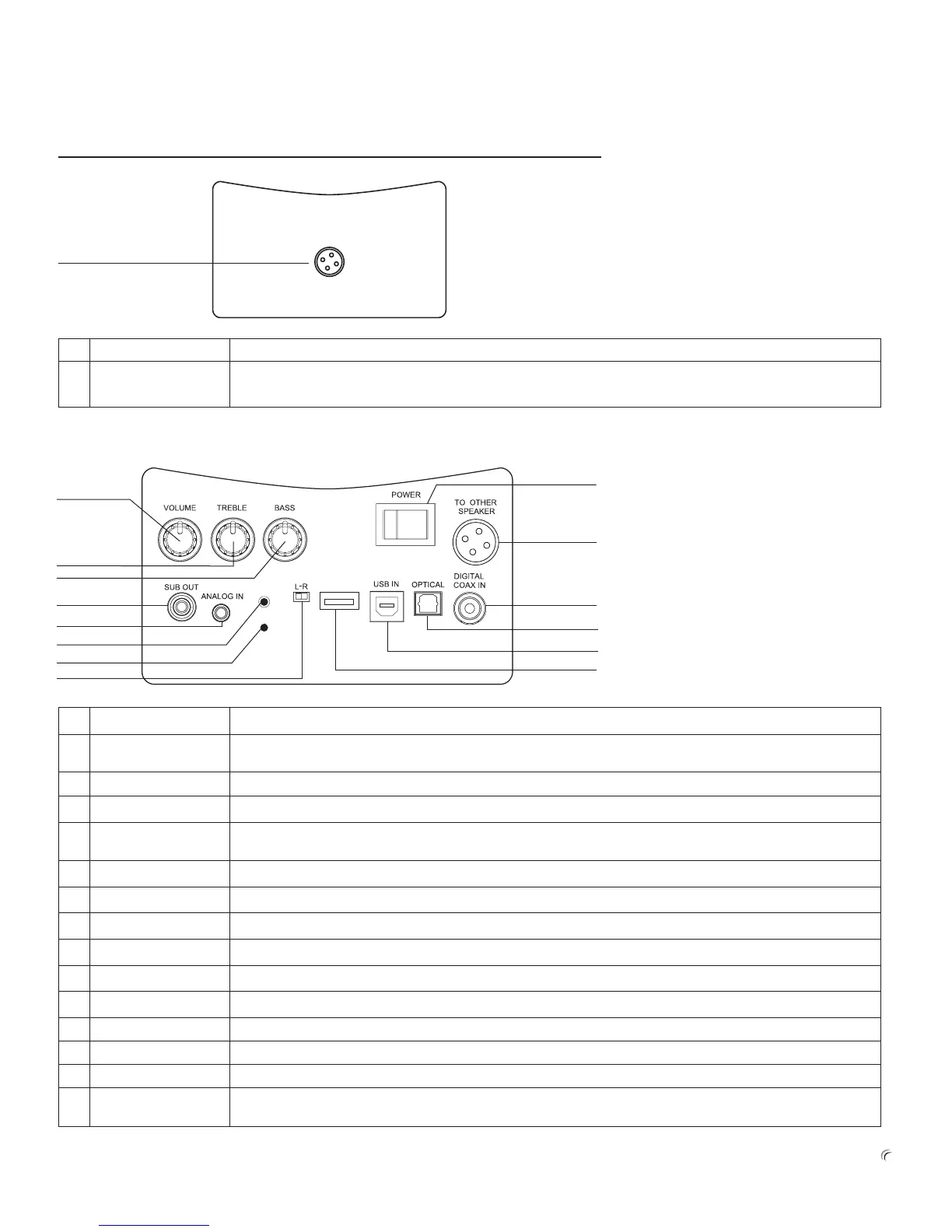
1 VOLUME Usetosetthevolumelevelthatworksbestwithyouraudiodevice.Itismeanttobesetoncethenforgotten.
Theday-to-dayvolumecontrolshouldbeaccomplishedviayouraudiodeviceorremotecontrol.
2 TREBLE Treblecontroltoadjustthesystem’strebleresponsetobestmatchyourspeakerplacementandspace.
3 BASS Basscontroltoadjustthesystem’sbassresponsetobestmatchyourspeakerplacementandspace.
4 POWEROn/O Usetopowerthespeakersystemonoro.IfthesystemisleftintheON positionwithnoactivity,andnosoundis
beingsenttothespeakersystem,thesystemwillgointoasleepmode.
5 TOOTHERSPEAKER AmplierOUTPUTconnectortoconnecttheactivespeaker’sinternalampliertothepassivespeaker(15).
6 SUBOUT Lineleveloutputforanoptionalpoweredsubwoofer.
7 ANALOGIN Analoginputfora3.5mm(sometimescalledan
1
/
8
inch)stereoplug.
8 PAIR-PROG PlacestheBluetoothreceiverinpairmode.Alsousedtoprogramspeakersetupcongurations.
9 BluepowerLED Whenlit,thisindicatesthespeakersystemisswitchedon.
10 L-Rswitch Usedtoselectwhereactivespeakerislocatedasyoufacethespeakers.L=leftside,R=rightside.
11 DIGITALCOAXIN DigitalS/PDIFinputforacoaxconnection.
12 OPTICAL DigitalS/PDIFinputforaTOSLINKberopticplug.
13 USBIN DigitalAudioUSBinputforastandardUSBtypeBplug.
14 USBSERVICE
CONNECTOR
UsetochargeanydevicethatusesaUSBportforchargingupto2A.Alsousedtodownloadsoftwareupdates.
SETTING UP YOUR SYSTEM
Youmayhavenoticedtheabsenceofaregistrationcard.Youarenotrequiredtoregisteryourspeakers.However,ifyouwantustosend
youupdatesorinformationonfutureproducts,you’llwanttoregisterasaVanatoocustomeratourwebsiteatwww.vanatoo.com.
Passive Speaker Back Plate Overview
# Feature Description
1 SPEAKERINPUT
CONNECTOR
PassivespeakerINPUTconnector.ConnectthisconncectortotheamplierOUTPUTconnector(7)ontheactive
speakerusingthespeakerwireprovided.
1
PAIR-PROG
SERVICE
Active Speaker Back Plate Overview
6
11
7
8
9
10
12
13
14
1
4
3
2
5


 To Next Page