EasyManua.ls Logo

Vanatoo TRANSPARENT ONE ENCORE - User Manual

Vanatoo TRANSPARENT ONE ENCORE
13 pages
Print Icon
To Next Page IconTo Next Page
Loading...
VANATOO
®
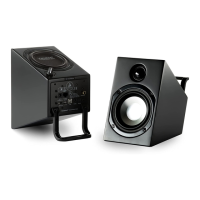
TRANSPARENT ONE ENCORE
POWERED SPEAKERS
Owner’s Guide

Other manuals for Vanatoo TRANSPARENT ONE ENCORE

Questions and Answers

  • A
    Angela McclainJul 27, 2025
    How to troubleshoot no sound from Vanatoo Speakers?
    • B
      Brent DiazJul 27, 2025
      To troubleshoot Vanatoo Speakers with no sound, first ensure the power LED is on. If not, refer to the troubleshooting steps for 'Power LED is not illuminated'. Then, check that the active speaker volume knob and your audio source volume are turned up, and that your audio source is playing. Disconnect all but one audio source input on the active speaker. If the output drivers experienced thermal shutdown, turn the power off on the active speaker, wait 5 minutes, turn down the volume of the audio source, then turn the speaker system back on. Try different inputs on the active speaker, and select 'auto' with the remote.
  • S
    Shelby AndersonJul 31, 2025
    How to fix Vanatoo Speakers when the power LED is not illuminated?
    • L
      linda06Jul 31, 2025
      If the power LED on your Vanatoo speakers isn't lighting up, start by ensuring the power switch is in the “ON” position. Check that the AC power cord is properly connected to the wall outlet and that the outlet is working. Also, verify the blue LED hasn't been dimmed too low and that the unit isn't in sleep mode.
  • S
    Susan McdonaldAug 5, 2025
    What to do if Vanatoo Speakers sound drops out momentarily?
    • J
      James WilliamsAug 5, 2025
      If you're experiencing sound drops with your Vanatoo speakers, it might be due to the protection circuits engaging. Try turning down either the active speaker volume or the audio source volume slightly until the sound stabilizes. If you need to play louder, consider adding a subwoofer to your system. If you're using a digital input, the digital signal may be interrupted, so consider changing the digital cable. For Bluetooth, your sending device might be out of range.
  • R
    Ronald RiveraAug 9, 2025
    Why are my Vanatoo Speakers audio distorted?
    • D
      David TaylorAug 9, 2025
      If your Vanatoo speakers are producing distorted audio, and you're using the analog input (3.5 mm connector), ensure you're not overdriving the audio input by turning down the volume on your audio source device, and increase the volume on the active speaker if needed. Also, make sure you're not overdriving the speaker drivers themselves by turning down your audio source device. Check that the audio source signal is clean and that the cable between the audio source and the active speaker is properly connected.
  • T
    Terri MillerAug 12, 2025
    What to do if only the active Vanatoo Speaker has sound?
    • N
      Nathan DiazAug 12, 2025
      If you're getting sound from the active speaker but not the passive speaker on your Vanatoo system, first, ensure the 4-pin cable is securely connected to both speakers. If you're using the analog input, verify the 3.5mm connector is firmly seated in both the active speaker and the audio source. If using a 3.5mm to RCA 'Y' cable, check that both RCA connectors are properly seated. Also, ensure the balance control on your source device (like a computer) is set to the midpoint.
  • J
    Jordan RichardsonAug 17, 2025
    What to do if only the passive Vanatoo Speaker has sound?
    • L
      Lori NovakAug 17, 2025
      If you're experiencing sound only from the passive speaker and not the active speaker with your Vanatoo setup, begin by checking the connections. If you are using the analog input, ensure the 3.5mm connector is firmly seated into the connector input on the active speaker and the audio source. If you're using the 3.5mm to RCA 'Y' cable, verify that both of the RCA connectors are properly seated. Also, make sure the balance control on your source device (like your computer) is set to the mid point.
  • K
    Kenneth MartinAug 21, 2025
    How to troubleshoot no audio from Vanatoo Speakers subwoofer?
    • T
      tracyreyesAug 21, 2025
      If you're not getting any audio from your optional subwoofer with your Vanatoo speakers, check that the RCA cable between the active speaker's subwoofer output and the subwoofer's input is properly connected. Ensure the subwoofer is plugged in and switched on, and that the subwoofer volume is turned up.

Summary

Safety Precautions

General Safety Precautions

Essential safety warnings and precautions for operating audio equipment to prevent hazards.

Welcome

About Your Speakers

Speaker Features

Details the primary features and specifications of the Transparent One Encore powered speakers.

Product Specifications

Unpacking Your Speakers

Setting Up Your System

Back Panel Overview

Explains the connectors and controls located on the active and passive speaker back panels.

Connection and Optimization

Details connection steps, optimization for space, and initial volume adjustments for best sound.

Customize Configuration Settings

Setting Descriptions

Explains the function and options for each customizable setting on the T1E speakers.

Customization Steps

Details the procedure for changing settings using knobs and switches, including factory reset.

Remote Control

Remote Command Functions

Explains specific remote commands for input selection, volume, treble, bass, and Bluetooth pairing.

Grills

Connecting to an Optional Subwoofer

Connecting to a Bluetooth Device

Adjusting Treble and Bass

Adjusting Power On LED Brightness

Audio Music Source Precedence

Troubleshooting

Warranty

FCC Compliance Statement

Acknowledgements

Vanatoo TRANSPARENT ONE ENCORE Specifications

General IconGeneral
TypeActive
InputsUSB, Optical, RCA, Bluetooth
Drivers1" Silk Dome Tweeter
AmplifierClass D
OutputsSubwoofer output
BluetoothYes
DAC24-bit/96kHz

Related product manuals