ProStar 210/215/ PrepStar 218/SD-1 SDM -7- 03-914947-20:5
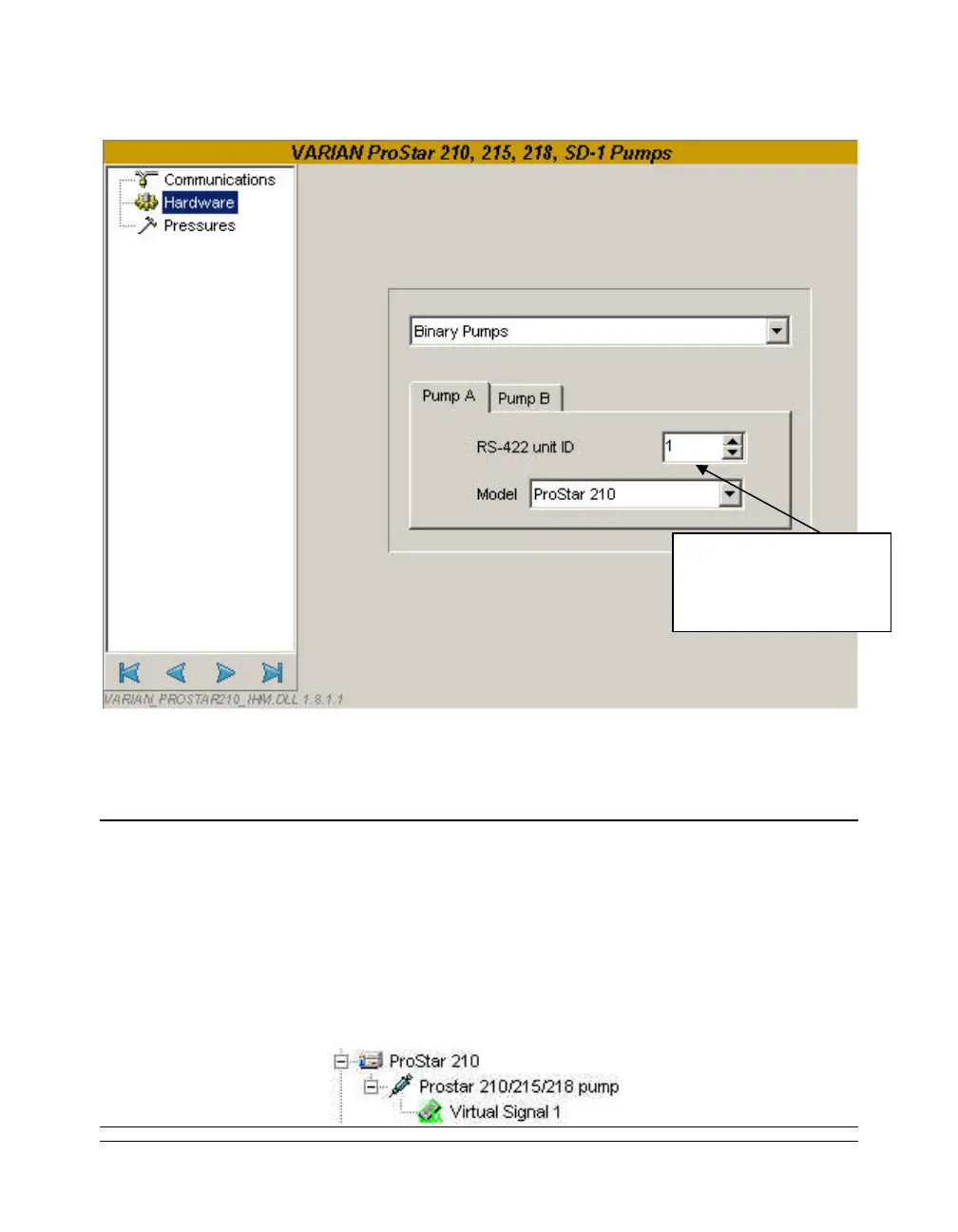
Hardware Window
Select from the list the type of the pump: isocratic, binary,
ternary, quaternary, isocratic + injector, binary + injector, ternary
+ injector. A new tab (Pump B, Pump C, Pump D or Injector)
appears depending on the selected type of pump.
NOTE:
- The system must be equipped by at least two ProStar / PrepStar modules to work as a
binary pump, three modules for a ternary one and four to work in quaternary mode.
- With this type of pump, a module can be used as an injector. In this case a new
Injection screen becomes active in the method. To learn more about this option, refer to
the chapter
Control method for the ProStar / PrepStar pump.
- When an Injector module is configured, in the lower part of the Galaxie Configuration
Manager an injector (of the new system) called ProStar 210/215/218 pump is created.
The ID entered here
must match the ID of
the pump.




 To Next Page