20 Vaultek
®
19 Vaultek
®
Product Registration
Vaultek
®
strongly encourages you to register your safe as soon as you receive it. Registration provides many
benets including three year warranty, technical support and ordering replacement keys should you misplace
them. Your Vaultek
®
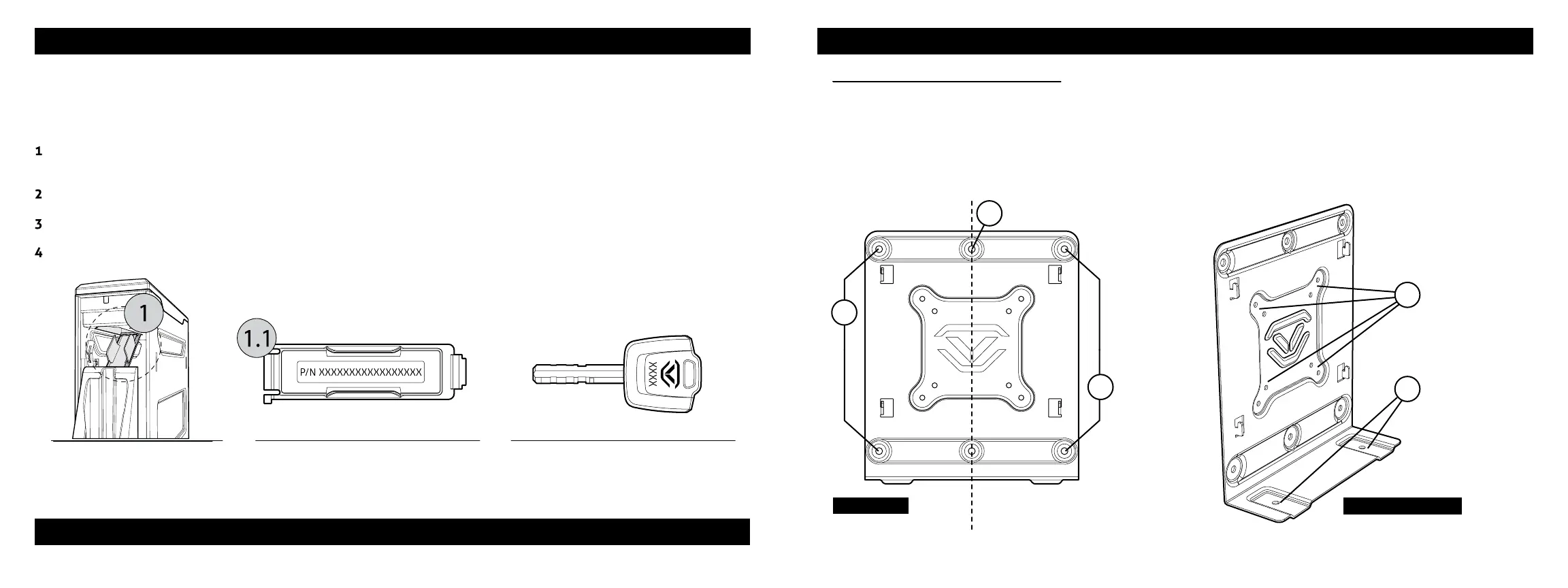
safe has a unique product number on the inside of the battery door and a 4-digit ID number
engraved on the keys. You will need these numbers to register your safe.
Locate your product number. It is printed on the rst page of this user manual and on the inside of the battery
door (Figure K/L).
Find your 4-digit ID number engraved on the keys (Figure M).
Please visit the Vaultek
®
website at vaulteksafe.com and click Support/Product Registration.
Enter the required information in the form and click submit.
Securing Your Safe
Mounting Plate Congurations
Your Vaultek
®
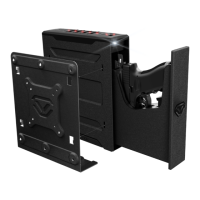
safe includes a mounting plate with multiple congurations for mounting. A four point
conguration can be used for standard vertical surface mounting (1.1), two point mounting for installing in a
vertical wall stud (1.2), and additional base mounts (1.3).
The mounting plate also features standard VESA 75mm and 100mm tment for use with other adapter
plates (1.4). Hardware for VESA tment not included.
FIGURE K FIGURE L FIGURE M
1.2
1.3
1.1
1.1
Front View Perspective View
1.4
Continue on next page for more information about Securing Your Safe
For tutorials, setup help, and FAQs visit www.vaulteksafe.com/setup/ and select your safe.


 To Next Page