Delete Fingerprints 15
Toggle Interior Light 16
Interior Light Time Extension 16
Toggle Bluetooth
®
16
Toggle App Unlock 16
Toggle Smart Key Modes 16
Toggle Alert of Manual Unlock 16
Vaultek
®
App Overview / Pairing 17 / 18
Product Registration 19
Securing Your Safe 20 / 22
Mounting Plate Installation 21
Mounting Your Safe 21
Removing Your Safe 22
Troubleshooting 23
Customer Support / Warranty 24
Table of Contents
Product Overview 01 /02
Introduction / Warnings 03 / 04
Battery Operation / Battery Maintenance 05 / 07
Battery Installation 05
Charging the Battery 06
Master Code Programming 08
Biometric Programming
(SL20i Only) 09 / 12
Helpful Programming TIPS 09
Programming Admin Fingerprints (First Two Users) 10
Programming Additional Fingerprints 11
Deleting Fingerprints 12
Smart Key Operations / Warnings (Optional Accessory) 13 / 14
Smart Key Pairing (Three Steps) 13
Multiple Safe Management 13
Smart Key Entry Modes 14
To Unpair Smart Key 14
Hot Keys 15 / 16
Tamper Detection 15
Toggle Stealth Mode 15
Toggle Travel Mode 15
View Battery Status 15
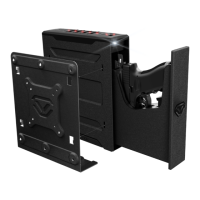
Box Contents
Vaultek
®
Safe
18650 Rechargeable Lithium-ion Battery
AC Power Adapter and Charging Cable
Mounting Plate
Hardware Mounting Kit
Owner's Manual / Quick Start Guide
Backup Keys (2)
For tutorials, setup help, and FAQs visit www.vaulteksafe.com/setup/ and select your safe.


 To Next Page