Automotive Short And Open Finder
4
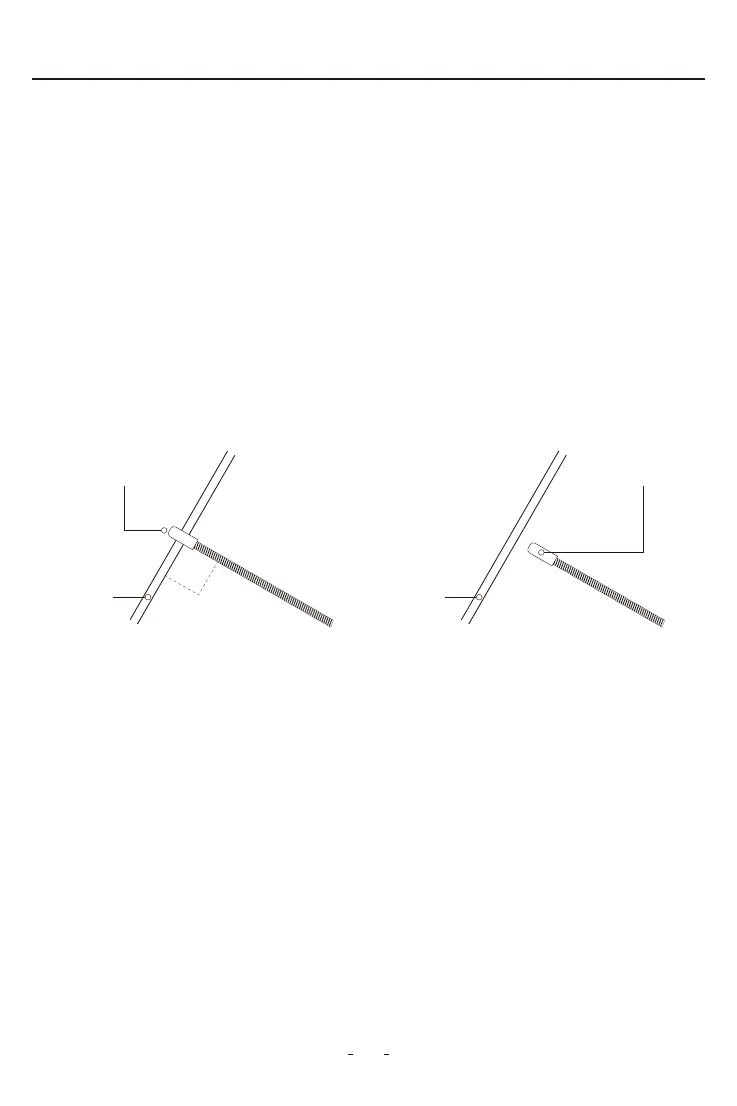
The probe of the V210 receiver is built of coiled steel equipped with a sensor (black
cylinder), and can be bent as needed, in order to reach wires in congested or dicult
areas. Depending on the circuit characteristics and the sensitivity setting, the probe’s
sensor will pick-up the signal from the wire in a wide range of positions. However, for the
best possible range, the V210 receiver’s sensor (black cylinder) should be positioned
perpendicular (at 90°) to the wire being traced and either above or below it, as shown in
Fig. 1 below
2.6 How to Use the Probe
VDIAGTOOL V210 receiver comes with rota switch dial to adjust sensitivity level easily
which allows technician to choose the degree of sensitivity most suitable to the paicular
detection being peormed.
To turn on V210 receiver or increase sensitivity level: Switch the rota switch dial
clockwise to turn on the V210 receiver and increase sensitivity level;
To turn o V210 receiver or decrease sensitivity level: Switch the rota switch dial
anti-clockwise to decrease sensitivity level, and switch it o until you hear a click.
2.7 Setting the Sensitivity Level
Open the batte cover at the back of the V210 receiver, replace the exhausted batte with
a new one of 9V (6F22) and reinstall the batte cover.
2.5.2 V210 receiver batte replacement:
Figure 1
CORRECT
Sensor
Cable
90°
INCORRECT
Sensor
Cable


 To Next Page