Automotive Short And Open Finder
6
7. If it’s dicult or unable to pick up any signal, please increase the sensitivity and t
again.
8. Double check by positioning the probe before and after the suspected point. If
the open circuit point has been found, the tone will show circuit integrity on one side,
and not on the other. At this point, where the audio signal stops, you have found the
open circuit.
Note: Obsee the limits and safety precautions at all times.
2.10 Wire Tracing
1. Set the switch of the V210 transmitter to “TONE”, the red LED of the transmitter lights up.
If the red LED does not light up, please check the batte.
2. Switch on the V210 receiver, set the rota switch to the middle position. Press and hold
“TEST” button, meanwhile move the probe sensor close to the test lead of the
transmitter. Receiver receives the signal and generates tone. If so, it means the unit works
correctly.
3. Connect the black test lead to the circuit positive supply( or to the negative for the
9. When you have nished locating the open circuit point, disconnect the test leads’
connection, set the transmitter to “OFF” position and loose the “TEST” button.
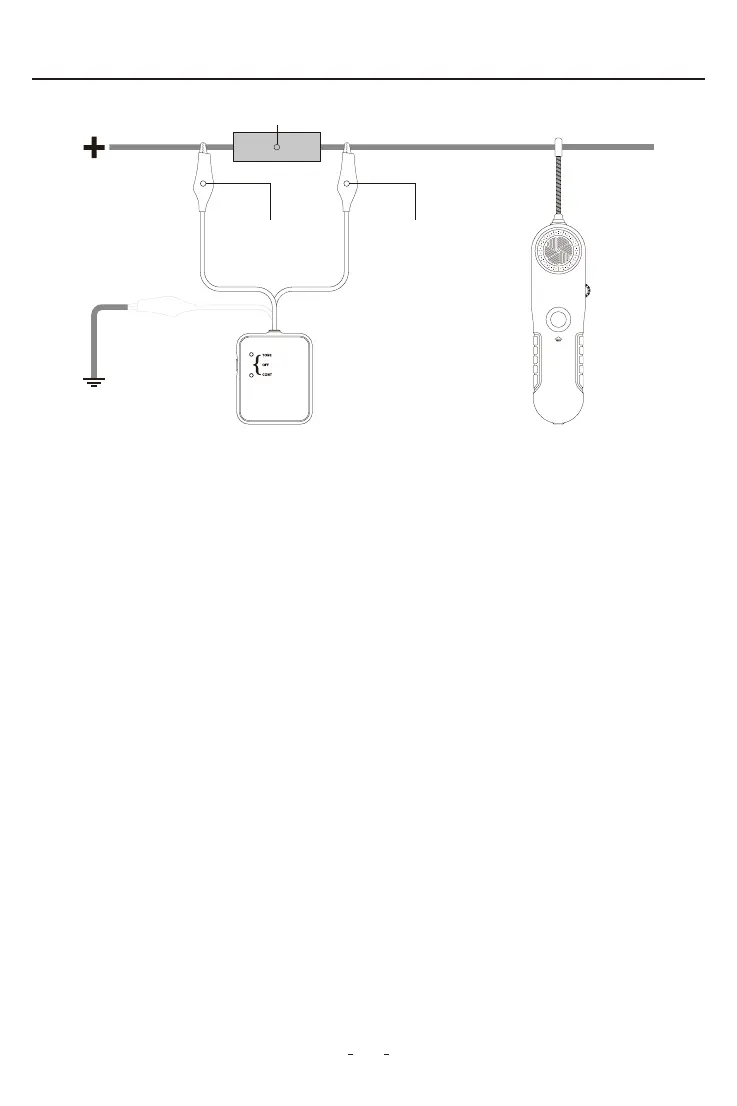
Fuse Socket or Connector
Figure 2
V210 Receiver
Black Negative Wire Red Positive Wire
V210 Transmitter
OR


 To Next Page