15
GB
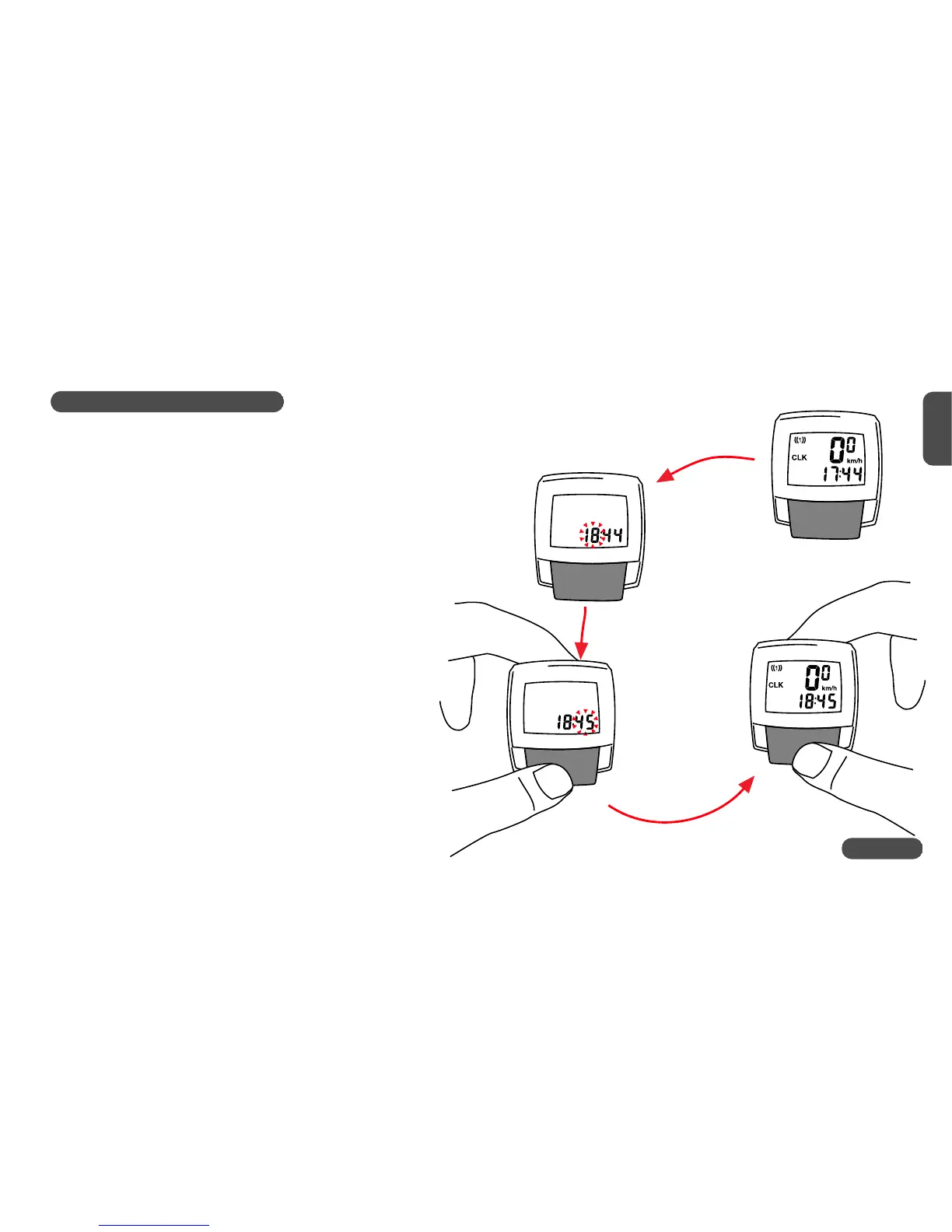
5.4 Setting the clock CLK
Your VDO CYTEC C05+ features a clock with hour and minute display
in 24 h mode To access the clock set-up mode proceed as follows:
Step 1: call in the CLK information into your display
Step 2: Press the MODE button for 5 sec.
The set-up mode for the clock starts.
You will see the digit flashing and changing
its value (14...15...16).
Step 3: Once the correcthour figure is
flashing (i.e. 15), press the MODE
button, then the minute figure is flashing
and changing its value.
Step 4: Once the correct minute value is
flashing, press the MODE button, the computer
will then return to regular display mode.
Watch out! The time (CLK) has to be reentered after a battery change
Press to Stop
switch to next
Press 5sec.
to start
5.4 Setting the clock CLK
Your VDO CYTEC C05+ features a clock with hour and minute display
in 24 h mode To access the clock set-up mode proceed as follows:
Step 1: call in the CLK information into your display
Step 2: Press the MODE button for 5 sec.
The set-up mode for the clock starts.
You will see the digit flashing and changing
its value (14...15...16).
Step 3: Once the correcthour figure is
flashing (i.e. 15), press the MODE
button, then the minute figure is flashing
and changing its value.
Step 4: Once the correct minute value is
flashing, press the MODE button, the computer
will then return to regular display mode.
Watch out! The time (CLK) has to be reentered after a battery change
5.4 Setting the clock CLK
Your VDO CYTEC C05+ features a clock with hour and minute display
in 24 h mode To access the clock set-up mode proceed as follows:
Step 1: call in the CLK information into your display
Step 2: Press the MODE button for 5 sec.
The set-up mode for the clock starts.
You will see the digit flashing and changing
its value (14...15...16).
Step 3: Once the correcthour figure is
flashing (i.e. 15), press the MODE
button, then the minute figure is flashing
and changing its value.
Step 4: Once the correct minute value is
flashing, press the MODE button, the computer
will then return to regular display mode.
Watch out! The time (CLK) has to be reentered after a battery change












 To Next Page