34
arrows
v
arrows
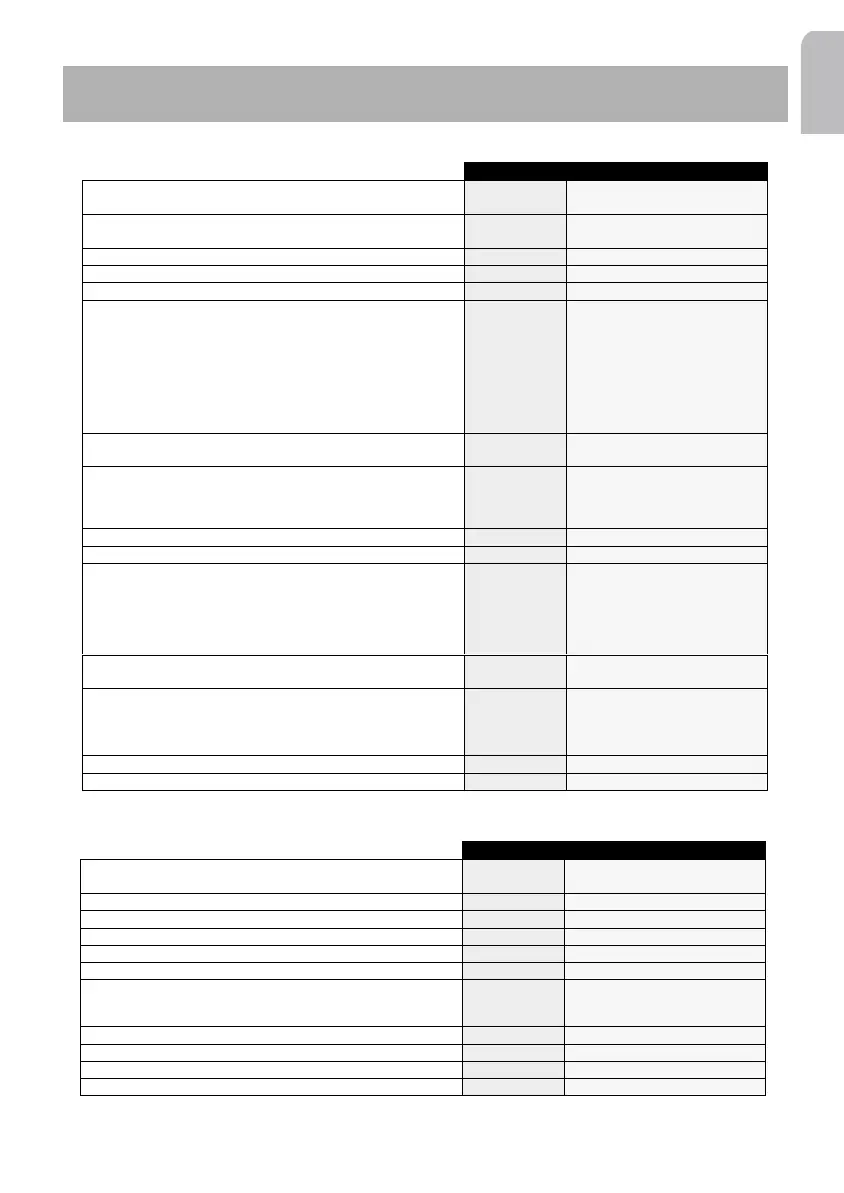
Select scan duration for CD tracks or radio stations
Scan time
5 seconds / 10 seconds / 15
seconds
Activate/deactivate ON/OFF Logic function limiting use of the
installation to 1 after removal of ignition key
Logic
On / Off
Activate/deactivate auxiliary source
Auxiliary
On / Off
Activate/deactivate visual temperature warning
Warm LED
On / Off
Volume of key tones
Chimes lvl
0 / 1 / 2 / 3 / 4
Choice of key tones for various activities:
Chimes set
Key press
Confirm
Announce
Warning
Errors
Welcome
Bye bye
Press enter
Off / Chime 1 / 2 / 3 / 4 / 5
Off / Chime 1 / 2 / 3 / 4 / 5
Off / Chime 1 / 2 / 3 / 4 / 5
Off / Chime 1 / 2 / 3 / 4 / 5
Off / Chime 1 / 2 / 3 / 4 / 5
Off / Chime 1 / 2 / 3 / 4 / 5
Off / Chime 1 / 2 / 3 / 4 / 5
Select volume level for Traffic Announcement, News bulletins
and Alarm messages
TA Volume
0 / 1 / 2 / 3 / 4
Select:
> IN if you wish to amplify the received call through the car speakers
> NO if no car phone is connected
> MUTE to automatically interrupt the radio during phone
Phone
In / No / Mute
Select LOW or HIGH according to phone’s mute signal
Phone lvl
Low / High
Increase/Decrease the phone volume
Phone Vol.
-30 to +30
Select:
> IN if you wish to amplify the guidance voice messages through the
car speaker
> NO if no navigation computer connected to the set
> MUTE to automatically interrupt the radio during the guidance voice
messages
Nav
In / No / Mute
Select LOW or HIGH according to the navigation computer’s
mute signal
Nav lvl
Low / High
Select the SDVC compensation volume level (only when
connected and calibrated, see SDVC).
Level 1 gives a smaller increase while level 4 gives a greater
increase with respect to the car’s speed.
SDVC type
Off / Curve 1 / 2 / 3 / 4
To adjust the light display brightness
Brightness
1 to 10
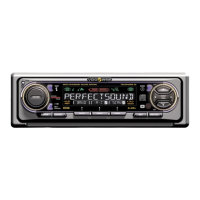
Launch the installation
Install
Start the automatic station storage
Start AST
Load the RDS memory on the current waveband
Start Memo
Select the Programme TYpe
PTY Search
News / Affairs / Info / Sport…
Activate/Deactivate Alternative Frequency function
AF
On / Off
Start scan on the current waveband
Scan Preset
On / Off
Select:
> MANUAL for a manual search,
> AUTO for automatic scanning.
Tuning
Auto / Manual
Give a name to the radio frequency
Name
Save a station in memory number X
Save in
Empty X
Move to the tuner init menu
Tuner Init
Move to the main menu
SAM



 To Next Page