30
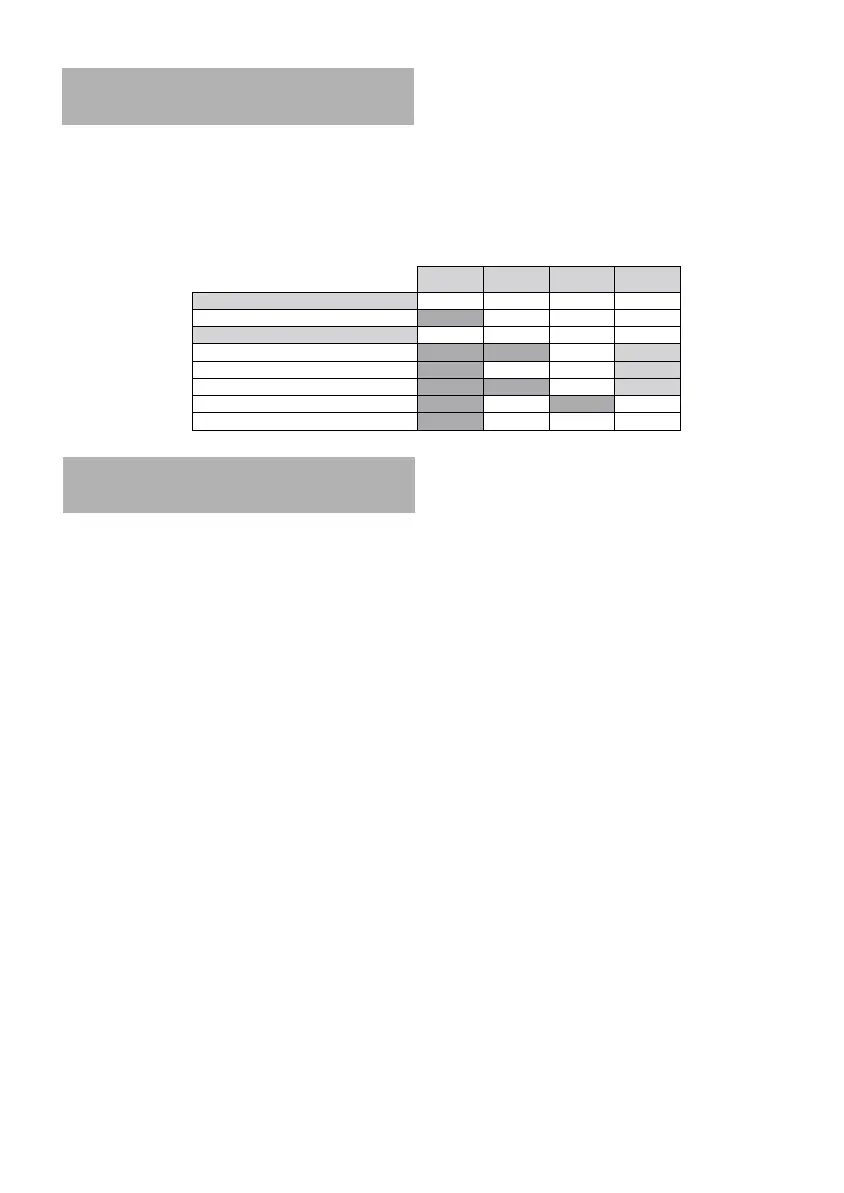
CD4402 CD4502 CD4802 CR4402
Source
DAB No
Yes Yes Yes
Functions
Listening MP3 files No No
Yes
Displaying CD text No
Yes Yes
Changing directory No No
Yes
Opening the TMC No
Yes
No
Yes
Setting the FM/DAB switch No
Yes Yes Yes
RADIO REFERENCE
May be, it will happen that you cannot find
an expected function. So, before calling for
service, please check this table and review
carefully the functions which work with your
reference car radio.
Activating the News Bulletin . . . . . . .23
Activating the TMC* . . . . . . . . . . . . . .22
Activating Traffic Announcement . . . .23
Calibrating the Auto Equalizer . . . . . . .7
Calibrating the Speed . . . . . . . . . . . . . .6
Changing Cassette Side . . . . . . . . . . .15
Changing Directory in MP3 CD* . . . . .14
Connecting the radio . . . . . . . . . . . . . .4
Controlling the volume . . . . . . . . . . . .8
Customizing the Sound Reproduction 20
Defining Bass Freq. Threshold . . . . . .19
Defining Subwoofer Threshold . . . . .19
Defining the Scan Time . . . . . . . . . . . .8
Defining Treble Freq. Threshold . . . . .19
Deleting the CD name . . . . . . . . . . . .15
Displaying CD Text* . . . . . . . . . . . . . .14
Displaying Source Informations . . . . . .8
Displaying the battery voltage . . . . .20
Displaying the clock . . . . . . . . . . . . . .20
Displaying the distance . . . . . . . . . . .20
Displaying the speed . . . . . . . . . . . . .20
Displaying the temperature . . . . . . . .20
Displaying the time . . . . . . . . . . . . . .20
Ejecting a cassette . . . . . . . . . . . . . . .15
Ejecting CD from the CD changer . . . .13
Ejecting CD from the CD Player . . . . .13
Fast Backward/Forward . . . . . . . . . . .14
Fast Rewind/Fast Forward . . . . . . . . .15
Installing a subwoofer . . . . . . . . . . . . .6
Installing an external amplifier . . . . . .5
Launching Loudspeakers Installation .10
Listening to MP3 files* . . . . . . . . . . . .13
Loading CD in the CD changer . . . . .13
Loading CD in the CD Player . . . . . . .13
Mounting a DIN radio . . . . . . . . . . . . . .5
Mounting a JIN radio** . . . . . . . . . . . .5
Moving to the CC Init Menu . . . . . . . .21
Moving to the Sound Init Menu . . . . .18
Moving to the Tuner Init Menu . . . . .12
Naming a Radio Frequency . . . . . . . . .12
INDEX
AN 2001 2L gb.qxd 16/07/01 14:55 Page 30



 To Next Page