8 Vector Lab Products Refrigerators and Freezers
Locking/Unlocking of the Keypad
The temperature controller is defaulted to lock out after 30 seconds without a key being pressed and will display
“Loc”. To unlock the controller press the SET key for 1 second until “UnL” is displayed. The controller is now
unlocked.
Viewing/Adjusting the Set Point
With the controller unlocked, press and release the SET key. The current Set Point will populate. Use the UP &
DOWN arrows to the desired Set Point and again press the SET key to store.
Powering the Equipment ON.
Locate the power switch to the left of the controller and place in the ON position (I).
Controller Set Up
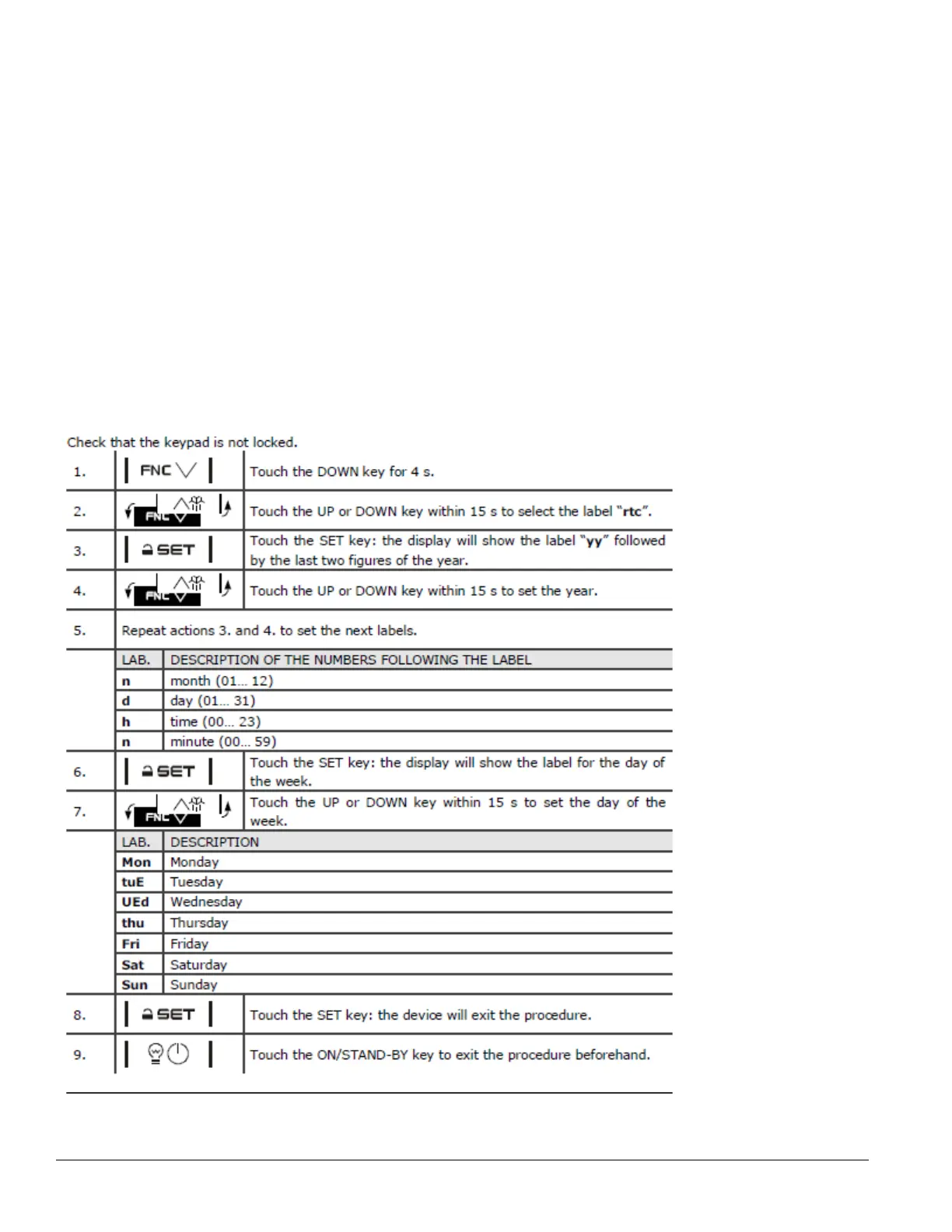
Upon power up your controller will alarm RTC. This is instructing you to program the TIME/DATE.
Press and release any key to silence the alarm.
Check that the controller is not locked (LOC). If locked press and hold any key for 1 second and (UNL) will
DISPLAY.


 To Next Page