3-15
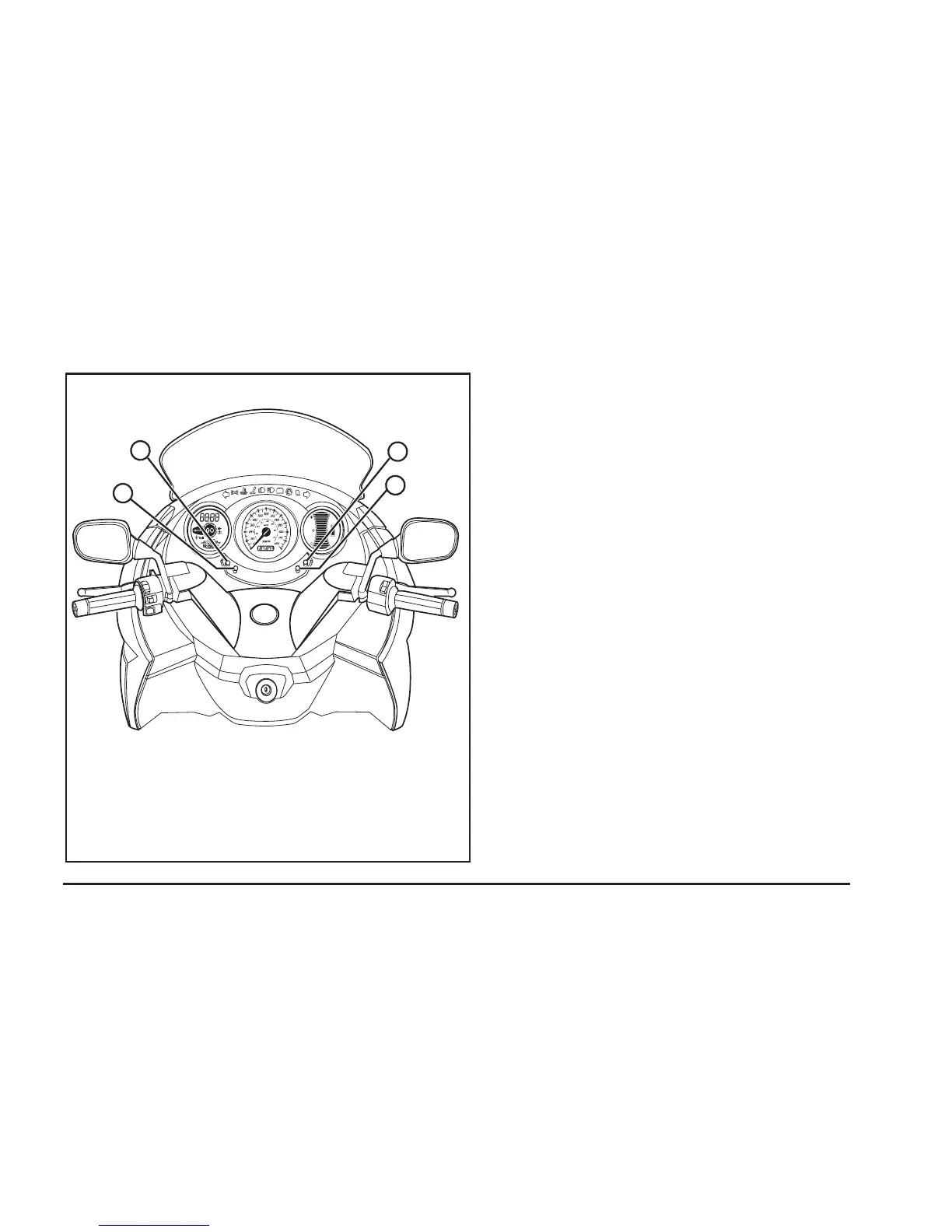
A
C
D
B
Instrument Cluster Controls
A. Hour Adjustment Button
B. Minute Adjustment Button
C. KM/H - MPH Button
D. Trip A-B Odometer Button
A. Hour Adjustment
This button is labeled with an “H.” It allows you
to change the hour on the clock. Push this button
in order to change the hour. Pressing down on the
button and holding for 3 seconds will allow you to
choose from 12 or 24 hour formats.
B. Minute Adjustment
This button is labeled with an “M.” It allows you
to change the minutes on the clock. Push this
button in order to change the minutes.
C. KM/H - MPH
This button is labeled with a “E/M.” Pressing it
allows you to change between kilometers and
miles. The current setting will be displayed on the
left instrument cluster. The factory default setting is
kilometers.
D. Trip A-B Odometer
This button is labeled with an “S.” Pressing it
allows you to scroll between Trip A, Trip B, or the
normal odometer reading. You can reset Trip A or
Trip B by scrolling to the desired trip then pressing
and holding the button for 3 seconds.


 To Next Page