3-10
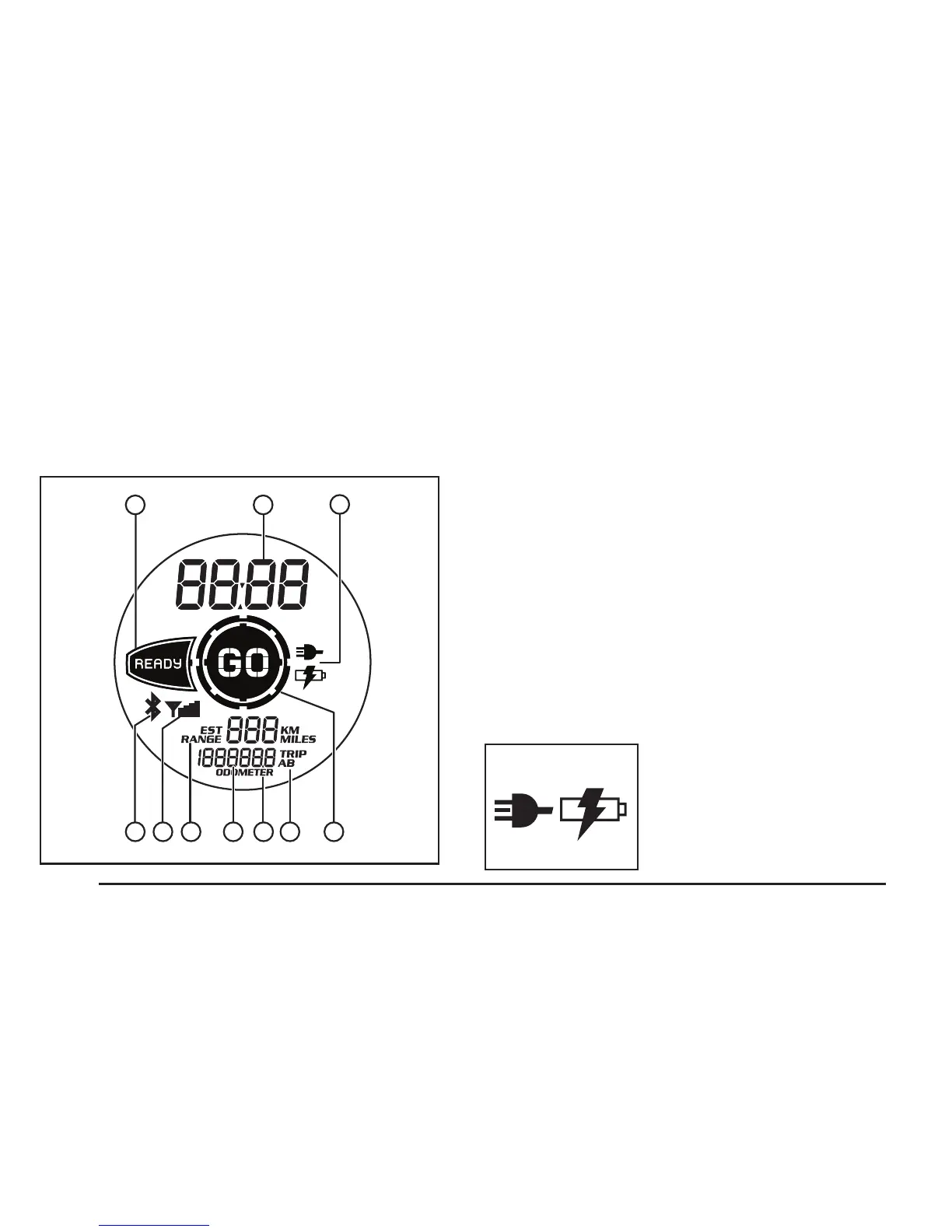
Left Instrument Cluster
A
C
JIHGFED
B
A. Ready Indicator
B. Clock Reading Display
C. Battery Charge/Charging Indicator
D. Bluetooth Indicator
E. RF Range Indicator
F. Estimated Range Display
G. Trip Odometer Display
H. Odometer/Trip A-B Display
I. Odometer/Trip A-B Display Setting
J. GO Indicator
A. Ready Indicator
This indicator is illuminated when the system is
ready to be enabled.
B. Clock Reading Display
This displays the time of day in either 12 or 24
hour format. This will also display the total charge
time during charging or the remaining cool down
time during the delay charging mode.
C. Battery Charge/Charging
Indicator
This indicator will
illuminate when the
system is being
charged by an external
power source .
E. Light Sensor
The light sensor detects the level of ambient light
and adjusts the liquid crystal display (LCD)
backlighting of the left, center, and right instrument
clusters.


 To Next Page