Data transfer PLRF10/15-2.0en
28
Data transfer
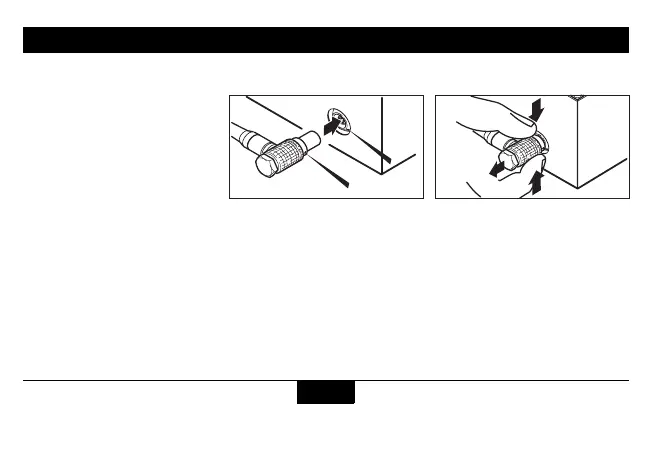
Connecting the interface cable
On the side of the device is a
socket for connecting the
device to a personal computer
or laptop.
The interface is used for service
purposes only.
Caution:
Incorrect handling can damage
the socket or optional interface
cable.
To plug:
1. Remove protection cap.
2. Align the respective mark-
ings on the plug and socket.
3. Slide the plug carefully into
the socket until the locking
mechanism engages
To unplug:
1. Grasp the plug grip between
two fingers,
2. draw it carefully back to the
stop to disengage the locking
mechanism,
3. pull back a little harder until
the plug slips out of the
socket
4. Attach the protection cap.


 To Next Page