34
PPS10 Pocket Scope
TM
Input coupling
Depending on the signal or the part of the
signal you would like to measure, you can
connect the input directly or via a decoupling
capacitor to the signal source.
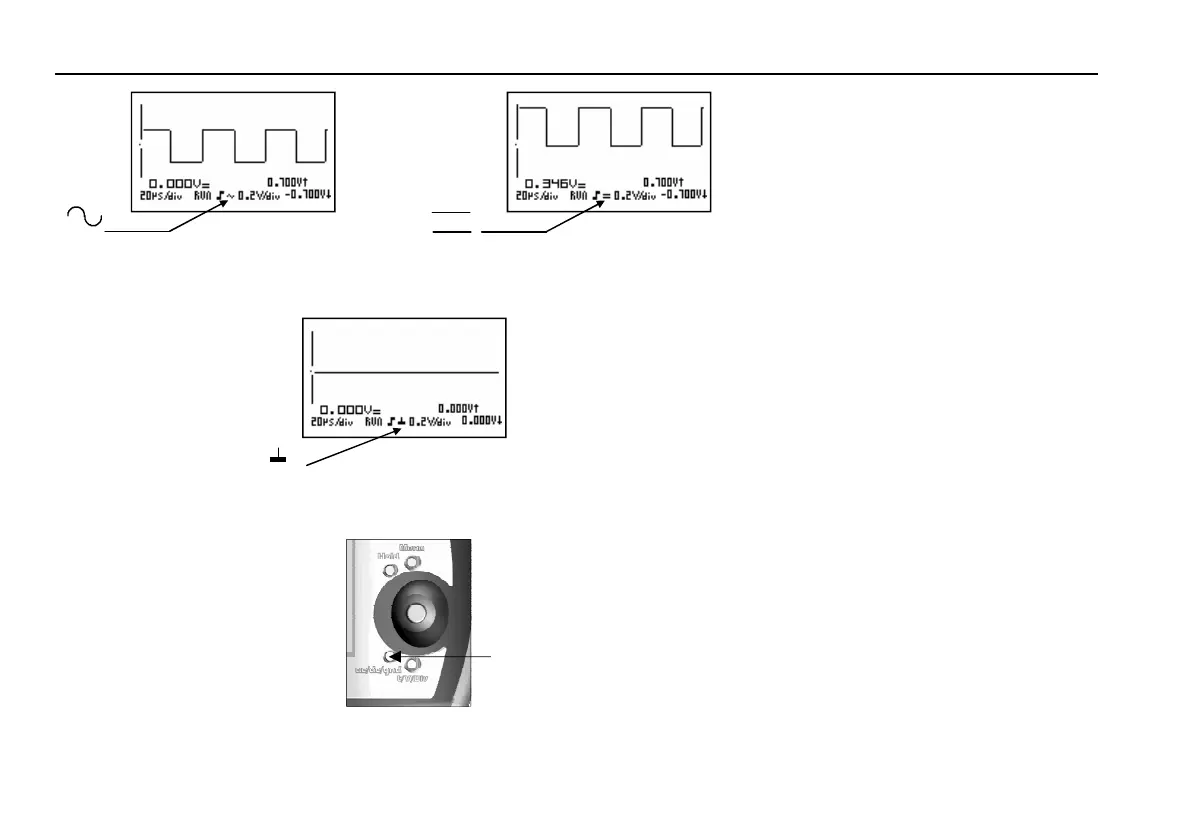
A short press on the AC/DC/GND button '1'
will set the input coupling to AC or DC.
An AC or DC symbol will be shown on the
display (fig.35 & 36).
Remarks:
• To measure the DC voltage only, set the
input coupling on ‘DC’.
• To measure the ripple on a DC voltage, set
the input coupling on ‘AC’.
• With a time base of 1s/div or slower the
input will always be coupled directly
(DC).
AC Voltage Reference
When moving the signal vertically, the refer-
ence level (0V) will be incorrect when meas-
uring AC voltages. In this case, enter a new
0V reference. To do so, hold the AC/DC/
GND button for a while. The input will be
disconnected internally from the signal and
connected to the ground. You will see a 0V
reference line and a ground symbol on the
display (fig. 37).
Fig 38
1
Fig 35 Fig 36
DC
AC
Fig 37
GND
input coupling















 To Next Page