46
PPS10 Pocket Scope
TM
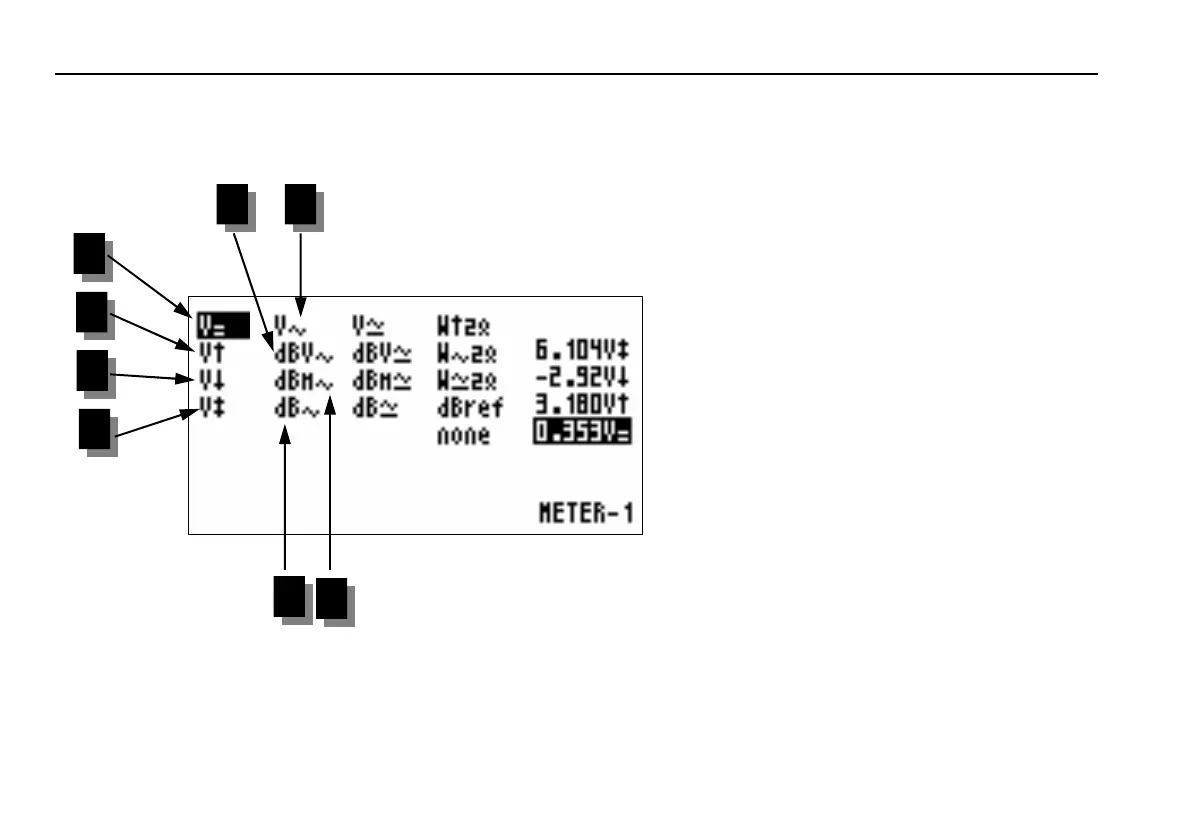
1. DC voltage (V=)
Tip: Set the DC voltage reference (0V) on
any position on the display by holding the
AC/DCGND button. Use the ‘Run’ trigger
mode to measure the DC voltage. Place the
input coupling on the DC.
2. Maximum voltage peak (Vmax)
The highest voltage value will be shown.
3. Minimum voltage peak (Vmin)
The lowest voltage value will be shown.
4. Peak to peak voltage (Vpp)
The difference between the highest and the
lowest voltage value will be shown.
5. True rms voltage (Vrms ac)
Calculation of the AC voltage surface and
conversion into voltage value.
6. dBV AC
The recorded AC voltage signal is converted
to dBV (0dB=1V)
7. dBm AC
The recorded AC voltage signal is converted
to dBm (0dB=0.775V)
8. dB AC
The converted AC voltage signal is con-
verted to dB (0dB=dBref*)
1
2
3
4
5 6
7
8
Fig 66
Readout setup















 To Next Page