58
PPS10 Pocket Scope
TM
Saving the screen
When the scope is set in Hold mode, you can
save the signal into the memory and calling it
up later.
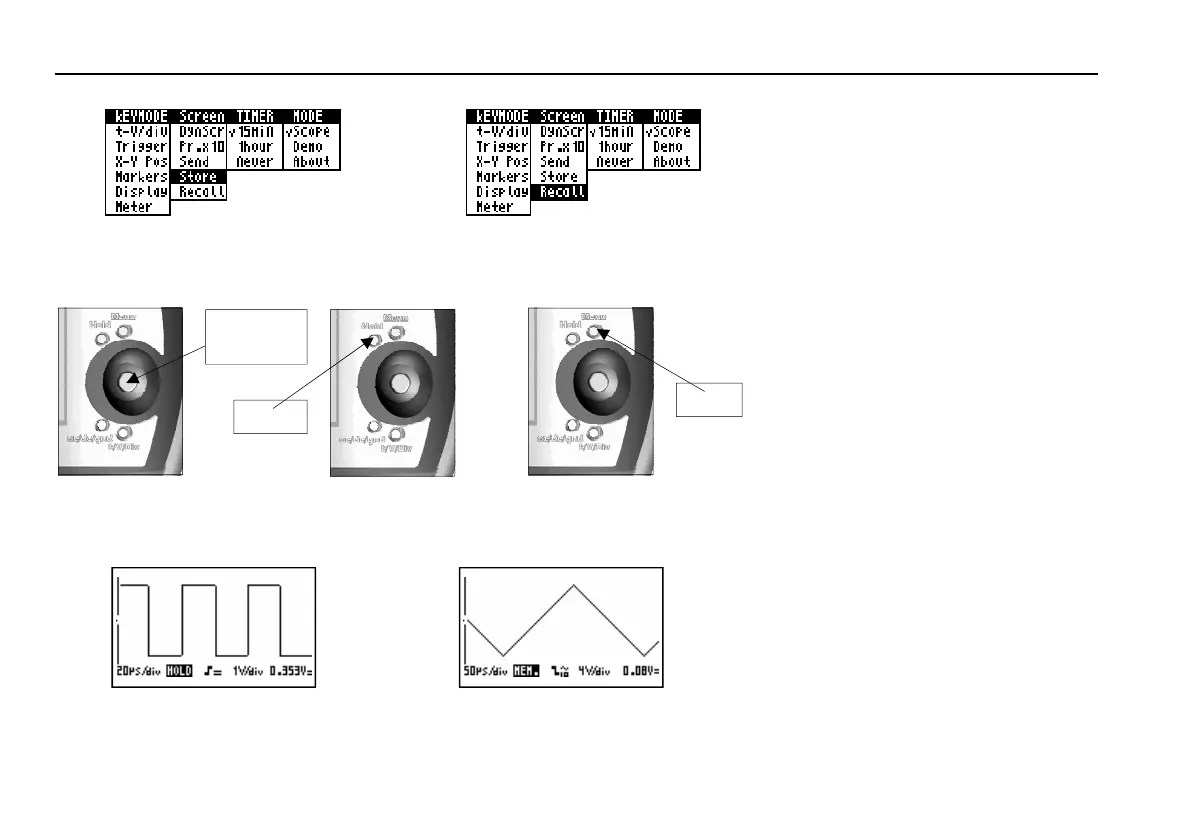
Press the MENU button to call the setup
menu. Use the joystick to select ‘Store’ under
‘Screen’ and press the joystick (Fig. 84).
The scope settings like sensitivity, time base,
input coupling, measurement probe setting
will also be saved. Press the Hold button to
quit the memory function. The scope returns
to the normal mode.
Fig 84
Fig 88
Menu
Fig 86
Calling the display memory
When the scope is in Hold mode, you can call
up the signal saved into the memory.
Press the MENU button to call the setting
menu. Use the joystick to select ‘Recall’ un-
der ‘Screen’ and press the joystick (Fig. 85).
The display shows the memorized signal and
its scope settings. The ‘HOLD’ text (Fig. 88)
on the display is replaced by ‘MEM.’ (fig. 90)
to indicate you are viewing the memorized
signal.
Repeat the steps to return to the previously
frozen signal.
Press the Hold button to quit the memory
function. The scope returns to the normal
mode.
Fig 85
Fig 89
Fig 90
Screen memory
Fig 87
Hold
Joystick
Manette















 To Next Page