EasyManua.ls Logo

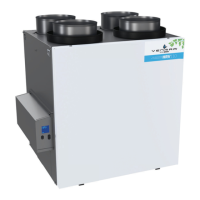
Venmar HRV110 - User Manual

Venmar HRV110
44 pages
Print Icon
To Next Page IconTo Next Page
Loading...
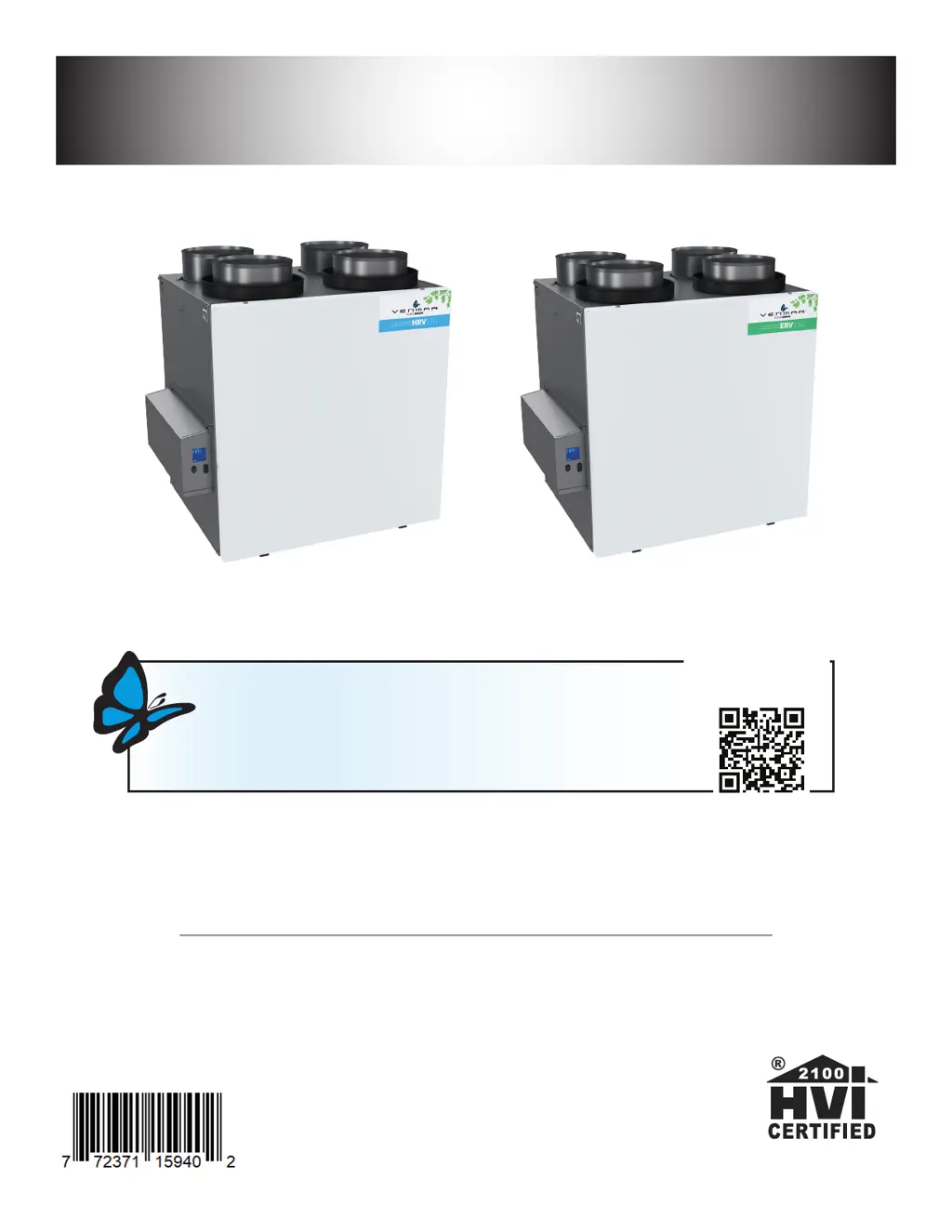
HRV110 AND ERV130
USER AND INSTALLER MANUAL
READ AND SAVE THESE INSTRUCTIONS
RESIDENTIAL USE ONLY
1107172 rev. B
VB0345
Venmar Ventilation ULC, 550 Lemire Blvd., Drummondville, Québec, Canada J2C 7W9 venmar.ca 800-567-3855
VB0346
Thank you for choosing Venmar to bring fresh air inside your home.
REGISTER YOUR PRODUCT ONLINE AND
EXTEND YOUR WARRANTY BY 1 YEAR!
It is easy: Go to www.venmar.ca/register-your-product or scan the QR code
For more information, visit www.venmar.ca
YEAR!
ONE MORE

Table of Contents

Questions and Answers

  • S
    Sarah BradleyAug 14, 2025
    What to do if my Venmar Ventilation Hood displays error E24?
    • D
      Dr. Patricia IngramAug 14, 2025
      Error E24 on your Venmar Ventilation Hood indicates that under or over voltage has been detected due to severe in-house power supply fluctuation, which stopped the motor for protection. Try unplugging and plugging the unit back in. If the problem persists, it is advised to contact customer service.
  • M
    Margaret HillAug 17, 2025
    What to do if my Venmar Ventilation Hood displays error E34?
    • J
      Jessica WillisAug 17, 2025
      Error E34 on your Venmar Ventilation Hood means that under or over voltage may have been detected because of a severe fluctuation in your home's power supply, which stops the motor as a protection measure. You can try to unplug and then plug the unit back in. If this doesn't resolve the issue, further assistance is needed from customer service.
  • E
    elijah46Aug 21, 2025
    What does error W61 mean on my Venmar Ventilation Hood and how to fix it?
    • J
      Jose GutierrezAug 21, 2025
      Error W61 on your Venmar Ventilation Hood indicates that the unit is in protection mode to reduce the temperature of the electronics by decreasing the power to the motor. Airflow reduction is normal during this period. The unit will exit this mode automatically when conditions return to normal. This usually happens when the unit is on high speed in a warm environment (over 30°C or 86°F). If this is not the case, contact customer service.
  • A
    adamheathAug 25, 2025
    What to do if my Venmar Ventilation Hood displays error E22?
    • D
      derekcruzAug 25, 2025
      If your Venmar Ventilation Hood is showing error code E22, follow these steps: 1. Unplug the unit and visually inspect the supply damper system. 2. Clean the filters, distribution registers, and the outside supply hood. 3. Check the ducting to make sure it isn't squeezed or bent. Then, plug the unit back in. If the error persists, unplug the unit again, remove the ducting from the supply path, and replug the unit. Select MAX on the wall control to see if the error disappears. If it does, check the ducting path. If the problem continues, contact customer service.
  • W
    Walter BoyleAug 27, 2025
    What to do if my Venmar HRV110 displays error E32?
    • S
      Susan ParkerAug 27, 2025
      If your Venmar Ventilation Hood shows error E32, here’s what to do: 1. Unplug the unit and visually inspect the exhaust damper system. 2. Clean the filters, distribution registers, and the outside supply hood. 3. Ensure the ducting isn't squeezed or bent, then plug the unit back in. If the error remains, unplug the unit, remove the ducting from the supply path, and replug it. Select MAX on the wall control to check if the error is gone. If so, review the ducting path. If not, contact customer service.
  • J
    Jasmine DanielAug 31, 2025
    What to do if my Venmar HRV110 displays error E23?
    • K
      Katherine SmithAug 31, 2025
      If your Venmar Ventilation Hood is displaying error code E23: 1. First, try unplugging and plugging the unit back in. 2. If the error continues, unplug the unit again. Remove the core and clear the ventilation wheel of any dirt or obstructions. 3. Replace the core, close the door, and plug the unit back in. If the error still persists, contact customer service.
  • N
    nicholepachecoSep 3, 2025
    What to do if my Venmar Ventilation Hood displays error E33?
    • Q
      qdavisSep 4, 2025
      If error E33 appears on your Venmar Ventilation Hood: 1. Try unplugging and plugging the unit back in. 2. If that doesn't work, unplug the unit. Remove the core and clear any dirt or obstacles from the ventilation wheel. 3. Put the core back, close the door, and plug the unit in again. If the error persists, contact customer service.
  • K
    Karen AyalaSep 6, 2025
    What to do if my Venmar HRV110 displays error E50?
    • A
      Angela MartinezSep 6, 2025
      If your Venmar Ventilation Hood is showing error E50: 1. Unplug the unit and inspect the wall control wires, then plug the unit back in. 2. If the problem continues, remove the wall control from the wall and test it with a short cable. If it works, install a new cable to the wall installation location. 3. If the issue persists, test the air exchanger with a spare wall control. If it works, replace the wall control. If not, contact customer service.
  • A
    Antonio Savage Jr.Sep 10, 2025
    What to do if my Venmar HRV110 Ventilation Hood displays error E01?
    • V
      Vickie GriffinSep 10, 2025
      If your Venmar Ventilation Hood shows error E01, unplug the unit. Inspect the damper system, and remove any obstacles or dirt. You might need to remove the filters and core to access the damper system. Then, plug the unit back in. If the problem is not resolved, contact customer service.

Summary

TECHNICAL DATA

Air Distribution

Details on how air is distributed during normal operation.

INSTALLATION

Inspect the Content of the Box

Instructions for checking unit contents and looking for shipping damage.

Installation Kits, Tools and Material

Lists necessary kits, tools, and materials for installation.

Locating and Mounting the Unit

Guidance on choosing the appropriate location and mounting the unit.

Installing Ductwork and Registers

Procedures for connecting ducts and installing registers for various system types.

Connecting the Drain (HRV Only)

Instructions for properly installing the drain hose for HRV units.

Installing Dual Exterior Hood (Optional)

Guidance on using a Tandem transition kit for dual exterior hoods.

Installing the Exterior Hoods

Instructions for properly installing exterior hoods to avoid cross-contamination.

Connecting Ducts to the Unit

Procedures for connecting insulated flexible and rigid ducts to the unit ports.

CONTROLS

Automatic Main Wall Control Installation

Step-by-step guide for installing the main wall control unit.

Electrical Connection - Main Wall Control

Details on wiring the automatic main wall control to the unit.

Electrical Connection - Auxiliary Wall Control

Wiring instructions for the optional auxiliary wall control.

Main Wall Control Operation

Explains how to operate the main wall control and its different modes.

NAVIGATION ON LCD SCREEN

Button Functions and Navigation

Explains the function of OK, +, and - buttons for screen navigation and configuration.

Display on LCD Screen

Defines the various display codes and their meanings on the unit's LCD screen.

Unit First Boot Procedure

Steps to follow for the initial startup and boot process of the unit.

Settings Modification

How to change settings like defrost, intermittent mode, and fan speed.

Factory Settings Reset

Procedure to reset the unit to its original factory default settings.

Manual Mode Operation

Information on using manual mode for troubleshooting or specific operations.

USING THIS UNIT

Your Ventilation System

An overview of the unit's purpose and benefits for home comfort and air quality.

Controls Overview

Explains the main wall control and optional auxiliary controls for unit operation.

SERVICE PARTS

Available Replacement Parts

Lists available service parts and guidance on using genuine manufacturer parts.

INSTALLERS TROUBLESHOOTING

Error Codes and Solutions

A table detailing error codes, their descriptions, and recommended troubleshooting steps.

Warning: Protection Mode

Explains the protection mode due to electronics overheating and its implications.

MAINTENANCE

Quarterly Maintenance

Steps for cleaning filters, core, and checking the exterior hood on a quarterly basis.

Annual Maintenance (Fall)

Procedures for annual cleaning of the unit and recovery core.

USERS TROUBLESHOOTING

Troubleshooting Common Problems

Common issues like unit not working, noisy unit, and condensation, with troubleshooting tips.

WARRANTY

Whole-House Air Exchanger Warranty

Details the warranty terms, limitations, and conditions for the air exchanger.

Replacement Parts and Repair Policy

Information on using genuine parts and seeking manufacturer-certified repair services.

Venmar HRV110 Specifications

General IconGeneral
BrandVenmar
ModelHRV110
CategoryVentilation Hood
LanguageEnglish

Related product manuals