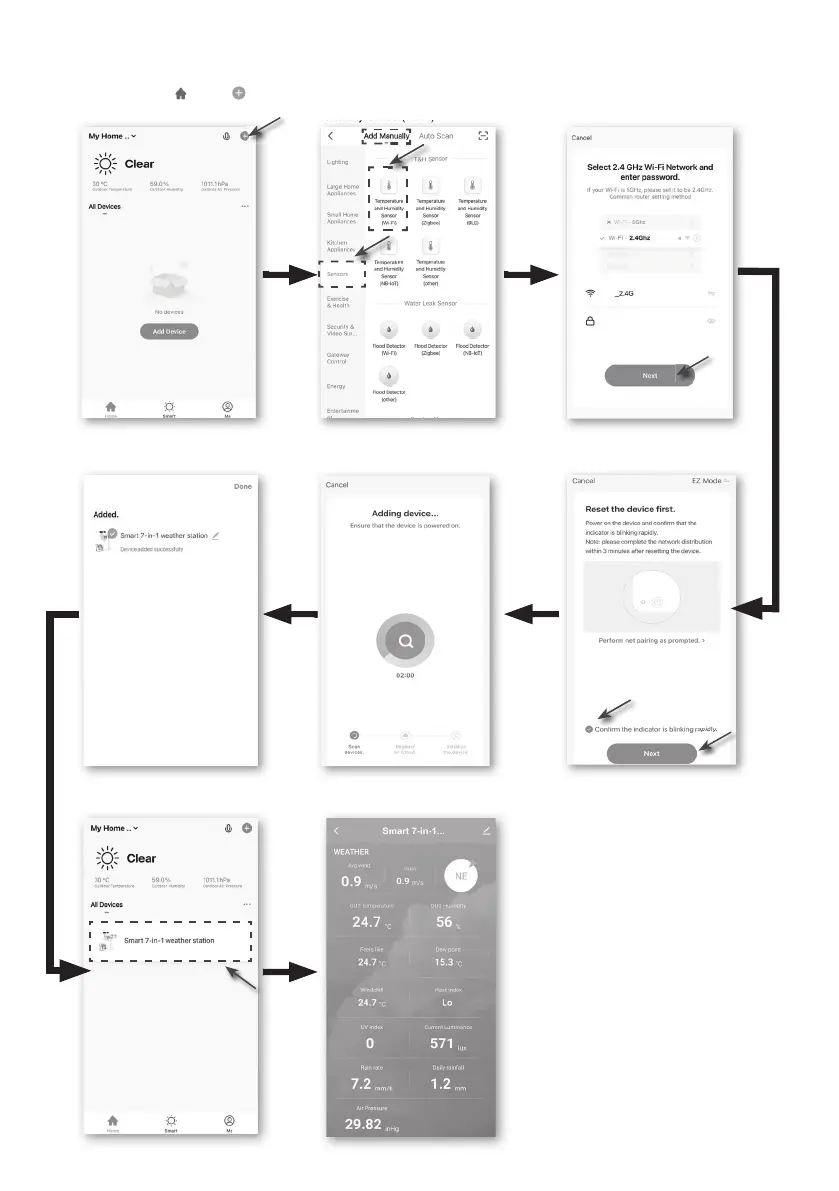
2. Open Smart Life APP and follow the in-APP instructions to connect weather station to your
Wi-Fi network.
Step 1:
At the home screen , tap the on the
top right corner to add your console.
Step 5:
There will auto scan and register
your device.
Step 6:
Once it success, the console icon will shown,
and you can customize its information.
Step 4:
Conrm your device is in "AP mode"
and tap "Next".
Step 3:
Make sure you select the 2.4G network
and enter your Wi-Fi password then
tap the "Next".
Step 7:
The console will appear on your Home
Screen. Tap to see the readings.
Step 2:
On "Add Manually" screen, choose
"Sensors" in the left menu bar
and then select "Temperature and
Humidity Sensor(Wi-Fi)".



 To Next Page