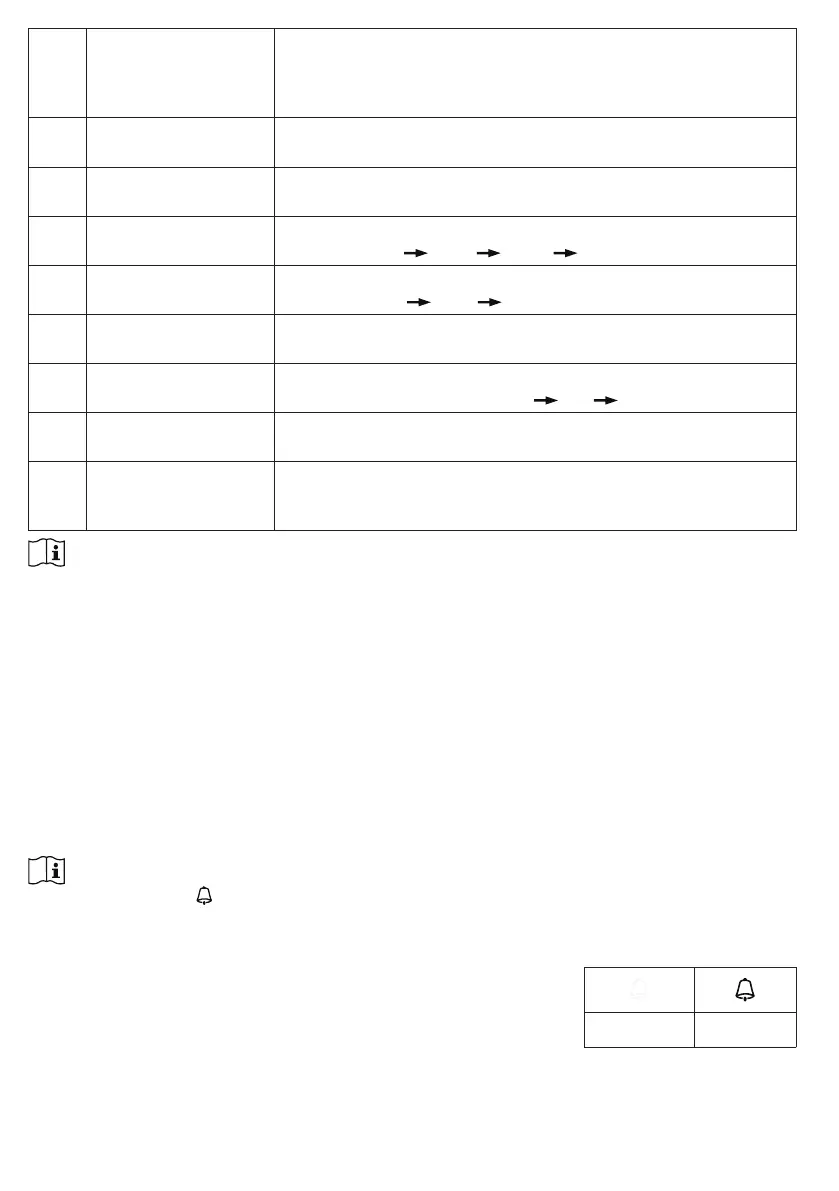
8 Time sync ON/OFF Press [ WIND / + ] or [ NDX / - ] key to enable or disable time
sync function
If you want to set the time manually, you should set time sync
OFF
9 Weekday Language Press [ WIND / + ] or [ NDX / - ] key to select weekday display
language
10 Temperature unit Press [ WIND / + ] or [ NDX / - ] key to change the rain display
unit between ˚C or ˚F
11 Wind speed unit Press [ WIND / + ] or [ NDX / - ] key to change the unit in
sequence: m/s
km/h knots mph
12 Baro unit Press [ WIND / + ] or [ NDX / - ] key to change the unit in
sequence: hPa
inHg mmHg
13 Rain unit Press [ WIND / + ] or [ NDX / - ] key to change the rain display
unit between mm or in
14 Light intensity unit Press [ WIND / + ] or [ NDX / - ] key to change the Light
intensity unit in sequence: Klux
Kfc W/m².
15 Channel auto loop Press [ WIND / + ] or [ NDX / - ] key to enable or disable
channel auto loop function
16 7-in-1 sensor point to Press [ WIND / + ] or [ NDX / - ] key to select the sensor
located hemisphere (e.g. US and EU countries are also "N",
Australia is "S")
NOTE:
Console will exit setting mode automatically, if no operation after 60 seconds.
5.2 ABOUT THE LOCAL TIME
This console is designed to automatically obtain the local time by synchronizing with your local
time. If you want to use it off line, you can set the time and date manually.
5.3 SETTING ALARM TIME
1. In normal time mode, press and hold [ ALARM ] key for 2 seconds until the alarm hour digit
ashes to enter alarm time setting mode.
2. Press [ WIND / + ] or [ NDX / - ] key to change the value. Press and hold the key for quick-
adjust.
3. Press [ ALARM ] key again to step the setting value to Minute with the Minute digit ashing.
4. Press [ WIND / + ] or [ NDX / - ] key to adjust the value of the ashing digit.
5. Press [ ALARM ] key to save and exit the setting.
NOTE:
- In alarm mode, the “ ” icon will display on the LCD.
- The alarm function will turn on automatically once you set the alarm time.
5.4 ACTIVATING ALARM FUNCTION
1. In normal mode, press [ ALARM ] key to show the alarm time for
5 seconds.
2. When the alarm time displays, press [ ALARM ] key again to
activate the alarm function.
Alarm off Alarm on
When clock reach the alarm time, alarm sound will start.
Where it can be stopped by following operation:
- Auto-stop after 2 minutes alarming if without any operation and the alarm will activate again in the
next day.



 To Next Page