4.2 Alarm Service Settings
4.2.1 Alarm Service Settings
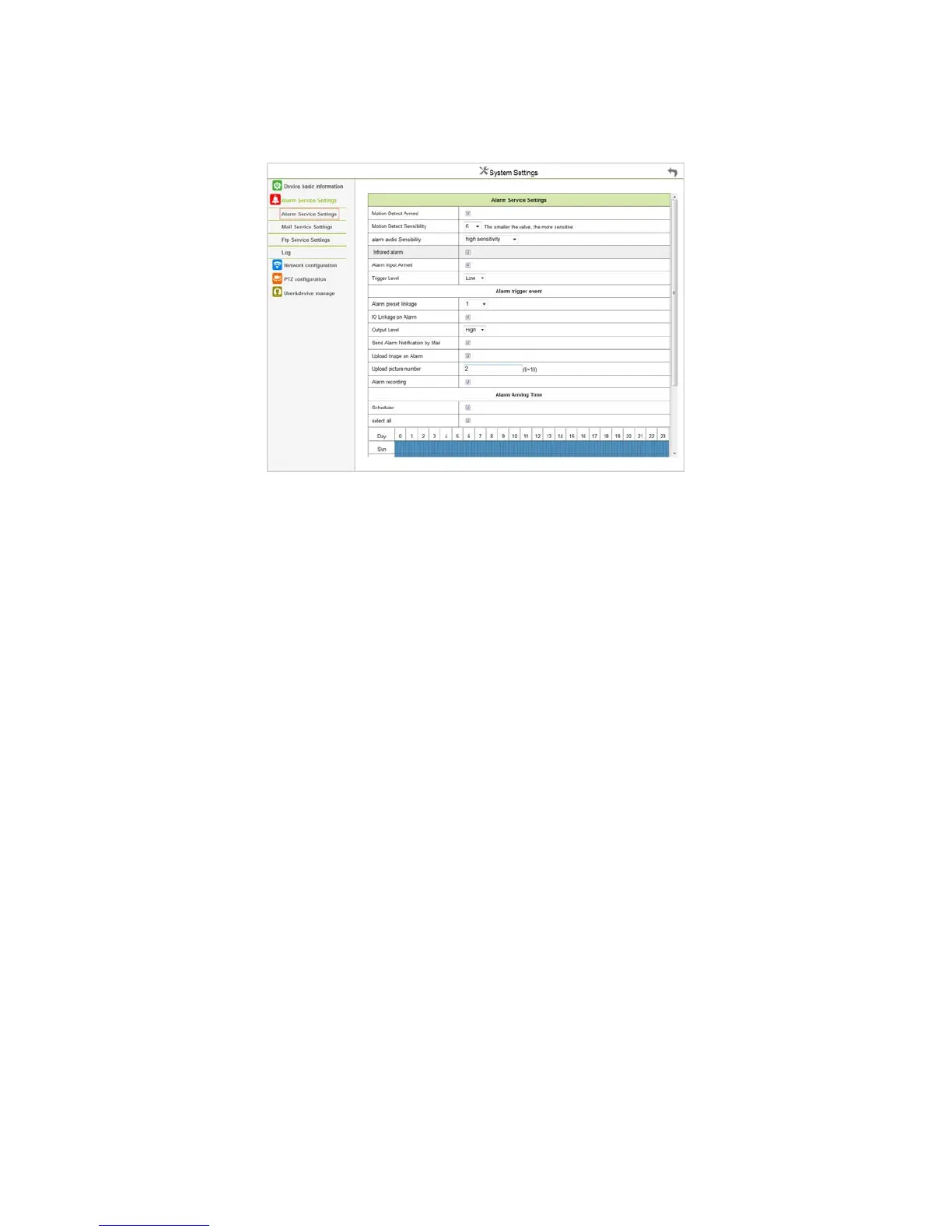
Figure 4.8
Trigger Alarm Mode
Motion Detection Protection:Monitoring detecting a moving object will trigger the alarm.
Alarm Voice Sensibility:Detecting the source of the annex will trigger the alarm.
Alarm Input Protection:Select it to trigger the alarm, by detecting GPIO input level signal. ( Support alarm port models )
Trigger Alarm Event
Preset linkage Alarm:When alarm been triggered, monitoring will display the preset position. (Now this function could normal use)
IO linkage Alarm:When alarm been triggered, the port will output the Level signal. ( Support the alarm port models )
Email Notify Alarm:When alarm been triggered, the email will send a notification (you need to set the alert mailbox)
Upload photo Alarm:Set the number of FTP upload photos when alarm been triggered.
Video recording Alarm:When alarm been triggered, the 30-second video will record to SD card.
Alarm Time Settings
You can select “All the time” or “Time Range” (shown in blue).
A complete alarm trigger task require the below three points, there are Trigger Mode, Trigger Event, and Protection Time.



 To Next Page