www.venuelightingeffects.com
15
3-PIN TO 5-PIN CONVERSION CHART
Ifyouuseacontrollerwitha5-pinDMXoutputconnector,youwillneedtousea5-pinto3-pinadapter.The
chartbelowdetailsapropercableconversion:
3-PIN TO 5-PIN CONVERSION CHART
Conductor
3-Pin Female (Output) 5-Pin Male (Input)
Ground/Shield
Pin 1 Pin 1
Data ( - ) signal
Pin 2 Pin 2
Data ( + ) signal
Pin 3 Pin 3
Not used
Pin 4
Not used
Pin 5
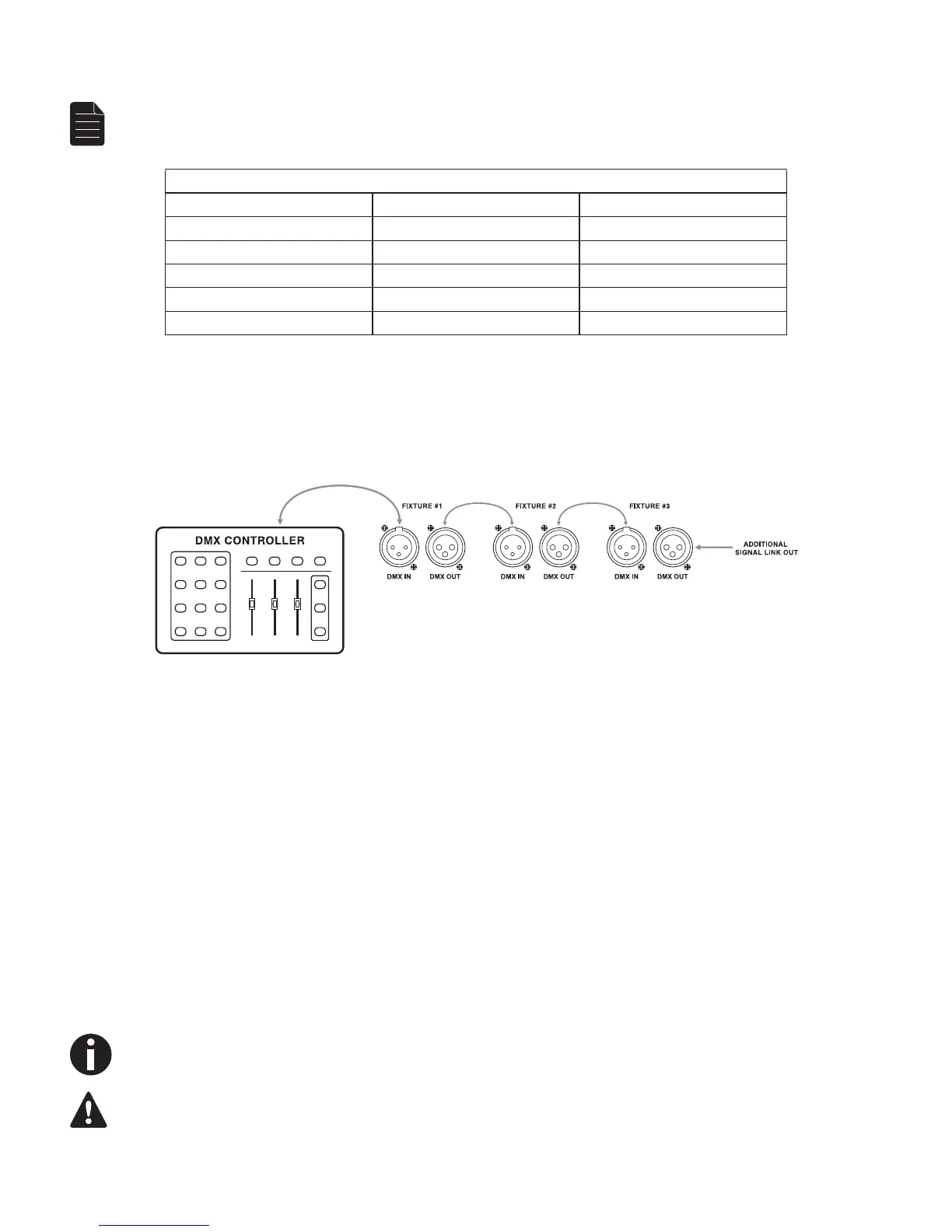
SETTING UP A DMX SERIAL DATA LINK
1. Connect the (male) 3-pin connector side of the DMX cable to the output (female) 3-pin connector of the controller.
2. Connect the end of the cable coming from the controller which will have a (female) 3-pin connector to the input
connector of the next fixture consisting of a (male) 3-pin connector.
3. Then, proceed to connect from the output as stated above to the input of the following fixture and so on.
GENERAL MAINTENANCE
Tomaintainoptimumperformanceandminimizewear,xturesshouldbecleanedfrequently.Usageandenvironment
arecontributingfactorsindeterminingfrequency.Asageneralrule,xturesshouldbecleanedatleasttwiceamonth.
Dust reduces performance and can cause overheating. This can lead to reduced lamp life and increased mechanical
wear. Be sure to power off fixture before conducting maintenance.
• Unplugxturefrompower.
• Useavacuumoraircompressorandasoftbrushtoremovedustcollectedonexternalvents.
• CleanallglasswhenthextureiscoldwithamildsolutionofglasscleanerorIsopropylAlcoholandasoft
lint-free cotton cloth or lens tissue.
• Applysolutiontotheclothortissueanddragdirtandgrimetotheoutsideofthelens.
• Gentlypolishopticalsurfacesuntiltheyarefreeofhazeandlint.
Thecleaningofexternalopticallensesand/ormirrorsmustbecarriedoutperiodicallytooptimizelightoutput.Cleaning
frequencydependsontheenvironmentinwhichthextureoperates.Damp,smokyorparticularlydirtysurroundingscan
causegreateraccumulationofdirtontheunit’soptics.Cleanwithsoftclothusingnormalglasscleaninguid.Cleanthe
externalopticsatleastevery20days.Cleanthextureatleastevery30/60days.
Alwaysdrypartscarefullyaftercleaningthem.
Never spin a fan using compressed air.


 To Next Page