THINPAR 64 USERS MANUAL
6
4. SETUP
AC POWER
This fixture runs on 100~240 VAC, 50/60 Hz. Before powering on the unit, make sure the line voltage is within the
range of accepted voltages.
To determine the power requirements for a particular fixture, see the label affixed to the back plate of the fixture
orrefertothexture’sspecicationschart.Axture’slistedcurrentratingindicatesitsaveragecurrentdrawunder
normal conditions.
Alwaysconnectthexturetoaswitchedcircuit.Neverconnectthexturetoarheostat(variableresistor)or
dimmercircuit,eveniftherheostatordimmerchannelisusedonlyasa0to100%switch.
Alwaysconnectthexturetoacircuitwithasuitableelectricalground.
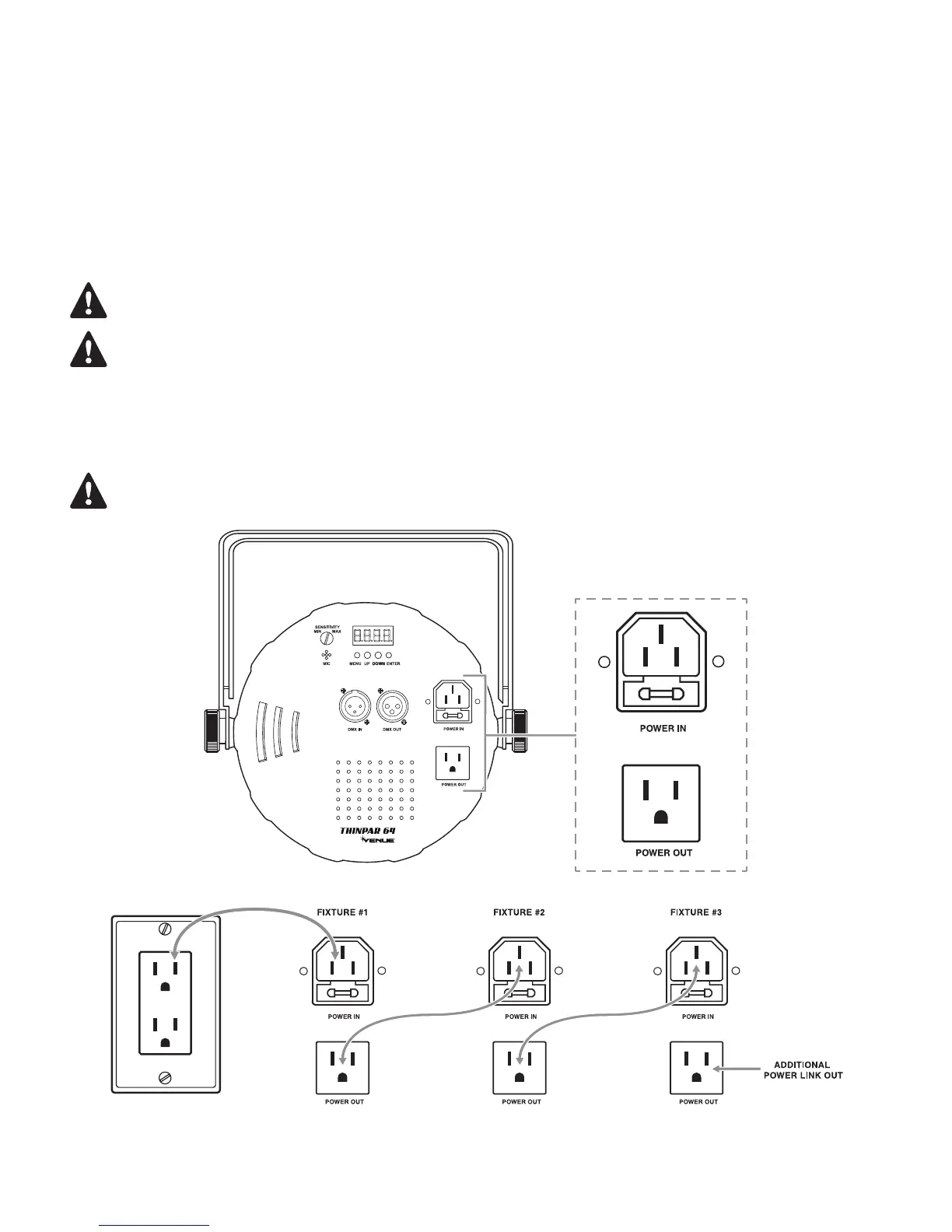
POWER LINKING
This fixture contains power linking via the outlet located on the back panel. Please see the diagram below for
further explanation.
Themaximumquantityofxturesthatmaybelinkedis40units@120V,60units@230V,10Acircuitmax.


 To Next Page