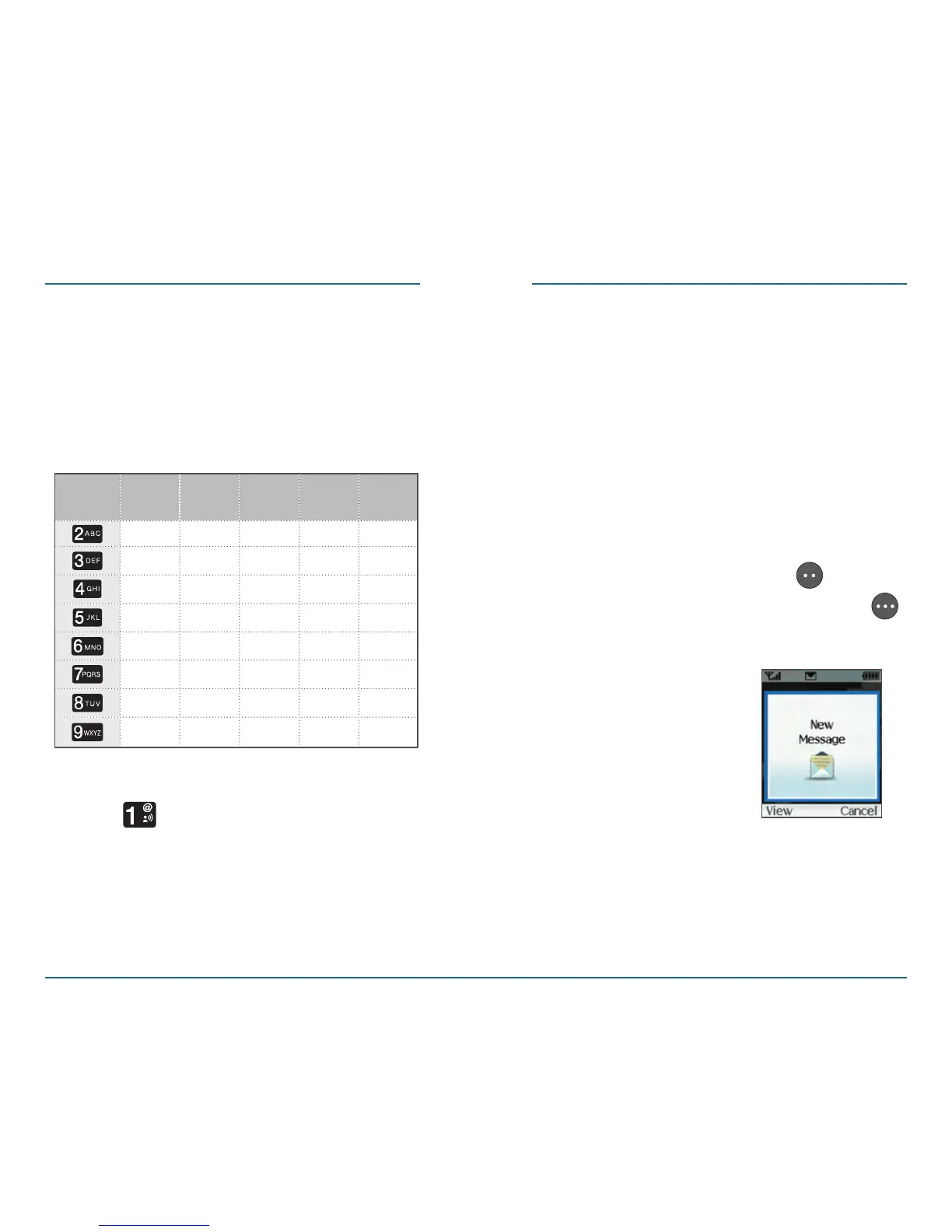
Standard Input Mode
Use the number keys to enter letters,
numbers and characters.
Enter letters using the keypad as
follows:
When entering . @ ? ! - , & : ’ / 1,
press repeatedly.
54 55
MESSAGING MESSAGING
Inbox
This function enables you to send and
receive text messages. Upon receiving
an incoming message, you will hear an
alert tone and the below message will be
displayed. For additional information on
how to choose an alert tone, see page 93.
H
New Message
Press the Left Soft Key [View]
to view now or Right Soft Key
[Cancel] to view later.
Press
1 Time
Press
2 times
Press
3 times
Press
4 times
Press
5 times
Keypad
A
D
G
J
M
B
E
H
K
N
C
F
I
L
O
2
3
4
5
6
A
D
G
J
M
P
T
W
Q
U
X
R
V
Y
S
8
Z
7
T
9









 To Next Page