13
oPeration
r
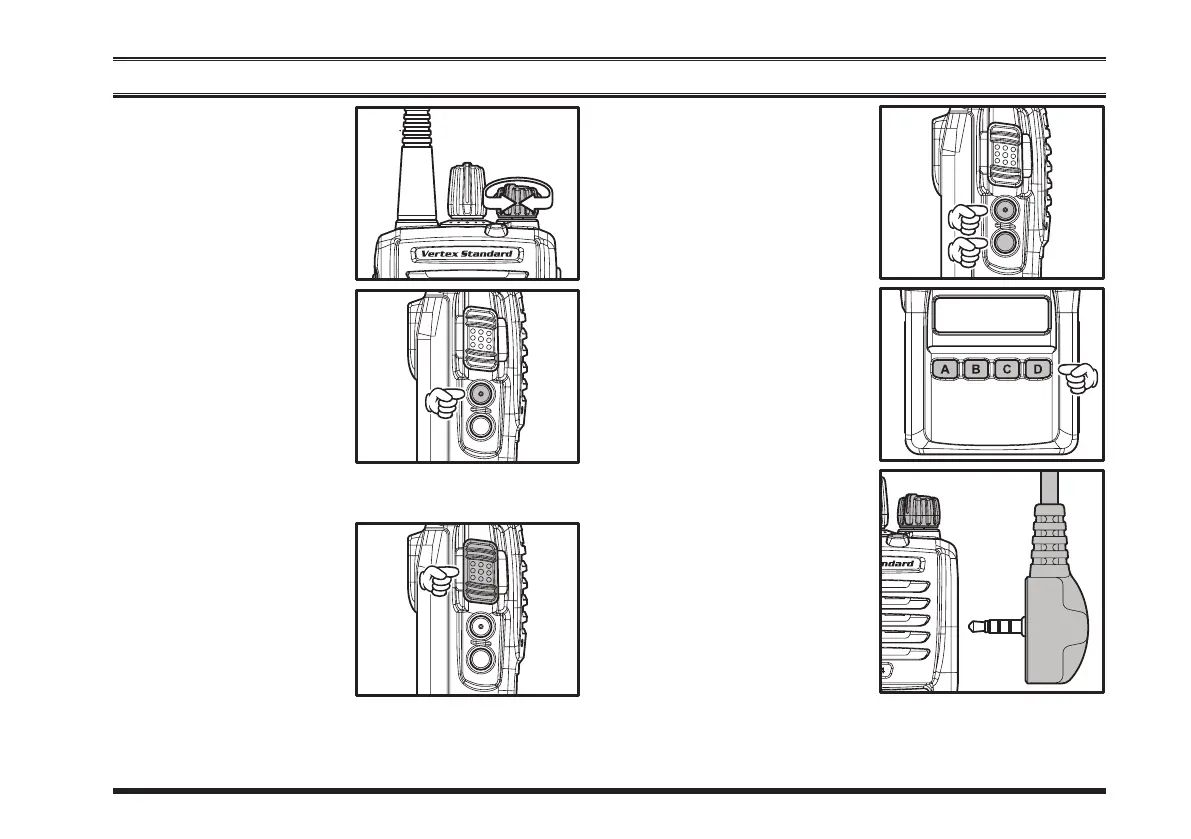
Rotate the
VOL/PWR
knob toset the volume
level.Ifnosignalispres-
ent, press (or press and
hold) the Programmable
ke y ( ass ig ned t o t he
“
sql oFF
”function:
Normally
SIDE-1
but-
ton);background noise
willnow be heard, and
you may use this toset
the
VOL/PWR
knobfor
thedesired audiolevel.
Press(or press andhold)
theProgrammablekeyagaintoquietthenoiseandre-
sumenormal(quiet)monitoring.
r
Totransmit, monitor the
channelandmakesureit
isclear.
Press and hold the
PTT
switch. Speak into the
microphone area of the
front panel grille in a
normalvoicelevel.ToreturntotheReceivemode,re-
leasethe
PTT
switch.
r
Press(orpressandhold)
the ,
SID E-1
SID E-2
button, or front panel’s
programmable keypad
([
A
]
-
[
D
]
key
)
to ac-
tivate one of the pre-
programmed functions
which may have been
enabled at the time of
pr og ramm in g b y t he
d ea l er. S ee t h e n ex t
chapter for details re-
gardingfeatureavailabil-
ityforthisradio.
r
IfaSpeaker/Microphone
is available, remove the
plastic cap and its two
mounting screws from
t he ri g ht s id e o f t he
transceiver, then align
th e c on nec to r o f th e
Speaker/Microphone on
theradio;securethecon-
nectorpinusingthescrewssuppliedwiththeSpeaker/
Microphone. Hold the speaker grille up next to your
earwhilereceiving.Totransmit,pressthe
PTT
switch






 To Next Page