3
Operating Manual Reprint
Preliminary Steps
U Install a charged battery pack onto the transceiver, as
described previously.
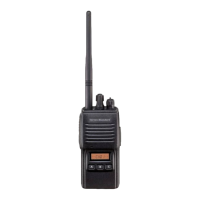
U Screw the supplied antenna onto the Antenna jack.
Never attempt to operate this transceiver without an
antenna connected.
U If you have a Speaker/Microphone, we recommend that
it not be connected until you are familiar with the ba-
sic operation of the VX-410/-420.
Operation Quick Start
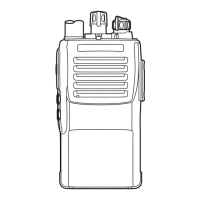
U Turn the top panel’s VOL/
PWR knob clockwise to turn
on the radio on.
U Turn the top panel’s CH selec-
tor knob to choose the desired
operating channel.
U Rotate the VOL/PWR knob to
set the volume level. If no sig-
nal is present, press and hold
in the Soft key assigned to
“MONITO R” for more than 1
seconds; background noise will
now be heard, and you may use this to set the VOL/
PWR knob for the desired audio level.
U Press and hold in the Soft key
assigned to “MONITO R” for
more than 1 seconds (or press
the MONITOR key twice) to
quiet the noise and resume nor-
mal (quiet) monitoring.
U To transmit, monitor the chan-
nel and make sure it is clear.
THIS IS AN FCC REQUIRMENT!
U To transmit, press and hold in
the PTT switch. Speak into the
microphone area of the front
panel grille (lower left-hand
corner) in a normal voice level. To return to the Re-
ceive mode, release the PTT switch.
U If a Speaker/Microphone is available, remove the plas-
tic cap and its two mounting screws from the right side
of the transceiver, then insert the plug from the Speaker/
Microphone into the MIC/SP jack; secure the plug us-
ing the screws supplied with the Speaker/Microphone.
Hold the speaker grille up next to your ear while re-
ceiving. To transmit, press the PTT switch on the
Speaker/Microphone, just as you would on the main
transceiver’s body.
Note:Save the original plastic cap and its mounting
screws. They should be re-installed when not us-
ing the Speaker/Microphone.
OperationOperation
OperationOperation
Operation
Accessories & OptionsAccessories & Options
Accessories & OptionsAccessories & Options
Accessories & Options
MH-45B4B
MH-360S
MH-450S
MH-37A4B
VC-25
VH-115S
VH-215S
VH-225S
FNB-V57
FNB-V57IS
FNB-83
FNB-V94
FNB-V67LI
FBA-25A
VAC-800
VAC-810
VAC-10
VAC-6800
VAC-6810
VAC-6010
VCM-1
VCM-3
DCM-1
FVP-25
FVP-35
VME-100
VMDE-200
DVS-5
CLIP-17C
LCC-410/S
LCC-420/S
ATV-6A
ATV-6B
ATV-6C
ATV-6XL
ATV-8A
ATV-8B
ATV-8C
FIF-10A
CT-106
CT-29
CT-28
CT-42
CE64
CT-27
Speaker Microphone (Noise Cancelling)
Speaker Microphone Miniture Type
Speaker Microphone Small Type
Earpiece Microphone
VOX Headset
Lightweight Headset w/Boom
Lightweight Padded Headset, Signle Speaker
Lightweight Padded Headset, Dual Speaker
7.2 V 1100 mAh Ni-Cd Battery Pack
7.2 V 1100 mAh Ni-Cd Intrinsically Safe Battery Pack
7.2 V 1400 mAh Ni-MH Battery Pack
7.2 V 1800 mAh Ni-MH Battery Pack
7.4 V 2000 mAh Li-Ion Battery Pack
Alkaline Battery Case (6 x AA size)
Desktop Rapid Charger for FNB-V57/V57IS
Desktop Rapid Charger for FNB-V67LI
Desktop Charger for FNB-V57/V57IS/83/V94
6-Unit Multi Charger for FNB-V57/V57IS
6-Unit Multi Charger for FNB-V67LI
6-Unit Multi Charger for FNB-V57/V57IS/83/V94
Vehicular Charger Mouting Adapter for VAC-800/810
Vehicular Charger Mouting Adapter for VAC-10
Desktop Chager Mounting Adapter for VAC-10
DTMF Pger Unit
Rolling Code Encryption Unit
MDC1200/GE-Star ANI Encoder Unit
MDC1200/GE-Star ANI Enc/Dec Unit
Digital Voice Strorage Unit
Swivel Belt Clip
Leather Case (S for swivel belt clip)
Leather Case (S for swivel belt clip)
VHF 3.5" Antenna 134 - 151MHz
VHF 3.5" Antenna 150 - 163MHz
VHF 3.5" Antenna 161 - 174MHz
VHF Untuned Antenna
VHF Antenna 134-151MHz
VHF Antenna 150-174MHz
VHF Antenna 161-174MHz
USB Programming Interface
Programming Cable (for FIF-10A)
RS232C Programming Interface Cable
Programming Cable (for CT-29)
Programming Cable Kit (CT-29 + CT-28)
Programming Software
Radio to Radio Cloning Cable


 To Next Page
 Loading...