Home
Vertical
IP Phone
SUMMIT IP Phone
Page 34
Vertical SUMMIT IP Phone - Page 34
70 pages
Manual
Save Page as PDF
To Next Page
To Next Page
To Previous Page
To Previous Page
Loading...
Release 1.0
SUMMIT
IP Station User Guide
April 2014
Forwarding Calls
2-
16
Chapter 2: BASIC CALL HANDLING
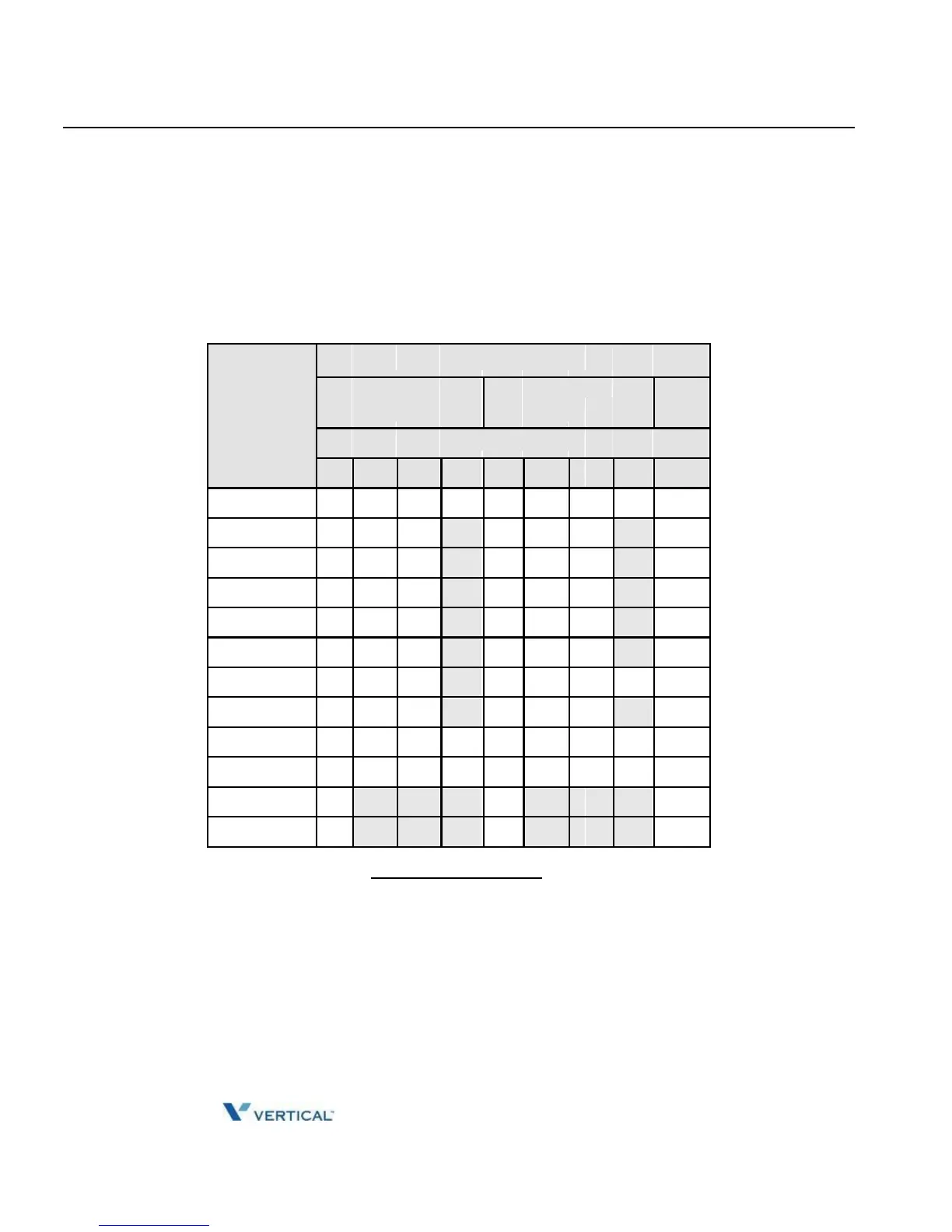
To program the Stat
ion Custom Mess
age (00) at your station:
1.
Press TRANS/PG
M,
2.
Dial User Program
feature code 5
2,
3.
Enter Message cont
ents, up to 24 characters
, using the Character E
ntry Chart belo
w.
4.
Press HOLD/SA
VE, to save m
essage
Letter T
ype
Dial Pad
Uppercase
Lowercase
Num
But
ton
(ABC)
(abc)
Butt
on
Depre
ssi
ons
1
2
3
4
1
2
3
4
1
1
@
:
/
<
@
:
/
<
1
2
A
B
C
a
b
c
2
3
D
E
F
d
e
f
3
4
G
H
I
g
h
i
4
5
J
K
L
j
k
l
5
6
M
N
O
m
n
o
6
7
P
Q
R
p
q
r
s
7
8
T
U
V
t
u
v
8
9
W
X
Y
Z
w
x
y
z
9
0
.
,
?
!
.
,
?
!
0
*
*
*
*
#
#
#
#
Character Entr
y Chart
33
35
Table of Contents
Main Page
Default Chapter
6
Table of Contents
6
Chapter 1 INTRODUCTION
10
General
10
Feature Information
10
Feature Groupings
10
Phones Supported on the SUMMIT IP
11
Chapter 2 BASIC CALL HANDLING
17
Placing a Call
17
Internal Calls
17
Leaving a Message Wait
18
External Calls
18
Disable Dialing from Your Phone
20
Temporarily Override Dialing Restrictions at a Phone
20
Using Directory
21
Using and Entering Saved Number Dial
21
Using System Speed Dial Numbers
22
Using and Entering Station Speed Dial Numbers
23
Using Dial by Name and Entering Your Name
24
Receiving Calls
26
Answering a Call While Idle
26
Responding to a Call While Busy
27
Using Answering Machine Emulation (AME)
28
Differential Ring Signals
29
Answering Calls at Night
29
Answering Calls to Other Stations
30
Using Do-Not-Disturb (DND) to Block Incoming Calls
30
Forwarding Calls
31
Forwarding Calls to an External Number
32
Call Transfer
35
Sending a Call to a Different Destination
35
Call Hold
35
Placing a Call in a Waiting State
35
Chapter 3 SEND & RETRIEVE MESSAGES
37
Responding to a Station Message Waiting Indication
37
Getting Voice Mail Messages
38
Sending and Receiving Short LCD Messages
40
Chapter 4 REMOTE SYSTEM ACCESS
44
Direct Inward System Access (DISA)
44
Mobile Phone Extension
44
Chapter 5 MISC FEATURES
46
Alarm/Door Bell
46
Broker Call
46
Call Park
48
Placing a Call on Hold to Page
48
Call Log
48
Conference Call
50
Joining Multiple People in a Conference
50
Setting up a Conference Room
51
Hot Desk
53
Paging
53
Using Internal, External and Meet-Me Paging
53
Push-To-Talk (PTT) Page
55
Power Fail Transfer (PFT)
55
System Voice Memo
56
Two-Way Record
58
Recording a Call
58
Wake-Up Alarm
58
Chapter 6 PBX, CENTREX, & ISDN FEATURES
60
Access PBX or Centrex Features
60
Access the ISDN Network
60
Using the Keypad Facility to Access ISDN Features
60
Using ISDN Supplementary Services
61
Activating ISDN Caller ID Restriction
61
Appendix A FLEXIBLE NUMBERING PLAN
62
Basic Number
62
Feature Code
62
Ip Phone Setup
66
Appendix B IP PHONE SETUP
66
Using the Display Menu
66
Phone Setting
66
Network Configuration
67
Using the Speakerphone
67
Using a Bluetooth Wireless Headset (IP-8024 Only
68
Related product manuals
Vertical SBX IP 320
248 pages
Vertical MBX IP
70 pages
Vertical Edge 120
70 pages
Vertical Wave Phone
180 pages
Vertical LDP-9030D
2 pages
Vertical Edge 5000
168 pages



 To Next Page