VESDA-EVES-A00-P Product Guide
60 www.xtralis.com
Static IPAddress Configuration
l IP Address:IPV4 static address
l Subnet Mask:Subnet mask for static address
l Default Gateway:Gateway for static address
5.5.5 Security Options
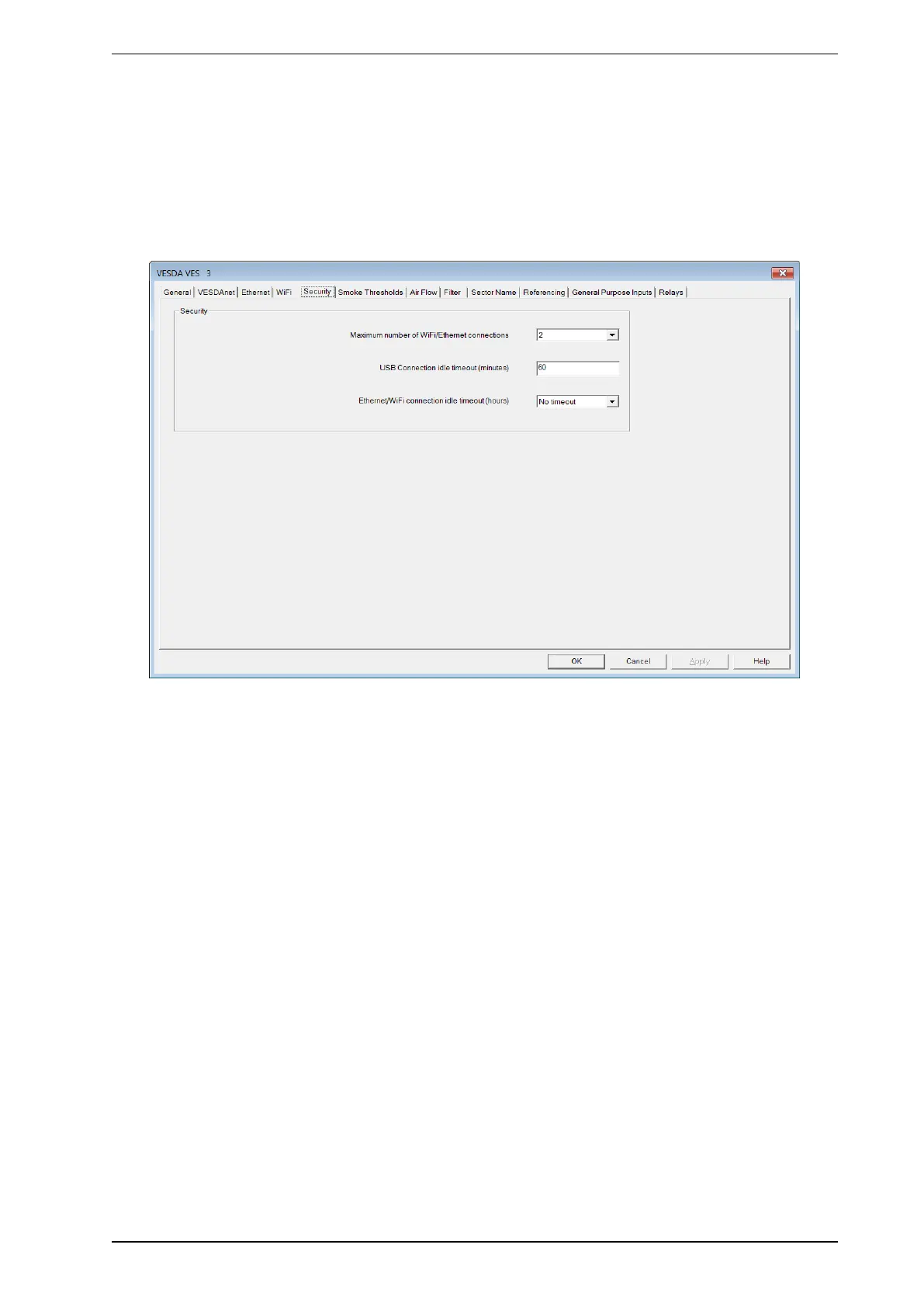
The Security options page allows you to define the number of WiFi/Ethernet connections and the USB, WiFi
and Ethernet connection idle timeouts.
Figure5-16: Security Options
l Maximum number of WiFi/Ethernet connections: The number of connections which can be running
at any time (WiFi and considered Ethernet together.)
l USB Connection Idle Timeout (minutes): The USB connection will be dropped after no activity from
the user on Xtralis VSC for this period of time.
l Ethernet/WiFi connection idle timeout (hours): Ethernet and WiFi connections will be dropped after
no activity from the user on Xtralis VSC on the particular connection for this period of time. The user can
also choose the option of no timeout.










 To Next Page