Noise Reduction
If the broadcast signal is weak and the picture is noisy, use Noise Reduction
setting to reduce the noise amount. Noise Reduction can be set to one of
these options: Low, Medium, High or Off.
Film Mode
Turn this feature on when you are watching lms to see the fast motion
scenes clearly.
Dynamic Contrast
Sets the contrast level in accordance with the displayed content with regard
to the selected mode. Dynamic contrast rate can be set to one of these
options: Low, Medium, High or Off.
Skin Tone Adjust the desired skin tone.
RGB Gain You can congure the colour temperature values using the RGB Gain feature.
Game Mode
When Game Mode is set to On, specic game mode settings, which are
optimized for better video quality, will be loaded. Picture Mode, Contrast,
Brightness, Sharpness, Colour and Colour Temperature settings will be
invisible and disabled while Game Mode is on. Picture mode selection
button will have no function while Game Mode is on.
V
V
SCREEN
LANG
SUBTITLE
PIP
MENU
RETURN
OK
SOURCE FAV
PRESETS SLEEP
?
INFO
EPG
V+
V- P-
P+
1
2
3
4
6
5
9
7 8
0
V
8
9
10
11
15
28
29
12
13
14
16
17
27
26
25
20
23
22
21
19
18
1
2
3
4
5
6
7
24
30
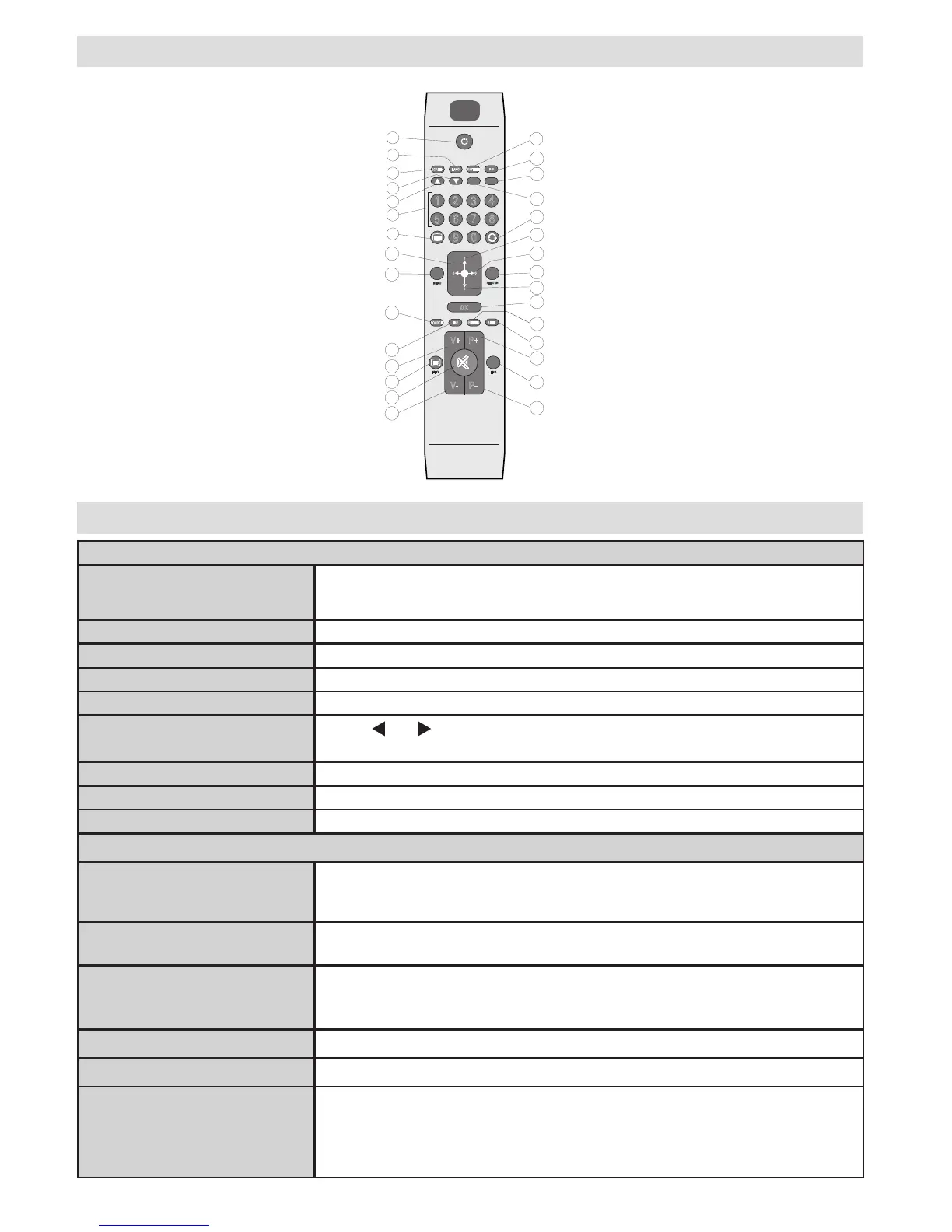
Remote Control
1. Standby
2. Mono-Stereo / Dual I-II
3. Expand (in TXT mode) / Image size
4. Green / Picture menu
5. Red / Sound menu
6. Numeric buttons
7. Teletext / Mix
8. Cursor left
9. Menu on/off
10. AV / Source
11. No function
12. Volume Up
13. Info / Reveal (in TXT mode)
14. Mute
15. Volume down
16. Programme down
17. No function
18. Programme up
19. Sleep timer
20. Picture mode selection
21. OK / Select / Hold (in TXT mode)
22. Cursor down
23. Return / Index page (in TXT
mode)
24. Cursor right / Subpage (in TXT
mode)
25. Cursor up
26. Previous programme
27. Yellow / Feature menu
28. Blue / Install menu
29. No function
30. TXT Subtitle


 To Next Page