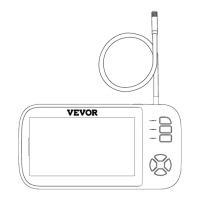
How to fix a VEVOR Analytical Instruments device that won't turn on?
- CChristopher BrooksAug 7, 2025
If your VEVOR Analytical Instruments device isn't turning on, the battery may be low. Charge the device for about 4-5 hours and then restart it.
How to fix a VEVOR Analytical Instruments device that won't turn on?
If your VEVOR Analytical Instruments device isn't turning on, the battery may be low. Charge the device for about 4-5 hours and then restart it.
What to do if my VEVOR 451P device crashes?
If your VEVOR Analytical Instruments device crashes, try these steps: First, connect the USB data cable to charge the product, which will automatically shut it down. Then, press the power button to reset it. Alternatively, you can reset it by gently pressing the reset hole with a fine needle.
What to do if my PC cannot read the TF card after connecting my VEVOR 451P Analytical Instruments device?
If your PC isn't reading the TF card after you connect your VEVOR Analytical Instruments device, try these steps: reconnect the device to the PC and confirm whether you have entered Mass storage mode.
How to remove smudges or smears from the screen of my VEVOR 451P Analytical Instruments device?
To remove smudges or smears from the screen of your VEVOR Analytical Instruments device, gently wipe the screen and lens with a clean cloth dipped in alcohol.
Read instructions carefully to avoid injury, electric shock, or fire.
Thanks users for choosing the product and advises reading instructions.
Illustrates and names the components of the endoscope device.
Explains the purpose and operation of each button and port on the device.
Lists various industries and scenarios where the endoscope is widely used.
Lists the items included in the product package.
Provides instructions on connecting the cable and installing accessories.
Guides on basic operation like TF card insertion and taking photos/videos.
Details key specifications such as monitor, resolution, lens, battery, and waterproof level.
Offers solutions for common issues like device not turning on or TF card errors.
Read instructions carefully to avoid injury, electric shock, or fire.
Thanks users for choosing the product and advises reading instructions.
Illustrates and names the components of the endoscope device.
Explains the purpose and operation of each button and port on the device.
Lists various industries and scenarios where the endoscope is widely used.
Lists the items included in the product package.
Provides instructions on connecting the cable and installing accessories.
Guides on basic operation like TF card insertion and taking photos/videos.
Details key specifications such as monitor, resolution, lens, battery, and waterproof level.
Offers solutions for common issues like device not turning on or TF card errors.
| Brand | VEVOR |
|---|---|
| Model | 451P |
| Category | Analytical Instruments |
| Language | English |