7/14
3. Control-Board and Laser (Laser is optional)
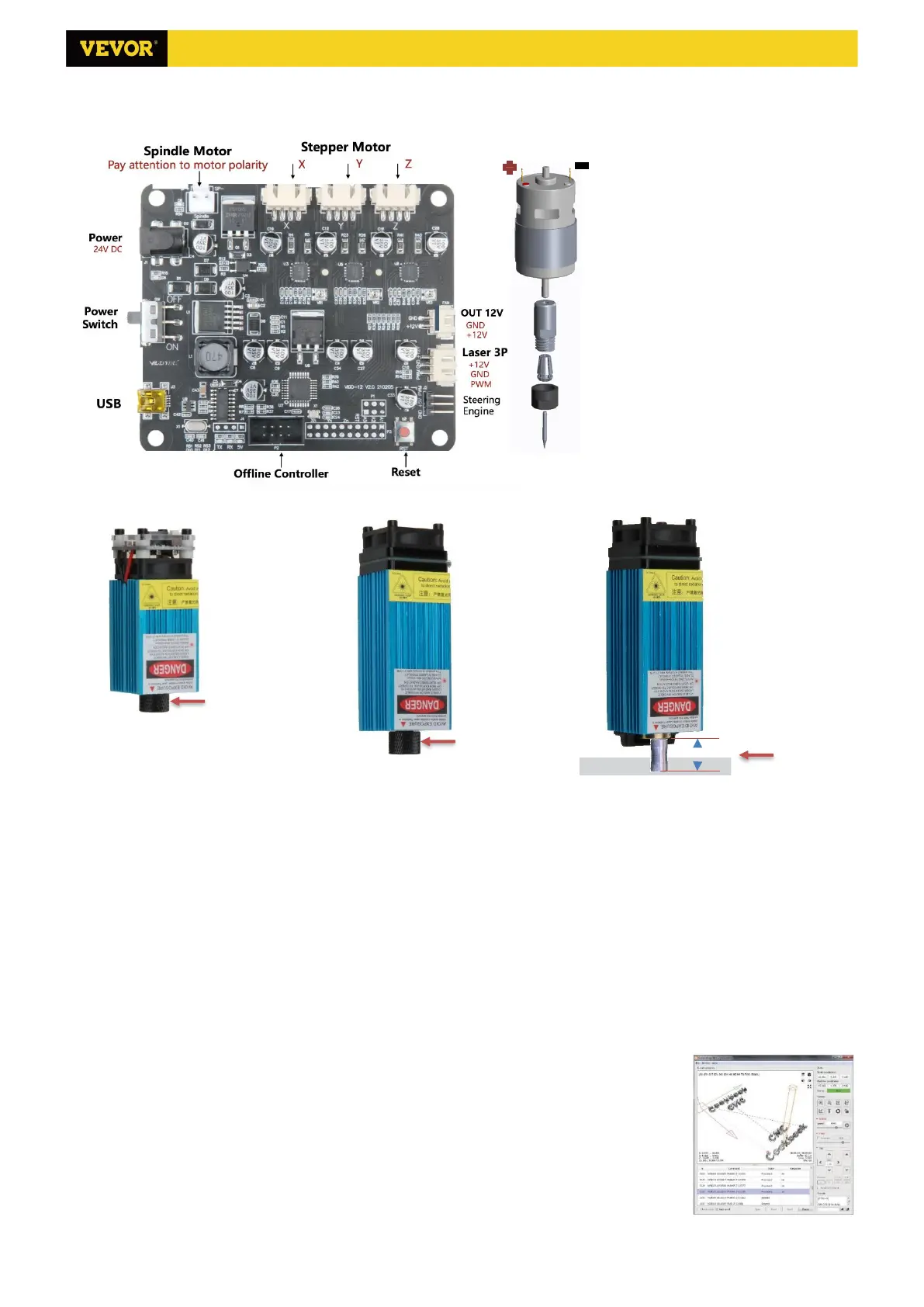
3.1 Instructions for control board connection
The Motor-X/Y/Z interface on
board should be connected to the
X/Y/Z motors correspondingly. The
6Pin plug is for the motor, and the 4Pin
is for the control panel. Power interface
connects to the power supply and USB
connects to the computer. Connect the
spindle motor wire according to the
correct polarity.
In general, there is no need to
adjust the motor driver current.
If using laser, please connect the
laser to the control board with the 3pin
wire. Correctly focus the laser on the
materials to be engraved referring to
the laser instructions below before
starting engraving.
3.2 Instructions for laser (Optional).
Please wear the protective glasses before operating the laser!
When all the connections are completed, turn on the power, and the laser is standby for working. The red light on
the top of the laser is continuous lighting in this time.
Turn on the weak light and adjust the focal length (except the Fixed-Focus Laser)
Please lay the materials to be engraved flat under the laser. The recommended distance from laser outlet to
materials is 3~10cm. Out of range may be out of focus.
Turn on the weak light. Rotate the focusing ring slowly on the laser outlet to shrink the laser spots. When the laser
spot is smallest and clearest, it is the optimum state for laser engraving, then turn off the weak light.
If you use the fixed-focus laser XTS15D, please use the focusing measuring column to adjust the distance between
the light outlet and the engraved surface to 18mm.
Note: Laser XTS05/XTS08/XTS10 have a weak light switch on top of the lasers, you also can use the switch to turn
on weak light. Be sure to turn of the switch before you start laser engraving.
4. Candle Software
Candle is a GUI application for GRBL-based CNC-machines with G-Code visualizer. Candle
is an open-source software suitable for CNC machine tool processing. It supports G code
file processing and visual display.



 To Next Page