Need help?
Do you have a question about the Vibradorm VFF/CDL-CF-15 and is the answer not in the manual?
General safety advice for children and persons with disabilities.
Specifies the designed purpose of the remote control and dual drives.
Lists conditions and environments where the remote control must not be used.
Step-by-step instructions for installing batteries into the remote control.
Explains the process for pairing the remote control with the dual drive.
Provides instructions and safety warnings for adjusting the bed using the remote.
Explains how to save and recall preferred bed positions using memory functions.
This document provides operating instructions for the VIBRADORM Radio Remote Control VFF/CDL-CF-15, designed for adjustable beds with a VIBRADORM dual drive V-MAT-Basic, memory function, and an LED night light module. It also supports Bluetooth technology for operation via smartphones or tablet PCs.
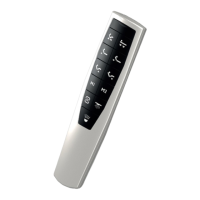
The VFF/CDL-CF-15 radio remote control is primarily used for operating VIBRADORM dual drives in adjustable beds within a home environment. It allows for the adjustment of bed positions, including both back and leg sections, and offers memory functions to save and recall preferred positions. The remote control can operate two dual drives simultaneously through its "Parallel function." Additionally, it features an integrated LED night light and a torch function.
The remote control communicates with the dual drive V-MAT-Basic via a teach-in process, which is typically performed by the manufacturer but can be re-initiated by the user if needed. This process establishes communication between the remote and the bed's drive system. A separate teach-in process is required for a second dual drive if simultaneous operation (Parallel function) is desired.
The device is equipped with a status LED that indicates when a button is pressed (lights up) or kept pressed (flashes). It also has a keypad background illumination that activates when the remote is moved or any button is pressed, turning off after approximately 5 seconds of inactivity.
For bed adjustment, the remote has dedicated buttons for moving all drives up (1) or down (2), back adjustment up (3) or down (4), and leg adjustment up (5) or down (6). These drives will move as long as the respective buttons are pressed.
The "Parallel function" allows for controlling two beds simultaneously with one remote control. To activate it, both beds should first be moved to the same position (e.g., "Flat"). Pressing button (7) until the status LED flashes activates this function. To deactivate, button (8) is pressed until the status LED flashes. It's important to note that the parallel function does not synchronize the drives perfectly; they move simultaneously, but slight differences in tilt angles may occur over time due to varying loads. Using button (1) to move all drives completely up should realign them.
Memory positions allow users to save up to three preferred bed positions (9, 10, 11) on each remote control. To save a position, the bed is adjusted to the desired comfort, then button (12) is pressed three times, followed by one of the memory buttons (9, 10, or 11). Stored positions can be recalled by pressing and holding the corresponding memory button. When the parallel function is active, a maximum of six positions can be stored (three on each remote if two are used). If the parallel function is off, only three positions are available per bed. For identical memory positions on both remotes, each must be programmed separately.
The night light function (13, 14) allows for switching the LED module on or off and dimming it. Pressing button (13) briefly turns the night light on or off. Pressing and holding button (14) controls the brightness, cycling between brightest and darkest. The dimming direction reverses if the button is released and pressed again.
The torch function (15, T) activates a torch LED. Pressing button (15) for approximately 3 seconds turns on the torch LED (T), which automatically switches off after about 20 seconds. A short press of button (15) will also switch off the torch LED. If the button is kept pressed, the LED remains on, turning off about 20 seconds after release.
The remote control can also be reset to factory settings by simultaneously pressing and holding buttons (1, 3, and 5) or (2, 4, and 6) until the status LED flashes and then becomes steady before turning off. Resetting the dual drive involves pressing the teach-in button (L) on the drive for approximately 10 seconds, then removing and reconnecting the mains plug after the green LED on the power supply goes off. Resetting the dual drive removes all pairings with remote controls and apps, requiring a new pairing process.
 General
| Brand | Vibradorm |
|---|---|
| Model | VFF/CDL-CF-15 |
| Category | Remote Control |
| Language | English |

 To Next Page