12
Operation
4 Operation
4.1 Status LED s
When a button is pressed, this LED
lights up. If the button is kept pressed,
the LED flashes.
4.2 Background illumination
The radio remote control is equipped
with a keypad background illumi-
nation. It is switched on, when the
remote control is moved or any button
is pressed, and turns off after approx. 5
seconds if no other button is pressed,
the same button is kept pressed or the
remote control is moved again.
4.3 Bed adjustment
Before making any adjustments:
Check that neither you nor anyone
else or any pets are at risk from to the
moving parts of the adjustment
mechanics!
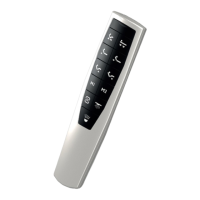
Both drives upwards.1
Both drives downwards.2
3 Back adjustment upwards.
4 Back adjustment downwards.
5 Leg adjustment upwards.
6 Leg adjustment downwards.
As long as you keep the buttons
pressed, the drives will move.
4.4 Parallel function on/off
Before you switch the parallel function
on, move the two beds into the same
position, e.g. the „Flat“ position.
To switch the parallel function on:
• Press button and keep it pressed 7
until the status LED starts flashing.s
• The parallel function is now activa-
ted, both beds can be controlled
with one remote control.
To switch the parallel function off:
• Press button and keep it pressed 8
until the status LED starts flashing.s
• The parallel function is now deacti-
vated again, the beds can only be
controlled with the associated
remote control.
Caution



 To Next Page
 Loading...