8
HOLD/
key: The H
O
LD key is to
hold "
of reading", working in response to trigger.
Press this key for one time to lock the reading. Press any other keys to exit HOLD
function. Press this key for more than two seconds to turn on the LCD backlight and
clamp light at the same time. The LCD back light and clamp jaw light will be turned off
automatically after five seconds, or turned off by press this key again for more than two
seconds.
Hz/DUTY key: In AC A/ AC V measurements, press this key to switch measurement
between frequency, duty ratio, voltage and current. In frequency measurement, press this
key to switch between measurement of frequency and duty ratio (1-99%).
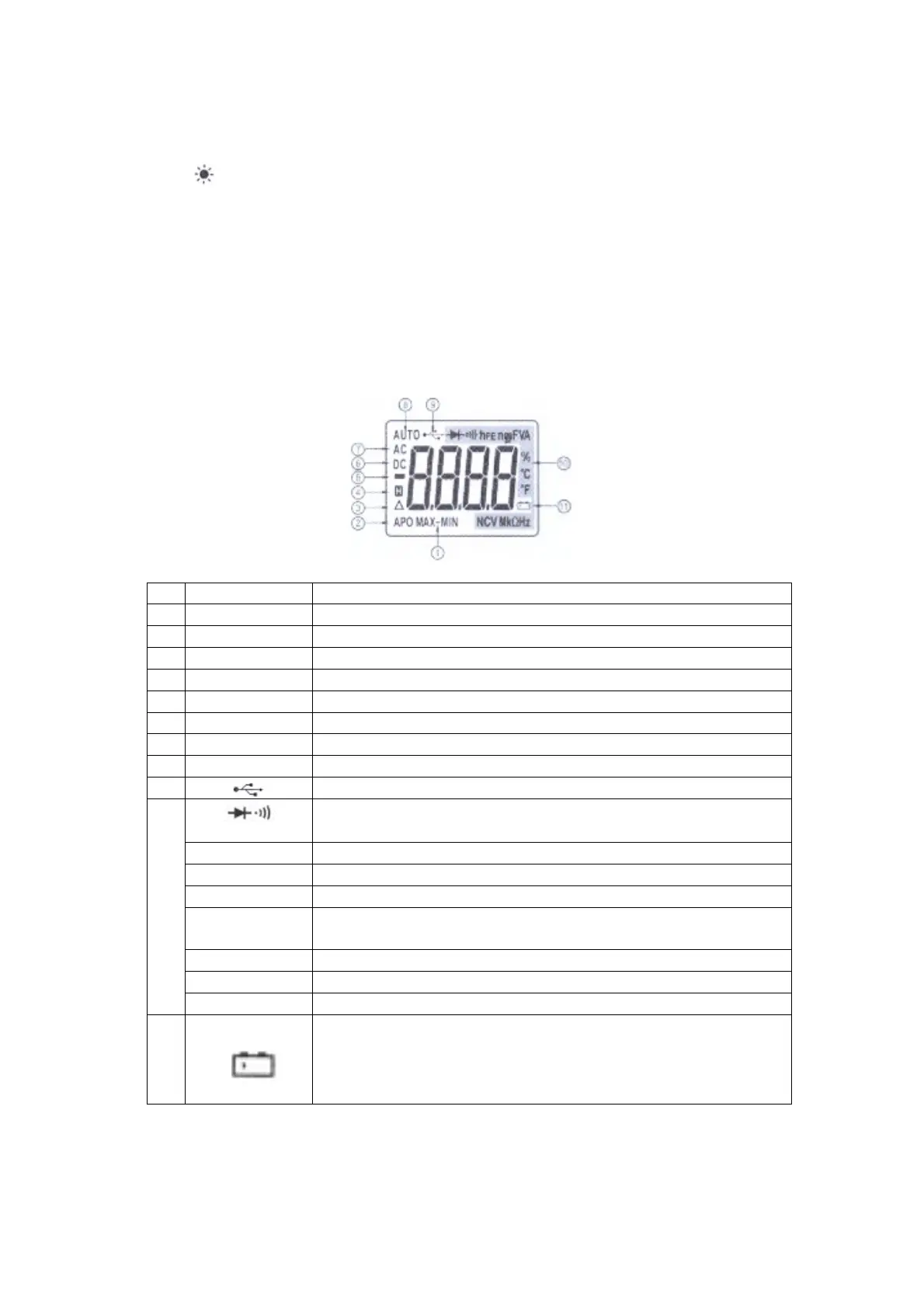
8) LCD panel: display the measurement values and units,
No
Function Description
1 MAX-MIN Invalid
2 APO A symbol of auto power off.
3 ∆ Clear to zero or in REL measurement mode.
4 HOLD Data hold funcions is activated.
5 ─ A symbol for negative measurernent value.
6 AC In AC voltage or AC current measurement.
7 DC In DC voltage or DC current measurement.
8 AUTO In auto range mode.
9
Invalid
10
hFE
In transistor measurement (to measure the magnification times
of transistor)
nF,µF NanoFarad, MicroFarad
mV, V MiliVolt, Volt
µA, mA, A MicroAmp, MilliAmp, Amp
%, °C, °F
Percentage (for duty rate measurement), centigrade degree.
Fahrenheit degree
NCV Non-Contact Voltage symbol
MΩ, kΩ, Ω MegaOhm, KilloOhm, Ohm
Hz, kHz, MHz Hz, KilloHz, Mega Hz
11
Low battery indication.
WARNING: To avoid electric shock or personal injury, please
replace batteries in time when the low batterv indication
appears on LCD.


 To Next Page