5
Product Overview
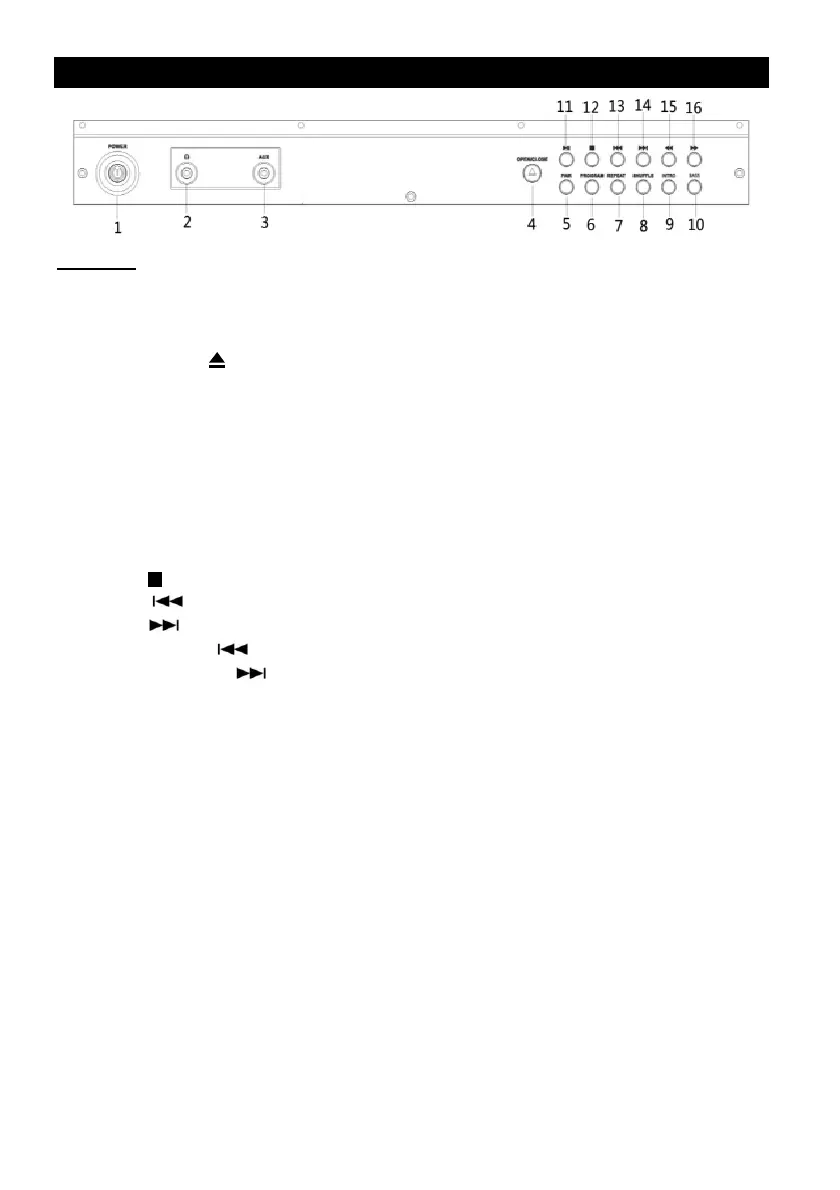
Top View
1. POWER: Press to turn the unit on or off.
2. 3.5mm HEADPHONE JACK
3. 3.5mm AUX-IN JACK: Connect your external source to the AUX-IN jack.
4. OPEN/CLOSE ( ): In CD mode, use to open and close the disc tray.
5. PAIR: Press to disconnect currently paired device. Press again to reconnect the device that has
been previously connected.
6. PROGRAM: In CD mode, press to enter program mode.
7. REPEAT: In CD mode, press to enter repeat mode.
8. SHUFFLE: In CD mode, press to enter shuffle mode, press again to cancel shuffle mode.
9. INTRO: Press to play every track for approximately 10 seconds.
10. BASS: Press to enter bass mode, press again to exit bass mode.
11. PLAY/PAUSE: In CD/Bluetooth mode, press to temporarily play, press again to resume.
12. STOP ( ): In CD mode, press to stop playback or cancel the program setting.
13. BACK ( ): In CD/Bluetooth mode, press to go to the previous track.
14. NEXT ( ): In CD/Bluetooth mode, press to skip to the next track.
15. FAST REWIND ( ): In CD mode, press and hold to fast rewind.
16. FAST FORWARD ( ): In CD mode, press and hold to fast forward.









 To Next Page