32E66-23
Menu Adjustments
Date & Time Settings
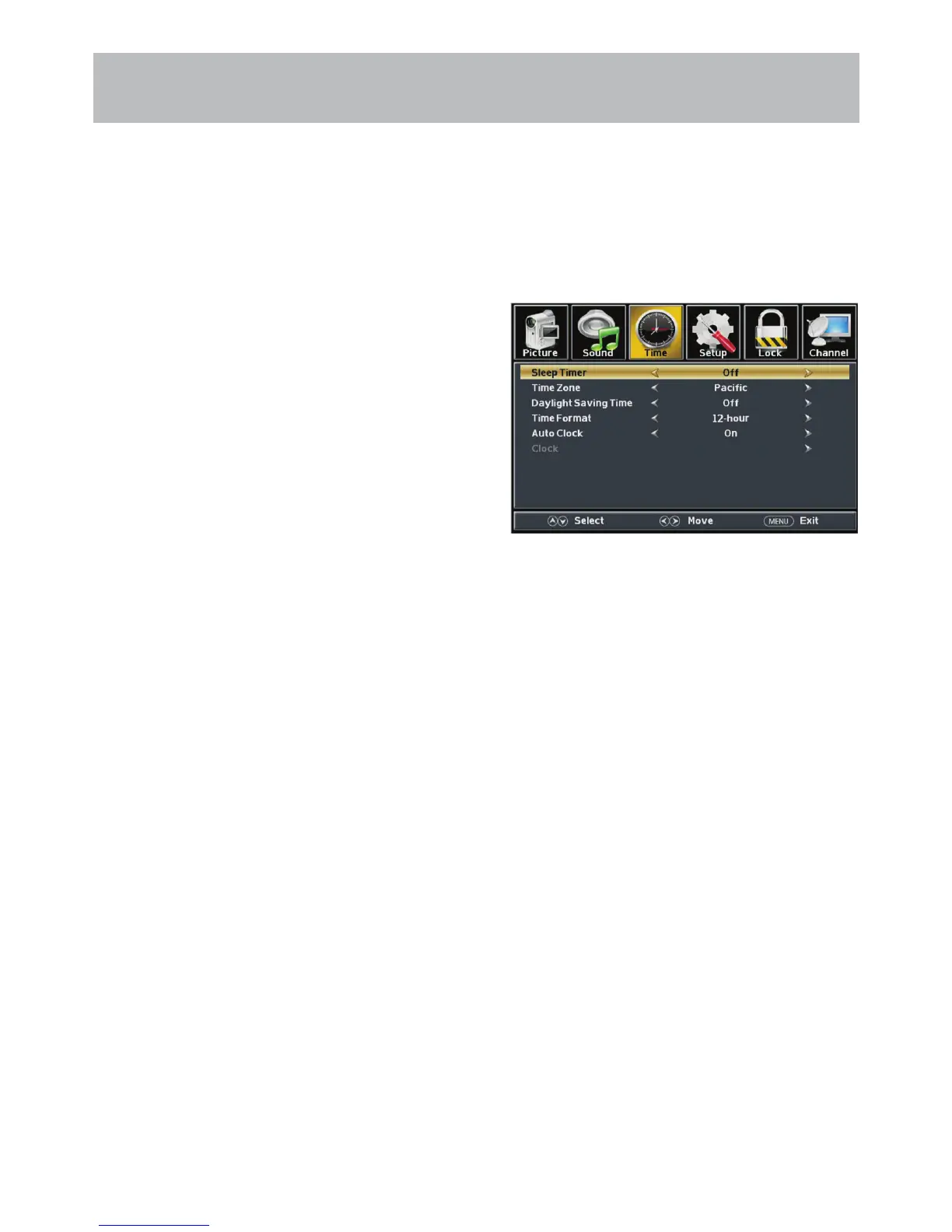
The Time menu includes adjustment of settings for your local time zone and daylight savings time. The clock will ad-
just automatically after the initial Channel Auto Scan of available broadcast channels in your area (see page 20 for TV
Setup).
How to Navigate:
Press the MENU button on the remote control. Navigate using arrow buttons to select Time.
• Press down arrow button to highlight Sleep Timer then
press the arrow button to select time to view before the
television timer turns the set off: 5 Min > 10 Min > 15 Min > 30
Min > 60 Min > 90 Min > 120Min > 180 Min > 240 Min > OFF.
• Press down arrow button to highlight Time Zone then
press the arrow button to select between: Eastern > Central
> Mountain > Pacic > Alaska > Hawaii > Samoa >
Newfoundland >Atlantic.
• Press down arrow button to highlight Daylight Savings
Time. Navigate using the arrow buttons to turn this
feature on or off.
• Press down arrow button to highlight Time Format.
Navigate using the arrow buttons to turn this feature
12-hour or 24-hour.
• Press down arrow button to highlight Auto Clock.
Navigate using the arrow buttons to turn this feature
on or off.
• Clock and Date are automatically set the rst time the tuner
receives a broadcast channel.
1980/01/06/12:00 AM
Note: When adjustments are completed, you may select another menu by pressing the Menu button.



 To Next Page