9
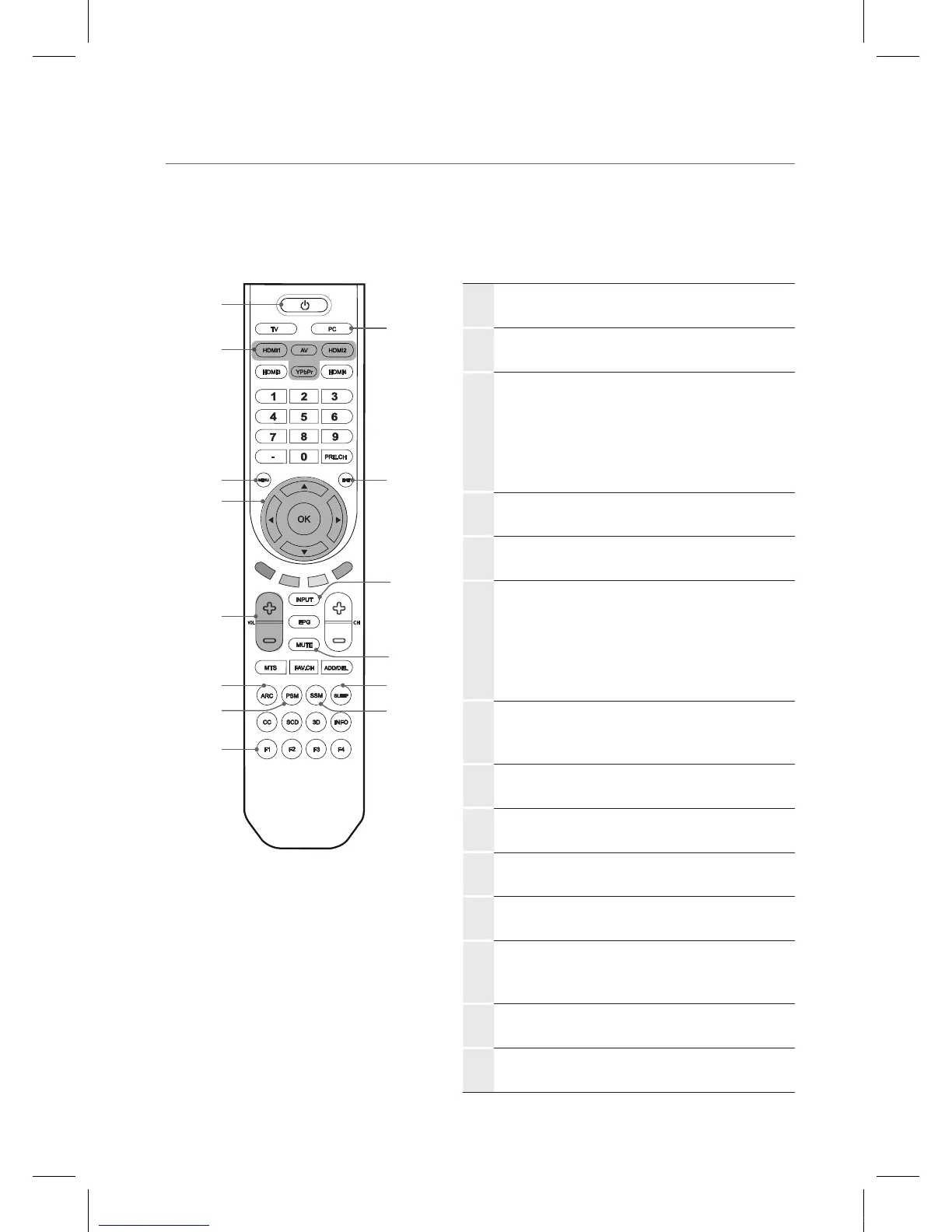
Viewing the remote control
1
POWER
Press to turn the IEB on and off.
2
PC
Press to select PC input.
3
HDMI 1, 2
Press to select HDMI 1, 2 input.
AV
Press to select AV input.
YPbPr
Press to select Component input.
4
MENU
Press to display the on-screen menu.
5
EXIT
Press to exit the current menu.
6
OK
Press to accept your selection or display
the current mode.
▲/▼/◄/►
Press to select on-screen menu items or
change menu values.
7
INPUT
Press to display a menu of all available
input sources.
8
VOL
Press to increase or decrease the volume.
9
MUTE
Press to temporarily switch the sound off.
0
ARC
Press to adjust the screen size.
!
PSM
Press to change to a preset picture mode.
@
SLEEP
Press to select a preset time interval to
automatically shut the IEB down.
#
SSM
Press to change to a preset sound mode.
$
F1
Press to freeze the screen picture.
1
2
5
#
@
7
9
3
4
6
0
$
!
8
IEB_UM_Vidi_Euro.indd 9 2013-03-11 오후 1:27:01



 To Next Page